Any GH2 news on the HDMI output front?

Thanks for the clips, if you want to keep experimenting can you shoot some stuff that is better lit and pointed an object? Maybe just grab a liquor bottle or something and throw it on a table, and try more AJA captures panning back and forth so we can remove interlacing and see if it's done correctly. This footage is tough to tell.

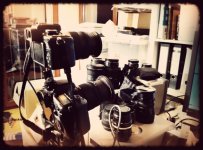
I'm a little short on liquor these days, so I decided to use my messy book shelve. I mounted the GH2 on top of my 7D to compare the skew of those rolling shutter beasts.The rolling shutter issues on the GH2 are really really disappointing for a second generation device.

I now have a download solution that should work for everyone (don't know if there is a download limit with a payed yousendit account ...). There are 3 files GH2 AVCHD2Prores, GH2 HDMI out capture and 7D 1080p30. The GH2 native clip is not a 24p but also 25i. This was not intended but I put up this file as well because the interlacing is different to that from the HDMI clip:

http://rcpt.yousendit.com/1006960449/ed8a6349dd2562ffd65d10490c766d87

here my setup:
GH2on7D.jpg
 
Last edited:
Downloaded the files. Thanks AEMonk for all you're doing here.

In the interest of clarity, let me see if I understand what we have observed so far.

AJA won't recognize your camera except in a standard 1080i PAL mode (running 25 fps) REGARDLESS of what your camera is actually shooting. Am I right in understanding that?

AJA won't recognize your camera at all when HDMI MODE is set to AUTO? Or it does, but only sees it as 1080i PAL?

Have I understood that right so far?

It's nice to see true 24P frames - even coming off the 7D :) If you really want to demonstrate the advantage, shoot both cameras at the fastest shutter speed you can manage (bring in more lights or go outside :) )
The progressive frames will manage detail better than the interlaced. Especially where fine details are involved - like winter tree branches or blowing hair.

Of course, the GH2 does 24P, but the trick is getting that cadence out of the camera. A rumor stated that it could, but no-one to my knowledge has done it.

I think the next step is a EDID Detector. $110 on ebay LOL. Who wants to chip in on some lab equipment for AEMonk? Are we ready for that step?

Isaac_Brody: Yes, deinterlacing will remove the interlacing through several available methods. One is to duplicate fields, and the smoother option is to interpolate the fields. Neither solution is what I'm hoping for, since each field is only capturing 540 lines of resolution per shutter-fire, and if there is any motion, the two fields of 540 lines will not be capable of capturing the detail of a single point in time. Instead, the computer interpolates between the two fields, creating false or "manufactured" resolution that can be plagued by its own artifacting.

With true pull-down, the progressive frames are reconstructed as they were originally shot - each frame capturing 1080 lines of resolution for a single point in time (ignoring global shutter lag of course).
 
as soon as HDMI is connected to my PAL GH2, the camera forces 1080i. As long as the HDMI is connected you can't change the video format. I don't think that Panasonic cripples the thing for a few indie filmmakers. They just want it to be fool proof for the consumer universe. Imagine you would have to find the right setting to be able to watch stuff on your tv. That would be a support nightmare for them.
 
Jesse, Seriously? Nanoflash more pro than an AJA product? Why do you say that?
It'd be nice if someone would give the NANO a try, but we can't just conjure equipment up and do it ourselves.
So, meanwhile, I'm sure the AJA card is perfectly capable of detecting signal from GH2, and what I've secretly wondered may be the truth. The camera my be looking for EDID data, and defaulting to a "normal" (ie. non pull-down mode) signal when it doesn't receive confirmation that the downstream device can handle 24P.

AEMonk, I agree. It's probably more about making the camera "consumer-proof" than trying to dumb down the signal.

So would we agree that an EDID detector is next?
 
I didn't even think of pulldown removal (talk about limited technical imagination). I am uploading some uninspired quick panning clips for pulldown testing.

Here is the MTS out of camera: http://bit.ly/dMdgyY

And here is the Pro Res footage captured via HDMI into Intensity Pro: http://bit.ly/fRpuKS
 
Last edited:
I am not an expert, but there look to be potential for pull down removal here for sure. Correct me if I am wrong, but frame 62 is interlaced, while frame 63 appears to be progressive. This is the nature of an embedded stream correct?

Here is the same clip as above, but with the interlaced frames removed manually by going through Quicktime Pro and just cutting them out. http://bit.ly/eZE3YW

The pattern includes goes 3 progressive then 2 interlaced. The result is 18fps so obviously the remaining 6 frames have to be hidden in those interlaced frames. I look forward to someone smarted than me finding the pattern.

Interesting side note: The overexposed highlight tool is still sent through HDMI while recording.
 
Last edited:
Hi Sandbox: If your theory turns out to be correct, and it's essentially only a matter of supplying appropriate EDID data, I have a question: Are AJA & other HDMI capture hardware vendors "allowed" to design new software drivers for a special case like the GH2? (I'm thinking of something like Final Cut Pro's "non-controllable device" feature, which allows it to proceed with a capture w/o establishing VTR device control first).

Or does the HDMI spec or controlling organization prohibit software end runs of this sort? I understand there are hardware devices which can embed EDID in an HDMI stream, but what about software drivers that tell capture cards "never mind"?

(I plead ignorance on this topic so my questions might not make sense.) Thanks.
 
OK farfromsubtle - the ProRes footage has pulldown on it - so that's great :) Now, was that HDMI recorded from the AVCHD playback in the GH2 or was it recorded at the same time the AVCHD file was being recorded? What were your camera settings? Maybe we got something here?!!!!
 
Just had a chance to check it out and it's just as I thought....it's a progressive image with 3:2 pulldown added. So...it's not so called "crippled."
 
Peter, I'm no engineer, and everything about needing an EDID Inspector was speculation based on key words in the user manual. If the camera was going to send a signal that was 24 fps (which really would be 1080P 24) then it needed to be set to AUTO. We deduced that it would be a safety feature so that a consumer doesn't accidentally make a setting and then wonder why nothing shows up on his 1080i - only monitor.
Theoretically, if the GH2 were applying pull-down to any 24 fps footage, we wouldn't need an AUTO mode, since 1080i could display it. After all, that's what pull-down is for. But when AEMonk couldn't get any recorded footage to show pulldown, I thought an EDID solution might be required.
As for getting new drivers for digitizing cards, I doubt that would work. The AJA or Intensity or NanoFlash are going to have to sync to whatever signal they see. The perceived problem is in getting the GH2 to send out the necessary stream, to begin with. Perhaps a card manufacturer could design their system to send out EDID data based on different requirements, but I doubt any of them are really thinking in that direction. Usually, when you start wanting control, you get into pro equipment, and HDMI is not really "pro." :) So I doubt they'd explore that option.

Someone else pointed out that all these specs applied to playback, and that the manual never states that 24 fps is available while simply viewing/recording with the camera.
So there was a possibility that during recording, the camera might simply feed a standard 1080i feed out through HDMI, regardless of what the camera's encoders were doing.
Most of this frustration is simply due to the fact that only a handful of people were even exploring this (some talked but never said a word afterwards). Many talk, few do. LOL

Big breath.

However, farfromsubtle has some interesting files here.
The time lengths are different (HDMI shorter in time length - started after camera recording and shut off before camera was stopped).
The HDMI footage has pull-down applied to it - 3 frames solid, 2 frames interlaced (which is where the 3:2 pulldown moniker comes from :) )
The AVCHD camera footage is slightly inferior to the Intensity-captured footage.

But what I'd like to confirm is, was this HDMI footage captured from playback off the GH2 (unlikely) or was it captured simultaneously? The quieter behavior of the HDMI footage tells me that these files were captured simultaneously, but I'd like to be sure so I'm not just getting confused here.

And what settings were used for this, on the camera? HDMI 1080i? HDMI AUTO? Have you tried digitizing without having the camera in record mode? Details, please. You're being too subtle right now :)

I know of 3 others who have tried to do this (2 on these forums) and have not been able to duplicate this. What did you do there, farfromsubtle? Use a Canon 7D :) LOL!!
 
I'm going to try and hold my excitement until someone else tries the same thing. :D I have them both in AE, and pulldown is easily removed, just standard 3:2 cadence.

It looks like highlight clipping was enabled, so there are artifacts in the tiny highlights from that being left on

EDIT:
Equalized both clips in AE to test the differences. Amazing quality difference in the HDMI clip! Makes the AVCHD clip look poor in comparison.

TOP HDMI, BOTTOM AVC - Just a very ugly screenshot pixelpeeping them to the great beyond
uglyequalize.jpg


Please someone tell me I'm wrong so I don't have to purchase a personal Nanoflash!!
 
Last edited:
Yep, saw the same thing in Shake. Biggest difference being the giant macroblocking on the AVCHD stuff, compared to the Intensity captured footage. However, want to be sure one isn't just an HDMI recording of the other. I know that sounds impossible, but strange things can happen, and I'd rather hear facts than simply deduce something. The process of playing AVCHD footage over HDMI and captured via Intensity may tend to soften up the stream a little, allowing the Intensity captured footage to create the appearance of more detail that's really not there.
So, here's hoping they're concurrent recordings.
 
Hi guys, sorry I had to drop someone off at the airport. Here are the details, including stuff that doesn't matter for interests sake:

Camera

Mode: "Creative Movie" (1080 24p Mode)
Film Mode: Smooth -2 Contrast, -2 Sharpness, -2 Saturation, 0 Noise Reduction
Exposure Mode: M
ISO: 320
Shutter Speed: 60
Rec Highlights: ON (Heh, weird that this shows on the live image when everything else on the display disappears)
HDMI Mode: Auto (But for the record, this does not have any bearing on the live image. This option refers only to playback of prerecorded stuff).

White balance was a weird custom one I made when doing some tests last night in another room, thats why it look so off in the recorded image. It is very different from what is sent through HDMI... does this mean that the HDMI feed does not have any of the camera settings applied?

Intensity:

Captured in Final Cut Pro with 1080i Pro Res High via HDMI... no other details here!

@Sandbox This was captured simultaneously while recording. For kicks I will now upload a sample while not recording.
 
If you guys can give me a solid/reliable way of removing pulldown I will use this to capture some chroma work I am doing on Monday.
 
Far - do you have access to after effects or Shake? I'll be happy to help you with removing pull-down if you do.
And THANKYOU for following this thread and your experiments through to the point of coming to a final answer!!! Well done!!! (And no need for extra devices either.) Would you be able to upload a couple of short clips from your chroma job Monday - AVCHD and Intensity capture? That would be icing on the cake, to be able to demonstrate the difference in keying (I assume by chroma job you're referring to shooting footage that needs keying).

Thanks aemonk and others for keeping the experiments going. I'd like to know if anyone else can duplicate these results.

And yes, Nano and AJA and Ninja sales should see a small bump once the GH2s start shipping, heh heh! :)
 
Oh wow... I am used to dealing with 24pa footage from my DVX100a and thought I would have to reverse telecine in cinematools, but here I find you can just toss it into an FCP timeline and change the frame rate 23.98! I think the value of this camera just doubled (or more) the purchase price.

I would still like to deal with it natively in FCP as 23.98 files... for some reason I can't find a straight answer on removing 3:2 in Cinematools. The manual just says to reverse telecine, and conform to 23.98... but then I am given these options:

options.png


So far I haven't found the formula.
 
Check your field order! That had me going for a while in Shake. I believe your Intensity card is capturing upper first. I thought there might be a solution with FCP, but I rarely work with 24P in edits. Just for fx work. Can you capture with pull-down removed on the fly? Might be a setting with Blackmagics hardware, too. Be cool if you could - save 20% file space :)
 
Back
Top