AG-DVX200 4K Large-Sensor Handheld Camcorder

The GH4 was little overexposed but still within 100% in FCPX. I also set the DVX200 using the waveform monitor. I made sure than it wasn't going over !00%. Really did. I knew you would be on me about that so tried to be careful.

Well, I apologize but I'm not understanding what I'm seeing. I just went to your vimeo and I think the DVX200 looks better there, than it did in the stills that you showed here. I screen-capped the vimeo and put it side-by-side with the still, and this is what I'm seeing:

greytail.jpg

The one on the left, from the still, has skin exposure that's over 100 IRE. The one on the right still has hot spots over 100 IRE, but in general the skin is lower exposure.

Here's what it looks like on my timeline. I masked out everything out of the image except the face, so the waveform would be showing only face tones.
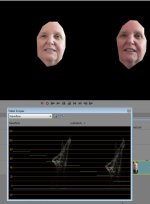
greytail2.jpg

As you can see on the waveform, both are crossing over 100 IRE (when, in my opinion, they generally shouldn't be crossing over 70). The one on the right is much lower in general; the shadow side of the face is between 30 and 50 IRE whereas the one on the left, that same area is 40 to 60 IRE. Yet they both say they're the DVX200?

To me, the one on the right is closer to proper exposure, although the highlights are still way way way blown out for my taste. And I think the skin tones in general are better on the one on the right. Not saying they're perfect, just saying they're better. So I'm wondering -- how does this compare to what you're seeing? Why are the stills so much brighter than the video, and which represents the proper color etc?
 
Last edited:
Is this with the new firmware update installed? Looks like there is still an issue with yellow? Look at the right side of the womans face, where it almost burns out there is some yellow.
 
Wanted to add a note to the conversation in relation to V-Log Lite. What I found from my time using it on the DVX200 is that it feels much more like a log gamma than say the original Canon Log. What this means essentially is I had to understand the log curve better by a bit of trial and error in post grading to be able to grade it with confidence and have an understanding of where I could put things.
 
http://www.fiftv.com/DVX200/Scene_Files/GH4-Natural/CamBelles-GH4-nat.jpg

I'm not warranting it as perfect, nor am I charging anything for it, I'm just experimenting to see what can be done. If you like this, let me know, and I'll try to do more....
My thought is that it is better than either of the previous images as regards skin tones - but compared to the original chart the colour of the stripe on the ball is still way off. The colour on the chart seems to be saturated red - this seems to be rendering it as orange. (Original chart colours can be seen at http://dsclabs.com/wp-content/uploads/2014/01/DSC-Labs-Basic-Chart-Use-Matt.pdf - scroll to near bottom of page.)
 
More scene files for folks to experiment with. All these were created with the use of color charts.

This one was sent to me by someone, and is their take on getting the color accurate. However, it was created on a version of the camera that predates the 1.25 firmware, so I don't know if it will prove to be 100% accurate, but still... it's something to try.

This one is my take on using a DSC chart and putting every color exactly in the box on the vectorscope. I first set exposure to expose the whites at 100 IRE, and then dialed in the colors to fit exactly in their boxes, and set all the intervening colors to be basically at their respective and appropriate midpoints.

This one is a modification of a perfectly accurate color system; instead I used the waveform monitor's RGB parade to set the color balance, instead of the vectorscope's boxes. DSC says this is a more accurate way to do it.

Ideally, you wouldn't see any difference between the last three, but ... they're three different takes on trying to reach the same goal, so I'm sharing them for your experimentation.

As always, proper white balance is a mandatory first step. And if you want accurate color, you won't screw around with "variable white balance"; instead do an actual manual white balance. Dialing in the kelvin temperature might get you accurate color on the red/blue axis, but it won't do a thing for you if your lights are off on the magenta/green axis. Manual white balance should properly address that.
 
but compared to the original chart the colour of the stripe on the ball is still way off. The colour on the chart seems to be saturated red
You can't look at it that way, for two reasons:
1) This isn't an attempt at "accurate" color representation; this is an attempt to get the colors looking like a GH4 renders them in the "Natural" scene file. It's entirely possible that the GH4 Natural would render that ball orange as well, and if it did so, then this scene file is doing its job.

2) My CamBelles chart is 8+ years old. Colors fade. Especially the brightest colors. Looking physically at my copy of the chart, I'd say the skin tones still look good, but that ball isn't a super-saturated red by any stretch. It looks red, leaning towards an orange/red.

The charts I used to create the GH4 and Accurate scene files are brand new, guaranteed accurate color. My CamBelles is quite old and I wouldn't expect it to be perfectly accurate. Reasonably so, but not necessarily mathematically ideal. So I don't use it to establish color; I use the brand-new ones to establish color, and then I've been shooting the CamBelles because people would rather judge off skin and humans than they would off of chips and charts.
 
What may make sense for one camera's gamma curve, may not make sense for anothers. SLOG and VLOG, for example, are generally equally divided -- same # of stops above middle gray as below it. VLOG-L is not that way; it has 8 stops below middle gray, and 4 stops above it. So if you go overexposing 2 stops, what do you end up with -- 10 stops below middle gray, and 2 above? Does that sound reasonable to you? Seems a tad disproportionate to me.

There's more to exposing a log gamma properly than worrying about noise. Noise is a consideration, yes, but hardly the only one.

Principle agreed, which is why I initially said "Basically, for average scenes, .......will normally give the best compromise for quality......". So it was talking about average scenes, and trying to get the best overall compromise for noise, and, yes, other factors such as not burning out highlights.

In any other circumstance would you think it a wise idea to overexpose video by two stops? In general, overexposing video leads to nasty results.
For normal video, that's perfectly true, no argument. Same thoughts as why with reversal film it is normally better to err on the side of underexposure than overexposure. But log is different, more akin to negative film, where I was always taught it's the other way round - better to overexpose than under?
Log gammas give more room for error, but it's still a video sensor, it's still generally not the best idea to go drastically overexposing.
I think the over/under exposure terminology may not be helpful to understanding. It may be better to think in terms of imaging a grey scale falling on the sensor. If it's 12 stops and the iris is set such that the blackest step just registers, the brightest just saturates, you'd expect the latter to map to the highest value able to be recorded, yes? And I think we'd both be agreed that the iris setting is optimum to capture the max dynamic range?

So now let's imagine the grey scale dynamic range is reduced to 10 stops, such that the darkest and brightest steps go away. At first sight, it would seem sensible to leave the iris where it is, effectively letting the remaining 10 steps have exactly the same values as before?

But think of the diagram k0byashi gave before:

View attachment 107281

It makes sense to try to use the right hand part of the curve as much as possible owing to it's linearity. A stop difference of light is represented by a greater range of values there than on the left hand side of the curve.

So far better to make the 10 steps correspond to +4 to -6 on the graph than the +3 to -7 they would otherwise be? Which is the same as saying overexposing by a stop (halving the ISO) relative to the initial 12 stop exposure. Go the other way - reduce the exposure by a stop instead of increasing it - and the 10 stops of DR will correspond to -8 to +2 on the graph. You'd not be making use of much of the linear part of the graph - but would be using all the toe, where the range of values per stop is far more limited.

Ideally, especially in an 8 bit log system, the brightest part of the scene would always lie corresponding to the highest value in the recorded range. This is what is meant by the term "expose to the right", or what Andy Shipsides calls "filling the bucket". (See the last page of the link I gave earlier - http://www.hdvideopro.com/columns/help-desk/the-rules-of-log-exposure/page-4 )

This is what I call "filling the bucket," meaning that we get as much information into our recorded Log image as possible. The rules of Log say we should keep middle gray at a lower value, but if we overexpose it, then we can correct the image to get cleaner black levels in post. In most cameras, you can do essentially the same thing by lowering the EI, ISO or Gain values of the camera and adjusting exposure accordingly. So, when I'm shooting in lower light, I actually choose to shoot at a lower ISO than I do when shooting in bright light. Seems a bit backward, I know, but it works. This isn't always possible, of course, but I prefer the cleaner results. In still photography, they refer to this method as "exposing to the right" in reference to keeping the majority of your exposure data to the right side of a histogram.

As for underexposing -- I don't know who the Panasonic representative was who said it, I don't know what the circumstances were, but I do know this -- if you were to underexpose VLOG-L by two stops, you'd get (wait for it): six stops under middle gray, and six stops over middle gray. Interesting. Doesn't sound THAT insane, does it?
If all was linear, the above would be true. But the curve is NOT linear, that's the point. The top six to seven stops will be represented by a given no of values each (the linear part of the curve), the bottom five by fewer, and the more you go down the fewer it becomes.

It depends on the contrast of the scene, but in general you don't want that even distribution. You want to be "exposing to the right" as much as possible without clipping, for the reasons Andy says above.
 
So the ETTR theory depends on the linearity of the applicable section of the log curve AND, and this varies from
camera to camera, if the log curve shifts middle grey within the log curve as exposure changes. Not all cameras shift. For example that is a selling point of the Canon EOS series. In this case it would seem that "filling the bucket" is not universally apllicable to all "log" curves.

Some cameras drop to only two stops above middle grey as gain increases. In this case ETTR would definitely help. The key to determining log exposure strategy is the distribution of available DR as gain increases.

What about ETTR without changes in DR distribution? Then the optimal strategy is determined by what Barry says, how thin is the available information in each stop of DR at the extremes of the log curve. Expose to the most information rich parts of the curve if you must discard some range of exposure.

Therefore these discusions are meaningless without knowing the shape of the log curve and ALSO how middle grey shifts within that curve as exposure changes.

So so the most essential question, and one I have not seen, is how middle grey shifts as DVX200 exposure increases, and does the log curve shape change with gain. Does the V log curve maintain the same ratio of exposure DR above and below middle grey as exposure changes? Do the extremes maintain the same ratio of information encoding? Does the thickness of the image change.
 
Last edited:
Can´t wait to see some more test footage after the firmware update...AND some nice scene-files ;-) It is hard to decide if one should spend 4000$ on the camera, when there is still so very few really impressive footage out there. Sometimes I think it looks great, other times it looks bad. Guess it´s just because this camera is really adcanced and the outcome depends so much of the operators skill-level..?
 
Can´t wait to see some more test footage after the firmware update...AND some nice scene-files ;-) It is hard to decide if one should spend 4000$ on the camera, when there is still so very few really impressive footage out there. Sometimes I think it looks great, other times it looks bad. Guess it´s just because this camera is really adcanced and the outcome depends so much of the operators skill-level..?

I agree, waiting for a side by side comparison with the GH4 using cinema D. So far not liking the size of the camera or image quality from what I've seen.
 
Can´t wait to see some more test footage after the firmware update...AND some nice scene-files ;-) It is hard to decide if one should spend 4000$ on the camera, when there is still so very few really impressive footage out there. Sometimes I think it looks great, other times it looks bad. Guess it´s just because this camera is really adcanced and the outcome depends so much of the operators skill-level..?

they certainly released it before the firmware was perfected. Perhaps it is not you.
 
Agreed. But I have been through the same scene-file-fiddling with my good old HMC151 once. It was quite a journey, and I never really found out what i did, but somehow I ended up getting a much nicer image. But it took a while.
It is such a shame, that Panasonic do not make some nice scenefiles from start to use for general purposes. the GH3 and GH4 does work quite well out of the box, with crisp colors and sharpness. But I guess more Pro cameras like the DVX200 requires a lot more tuning, because it is so advanced and there are so many ways to modify and tune things. But it should be possible to make six nice scenefiles, that makes results that equals what comes out of fx a GH4.

From what I have seen until now - apart from a few testvideos using V-Log that looked sharp and nice - I honestly can´t see a major difference between the DVX and the new Panasonic camcorders. Look at this: https://www.youtube.com/watch?v=9DE8_qiYKk4
If that was shot on the DVX200 I would seriously consider buying it, but it is shot on a 800$ camcorder. The color and crispiness is much better than what i have seen from 80-90 % of the footage from the DVX200. So I sincerely hope that we will see some footage soon, that will convince us, that the DVX200 is worth the money...I really want to like the DVX200, but it is hard when the quality of the footage so far apparently is not representing the cameras full potential...
 
I just want to add, that I am fully aware that the DVX200 is a professional camera and therefore can not be expected to be switched on and then just work the same way as a camcorder. Nevertheless, I think that it is reasonable to require, that there is a set of usable scenefiles, which works from start and provides useful results matching fx the GH4 or the new 4K camcorders from Panasonic. Should one have to spend days creating a unique expression to all sorts of lighting conditions and scenarios, it might be a very big task for many users. I acknowledge that all of these options and settings makes the camera very professional and dynamic for the advanced user, but it will surely keep many, especially semi-professionals, from investing in the camera I guess. I myself is very close to choose this camera, despite it is still so new and we still need to see some footage with a consistent quality in color and dynamics. But I can really see the potentials in this camera. It will just take a lot of time and effort to digg into all of its options...
 
Last edited:
The camera would obviously be better served if the default scene files delivered fantastic, jaw-dropping footage without needing tweaking. If the very first preproduction models would have had such scene files, I'm sure this would have been an easier and smoother launch for them. But it didn't, and really, it couldn't; I'm aware of at least a couple of significant color profile changes during the camera's development, and the most recent change in the 1.25 firmware is notable enough that it would warrant adapting any scene files that had been previously developed.

The DVX100 and HVX200 benefited from a lot of people who put in the time to create their own unique looks and shared those with other users. I've tried to post a couple of different interpretations on scene files here, and I hope that as users get more comfortable with it and dial in their preferred looks, they'll share those with everyone and we'll start to see some really impressive footage. And, soon Panasonic will release The DVX200 Book, which goes into some depth in explaining what those image controls do and how they affect the image; perhaps when that's released we'll see users empowered to create and share more scene files.

In the meantime, for someone who wants to avoid all that learning, there's always VLOG-L mode. VLOG-L disables pretty much all the scene file functions and delivers a flat image for grading; the marketplace for LUTs seems rather flush already for various cameras and probably will develop for the DVX200 as well. I'm sure at some point we'll see artists and technicians developing DVX200-specific LUTs for grading purposes, and that might be a way for many people to get the best-quality footage possible while not having to learn all the various scene file menu options.
 
Thx Barry.
But do you agree, that a big company like Panasonic should have used just a tiny bit of their economic resources on having a couple of folks making just a handful of usable scenefiles? Just as a reasonable starting-point for ordinary people, who pays 4500$ for a camera, that does not even work at a level comparable to their own camcorders out-of-the-box? That is not a modern way of doing things or a service-level, that meets modern standards IMHO. Who else offers cameras with this price-tag without offering some sort of usable out-of-the-box look? Panasonic makes great products. I own sevearl both professional and at home, but they still run their business like it´s in the 19th century and that´s a shame ;-)
 
I would like to see them offering fully-developed scene files, yes. But, as pointed out before, the question of whether the scene files that come with the camera are good or not, is entirely subjective. I posted a comparison picture of an "accurate" scene file, as versus the camera's stock Scene File 1, and most people who responded preferred the camera's default scene file.

I would like to see them offer a package of scene files developed by a professional cinematographer and designed to demonstrate the kind of looks the camera is capable of. They have done this for cameras in the past, and I have no doubt they will do so with the DVX200, I just can't say as to when.
 
So the ETTR theory depends on the linearity of the applicable section of the log curve AND, and this varies from
camera to camera, .......
Largely true, but even with a linear curve "expose to the right" may have merit (as long as highlights don't significantly clip) if sheer absolute quality is the goal *and if the scene allows it*. It should mean that the post process will have the function of "shifting back to the left" and that will suppress noise in the blacks. You're effectively trading camera sensitivity to get lower noise.


....if the log curve shifts middle grey within the log curve as exposure changes. Not all cameras shift.

Not sure I'm understanding your point. Within a scene with fixed lighting middle grey won't change - it's what a card with neutral reflectance of 18% of total will be. How much light that will represent at the sensor obviously WILL vary with exposure - and it's normal to say that such SHOULD correspond to a certain IRE level. (I believe around 42% in this case?) Adjust the iris and you'll be moving left or right along the curve, stop down and it's a move to the left (so mid-grey in the scene will then correspond to less than 42%), open up and it's a move to the right (mid grey will then correspond to more than 42%). But all cameras will do something along those lines - I don't see what you mean by "Not all cameras shift"?

As mid grey represents 18% reflectance of white (by definition), then "normal" white must be about 2-3 stops brighter. Theoretically, mid grey could then be just that much from the right hand side (the point where max output is given) and all shades from mid grey to white could be represented. But it would then mean abrupt clipping of anything over white, which is likely to be undesirable. It becomes a matter of compromise. Compromising highlight handling with treatment of the shadow areas. The way the graph is shown, V-log L puts mid grey in the middle of the linear portion (-4 to +4), so will retain detail in anything that is within about 1 1/2 stops more than white. You COULD underexpose to gain better highlight handling - but it would then put the shadows (even 4 stops less than mid-grey) out of the linear region, and I'm not sure that would be a good idea.......

Therefore these discusions are meaningless without knowing the shape of the log curve and ALSO how middle grey shifts within that curve as exposure changes.
The biggest unknown is what the scene is! What most needs "help" - highlights or shadow areas? But whilst it may be impossible to give any precise instructions which are universally valid, it's possible to give general advice which is most likely to be sound MOST of the time - and (as Alister and Andy both seem to say - let alone others) which may be summed up as "generally better with log to overexpose than under". In other words, treat log more like negative film than reversal.

I've just looked back at the post (2023) that started all this and the original statement was ".....we had the Panny rep come by and demo the DVX200 and he said for LOG, just like the GH4, you should underexpose by 2 stops. He actually showed us the curve where there are more "data" points in the lower part of the exposure curve, so give the highlights more leeway that was what you have to do!"

Surely the Panasonic rep has got it the wrong way round? You get more "data points" (distinct values) between stops in the HIGHER part of the exposure curve? (The right hand linear part.) Is this what's leading him to give the opposite advice about log exposure to most other people?
 
I am suspicious of how I am achieving a correct white balance with this camera. What techniques/equipment should be used for an interview situation where mixed light is apparent. I was using a white board, but I noticed when I took a reading off a cream colored wall, the reading was completely different, I mean very different. I also have a minolta color meter.. Could I use that?
 
Back
Top