AG-DVX200 4K Large-Sensor Handheld Camcorder

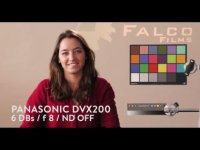
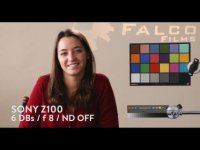
I do not completely agree. The DVX200 looks lighter than the Z100. I guess the DVX200 is using the old firmware. And it looks like the colors is all wrong on the DVX200 in this comparison. Look at the blue - it looks purple, and the yellow looks green (most obvious in the CMYK card. All in all the DVX200 just looks pretty bad here...Did they ever made a proper whitebalance? But with the right scenefile and the new firmware...how would it look then? And thats the problem. We have not seen any comparison with new firmware installed and a descent scenefile.
 

Attachments

  • image.jpg
    image.jpg
    13.2 KB · Views: 0
  • image.jpg
    image.jpg
    12.7 KB · Views: 0
I was referring to the earlier comparison to the AX1. The AX1 and Z100 are essentially the same camera but the comparison video are very different. No comments on the colours of the DVX200 only the difference between the AX1 , Z100 and the DVX200 in both videos. Main difference between the FDR-AX1 and the Z100 are the record formats and data rates. I agree that in both cases the colour from the Sony's is better when exposed properly.
 
Even after firmware update to 1.25

Even after firmware update to 1.25

Yeah. The Z100 certainly looks more natural in color and contrast and the dvx200 looks too red/purple. The blue color at the colorboard looks more redviolet than blue. Wonder if this is with the new firmware update installed? And I also wonder if it would be possible to adjust the dvx200 to look almost the same?

Even after firmware update to 1.25, I am still getting yellow/greenish mid-tones and highlightes....vLOG-l is too noise...I was really hopping for this is the camera with all the bells and whistles ...BUT it seems I am wrong....

my canon 70d looks much better skin tons in HD...
I have the following issues.

1) poor white balance even kelvin or white card
2) either pictures too sharp and contrasty
3) much noise in V-Log L
4) skin tones NOT SOFT
5) skin shadows have green tint..

I have uploaded this clip shot at 24p UHD 100Mb

https://vimeo.com/146338971
 
Even after firmware update to 1.25, I am still getting yellow/greenish mid-tones and highlightes....vLOG-l is too noise...I was really hopping for this is the camera with all the bells and whistles ..
my canon 70d looks much better skin tons in HD...

https://vimeo.com/146338971

I had to shoot some b-roll this evening for a project and I shot it on a Nikon D800 with my DVX200 sitting out in the car. Sad.....
 
I'll be working with AC90s as B cams and trying to pull them together with DVX200s using both cam's scene files. Is anyone else on that train?
 
Last edited:
Even after firmware update to 1.25, I am still getting yellow/greenish mid-tones and highlightes....vLOG-l is too noise...I was really hopping for this is the camera with all the bells and whistles ...BUT it seems I am wrong....

my canon 70d looks much better skin tons in HD...
I have the following issues.

1) poor white balance even kelvin or white card
2) either pictures too sharp and contrasty
3) much noise in V-Log L
4) skin tones NOT SOFT
5) skin shadows have green tint..

I have uploaded this clip shot at 24p UHD 100Mb

https://vimeo.com/146338971

Can anyone else confirm this? Barry?
 
Found this footage shot in 12 bit 4:2:2. No colorcorrection. Looks OK to me, most of it. To me this shows, that this camera has lots of potential. iBut at the moment you either have to record in V-LOG or in 12-bit 4:2:2 to het descent results. I do not understand why the folks at Panasonic have not yet been able to develop six working scenefiles. That is really bothering me.

http://youtu.be/qdzUJpHf4_s

For those of you who would be interested - it is possible to download the 15 GB PROREs version of this footage right here: http://stjernholms.com:8000/_8az1OGSbp1_TxR
 
Last edited:
Found this footage shot in 12 bit 4:2:2. No colorcorrection. Looks OK to me, most of it. To me this shows, that this camera has lots of potential. iBut at the moment you either have to record in V-LOG or in 12-bit 4:2:2 to het descent results. I do not understand why the folks at Panasonic have not yet been able to develop six working scenefiles. That is really bothering me.

http://youtu.be/qdzUJpHf4_s

For those of you who would be interested - it is possible to download the 15 GB PROREs version of this footage right here: http://stjernholms.com:8000/_8az1OGSbp1_TxR

I have to say that footage does look pretty good but what I find a little strange is that the footage was posted on Aug 11 which was well before the v1.25 firmware upgrade. His chance of creating images like this would have been far less prior to the firmware upgrade. I think we can all agree that if there was no color correction in post that this guy has to have a well manipulated scene file because there isn't any of us that have publicly shown any footage close to this that was shot just using a factory scene file.

Maybe someone that knows what they are doing can download this guys footage and see if they can create a baseline scene file that can possibly mimick what this guy's camera was set for. Maybe it's not even possible to reverse engineer a scene file that way, I don't know.
 
Hi

This guy is danish. I am from Denmark too. I will try to contact him and find out what settings he was using and if he knows more. Maybe he even has some kind of scenefile he wants to share. I´ll be back ;-)
 
Allright. I have just talked with him. He used a pre-production camera with the old firmware.
He told me that the secret is to record in V-LOG Cinema on the Atomos Shogun in 10 Bit 4:2:2 Prores 422.
That was how he got this very nice result. He told me, one can get nice result with V-LOG recorded internally, but external is better as it is 10 bit 4:2:2 instead of 8 bit 4:2:0 - so you get quite a lot more information.
After recording he imported to Final Cut Pro, and applied the V-Log, and exported with no further colour-grading og manipulation in any way.

He argued, that the camera was very nice, as it could be used both as a run-and-gun camera for interviews etc. using the internal recording, and as a real nice professional camera with external recording for commercials etc.

The problem is, that the ATOMOS Shogun with SSD disk etc. is quite expensive - almost ½ the price of the camera it self. But if you need the 4:2:2 option and the splendid quality, that's the way to go I guess.

So he did NOT use any scenefile or baked in look - just the raw data with V-LOG...

Hope that helped...I am almost convinced. This camera can do what you want it to do, but you have to learn, and you might also have to buy an Atomos Shogun (or some other external recorder with 10-bit 4K 4:2:2) to get the best out of it.
 
Run & Gun and V-log do not go together in real world shooting. Run & Gun by nature means you need the look straight out of the camera. If shooting V-log with an external recorder is the main way to get nice correct images out of this camera then it is sort of an epic fail on the whole product design imho.

It is still "early" but that window is closing. I am sure it will get worked out but what is up with releasing unfinished cameras? Isn't that bad for business?
 
He did mention the scenefile as usefull when using the camera as run and gun, but he aslo stated, that you would be able to do more fun in post with V-log. So I guess if you are mainly run and gun and just want footage that are OK out of the box, you need to wait for some scenefiles or make them yourself. Otherwise use V-Log. And eventhough I do not have any experience using V-log myself, it does not seem to be such a big deal? There may be a bit more work in post, but it is a mater of applying it inside Premiere og Final Cut, and make some minor adjustemenst and you are ready to go. Or am I wrong?
 
Run & Gun and V-log do not go together in real world shooting. Run & Gun by nature means you need the look straight out of the camera. If shooting V-log with an external recorder is the main way to get nice correct images out of this camera then it is sort of an epic fail on the whole product design imho.

It is still "early" but that window is closing. I am sure it will get worked out but what is up with releasing unfinished cameras? Isn't that bad for business?

I agree. I have enough trouble handing off split track audio where I give someone a lav in one channel and the camera's shotgun in the other channel as a backup. I've received calls from top media outlets saying, "the audio sounds really out of phase". Giving them footage and telling them what they have to do to get a good image out of it is even harder to imagine. I do a lot of projects where it goes right from the camera to the web or tv within minutes. Having some kind of decent look right out of the camera is critical and it just baffles me that Panasonic did not take this into consideration. This is 2015 isn't it?
 
For that kind of run-and-gun you definitely need nice working scene-files. I fully understand that and they will come sooner or later. I also agree that it is not very smart of Panasonic to send out a camera they call run-and-gun out-of-the-box but apparently is anything but that. Even so, I still get more and more convinced, that this camera fits my needs as I normally have time enough for doing som corrections in post...
 
He did mention the scenefile as usefull when using the camera as run and gun, but he aslo stated, that you would be able to do more fun in post with V-log. So I guess if you are mainly run and gun and just want footage that are OK out of the box, you need to wait for some scenefiles or make them yourself. Otherwise use V-Log. And eventhough I do not have any experience using V-log myself, it does not seem to be such a big deal? There may be a bit more work in post, but it is a mater of applying it inside Premiere og Final Cut, and make some minor adjustemenst and you are ready to go. Or am I wrong?

I agree that using V-log isn't that big of deal when you are in the situation where that makes sense. Personally, if I was doing something for myself I have all of the tools right in front of me. For some of the people that I feed content to they are literally playing a clip from my file.
 
External recording sample is really nice but we still do not have (or at least I did not see as I scrubbed the video) examples of caucasian faces to see if the shadow discoloration and highlight problems are still present.
 
There are two persons running in the last section of the video, and their skin looks fine with no burnout or yellow-green.
As stated earlier - this was shot on a preprodution camera with old firmware - so the latest firmware should be even better. But I honestly do not know, if the new firmare does anything to the raw output of the camera. So maybe it does not make any difference.
 
Last edited:
Back
Top