AF102 Colour grading question

evanrm

Active member
Hi all,

Before reading this, please be aware that I am inexperienced, and the issue might just be that I don't know what I'm doing.

For the past few weeks I have been struggling to figure out how to get the images I want from my AF102 (Australian model). I have watched a lot of footage on this site (well, Vimeo) as well as other clips by various internet posters, yet I cannot replicate the same quality myself. The actual image quality/resolution etc itself is fine, but all my shots come out very dull. I have several Canon FD lenses, but have also tried a cheaper Nikkor (18-55mm). Both seem to produce similar quality images (and colour), and I prefer the focus on the Canons. The Nikkor is very twitchy.

I have tested some of the settings in-camera, but have not been able to produce vibrant colours and an adequate contrast range (especially in bright sunlight, which I know brings its own issues). My primary question is: given some of the excellent examples posted on the footage sub-forum (and other sites as well), does all AF100/2 etc footage come out dullish and require correcting in post?

I've gotten some excellent images in lower light (shade, dusk etc). Even in bright overcast light the image is a little dull and the contrast is low. I've tested with a mattebox, and that didn't make much, if any, difference.

I am still learning about lenses as well. Another question therefore is that given some of the footage I've seen posted here and on other sites, how do you get such good looking footage in bright sunlight? Is the end result entirely achieved via post editing? I've watched the footage (I think by Philip Bloom) with the racing car mixed with 5DMK2 footage, and it looks amazing. I haven't come anywhere near that level of image quality and colour (and they were doing it from a moving car no less).

I'm practicing filming and trying to figure out how to get the best images possible. I'd appreciate any suggestions, tips, tricks etc. Of course experience and skill can't be absorbed from a forum, but it all helps.

Evan
 
Some people have done some really good looks in the camera. Search around for the scene file sharing thread. I wouldn't call the Af100 footage dullish, if you want to program a look in the scene file. I grade in post, because you can always get more control and more customized looks that way. Bright light is hard on cameras. It pushes the dynamic range of the camera. You are probably blowing out the highlights. It is a common mistake when you are first starting out. Use the ND filter wheel, and just try to practice getting the best exposure that you can. Yes, you can work on footage in post and get better results. However, you can't just fix entirely blown out highlights. When that part of the image is clipped, it is gone.

Dawn and dusk are always easier, and the golden hour lighting looks great. If you are shooting with the daylight beating down in the middle of the day, you are dealing with one of the more difficult outdoor lighting situations that exist.
 
In bright outdoor conditions a UV filter and a circular polarizer can do wonders for color saturation and contrast.
 
Can you post up some frame grabs so we can see what you are dealing with.

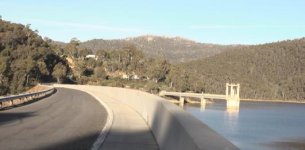
As I look through them, I mostly see that they lack contrast (or at least I think they do).
Dam 1.jpg

I have been shooting bright light (both sunny and overcast, shade etc) in order to see how the camera performs.
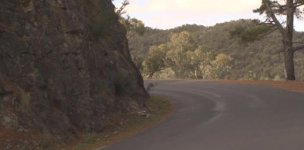
Road 1.jpg

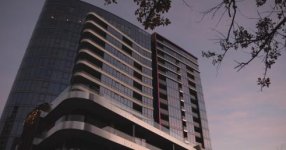
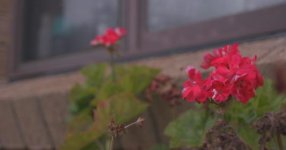
That said, I have seen some really nice images in low(er) light.
Building 1.jpgFlower 1.jpg

Keep in mind that I am a complete amateur here. I suppose my question is ultimately, should I be looking at getting the right image in camera, or are the many excellent examples online the result of post colour correction? Some of the daytime, sunny images look fantastic. For instance, Shooter, that first screen grab from your 48 hour film competition entry (the beach shot plus the others have warmer colours and better contrast), was that corrected in terms of colour and contrast? It looks like quite a bright day yet the colurs and contrast look great. I've struggled with inexperience in terms of getting the exposure right (I've been using the LCD mostly, and that is apparently a bad way to get it correct), so I figure that probably accounts for much of my poor shots.

I have considered looking into a polarising filter, but haven't had the time yet to investigate further.

EDIT: Sorry, I should clarify: what am I doing wrong here, and what can I do to get better images?

Evan
 
Last edited:
Some people have done some really good looks in the camera. Search around for the scene file sharing thread. I wouldn't call the Af100 footage dullish, if you want to program a look in the scene file. I grade in post, because you can always get more control and more customized looks that way. Bright light is hard on cameras. It pushes the dynamic range of the camera. You are probably blowing out the highlights. It is a common mistake when you are first starting out. Use the ND filter wheel, and just try to practice getting the best exposure that you can. Yes, you can work on footage in post and get better results. However, you can't just fix entirely blown out highlights. When that part of the image is clipped, it is gone.

Dawn and dusk are always easier, and the golden hour lighting looks great. If you are shooting with the daylight beating down in the middle of the day, you are dealing with one of the more difficult outdoor lighting situations that exist.

Yes. I have noticed that a lot of my shots have harsh highlights. Thanks for the wise comment.
 
@evanrm

Looking at your shots they seem to me to be overexposed a little in general.

If you want to get a more solid black (shadow) ...you need to expose it more as black. (ie stop down )

Shooting a flat scene (ie the shady corner in the road) wiull look flat. You have over exposed it though and so again...your shadow is not as dark as it should be. Over exposing the shade has "lifted" the black.

I suggest you shoot a few scenes and bracket some exposures so that you can see the effect of each onthe same scene. ( Take mnotes and watch your WFM closely)

All the clues you need are in are in the WFM. Look at your subject...see what is light and what is dark...and that is where it should sit in the WFM. Then its up to you how to manipulate it. eg expose down to crush it...expose up to lift it.

BTW; that beach scene of mine you referred to in the 48 hr film is essentially straight out of the camera.
 
I agree that the images look somewhat overexposed. Bright light in the middle of the day can be more challenging when you are first starting out. Like on your first shot, you overexposed the trees, and that caused the shadow to look washed out too as Shooter mentioned. That is the kind of thing that you could try to touch up in post, but you might have lost a bit of the highlights on the trees and road forever. If you are going for a specific look in-camera, a lot of people shared samples on that scene file thread. It could be a good place to start out.

The waveform monitor is the most useful tool. The zebra stripes can also give a good clue, if you get used to them.

Thanks for that link. I read a few articles, and although opinion seems to be divided, theres good arguments for both. I haven't the experience to say which side I fall on, but given my amateur level of experience so far, I'll go with the flat angle.

Being a real colorist is a profession in itself, and they can do a lot. Depending on what you are going for, it can be worthwhile to learn how to do decent grades. Getting a look in camera is nice for speed, but there are certain things that you can only do in post, like creative uses for secondary corrections, vignette tools to adjust the exposure on people's faces, and so on. There are reasons to do it either way. Everything depends on your workflow and the kind of work that you are doing.
 
Being a colorist isn't an overnight skill, I've been doing it for years and I'm still learning new things everyday. Practice, practice, practice.
 
evan- the first shot has the harshest highlights.
Two things you could do:
Move the camera forward so you don't have the deep shadow contrasting with the edge of the road and the wall.
Use the WFM and/or Zebras, specifically on the wall and the structure in the distance in the water, to keep them from blowing out.
As a result, your sky would come down to a nicer level, too.
 
@evanrm

Looking at your shots they seem to me to be overexposed a little in general.

If you want to get a more solid black (shadow) ...you need to expose it more as black. (ie stop down )

Shooting a flat scene (ie the shady corner in the road) wiull look flat. You have over exposed it though and so again...your shadow is not as dark as it should be. Over exposing the shade has "lifted" the black.

I suggest you shoot a few scenes and bracket some exposures so that you can see the effect of each onthe same scene. ( Take mnotes and watch your WFM closely)

All the clues you need are in are in the WFM. Look at your subject...see what is light and what is dark...and that is where it should sit in the WFM. Then its up to you how to manipulate it. eg expose down to crush it...expose up to lift it.

BTW; that beach scene of mine you referred to in the 48 hr film is essentially straight out of the camera.

Thanks for the reply and advice, Shooter. I think I have been adjusting the levels of exposure, but thought that they were getting too dark. As a result, I have ended up overexposing. I can see that I have not being using the in-camera tools correctly in the first instance. I'll continue to practice. With regards to the beach shot, given that it looks like it was taken on a bright sunny day, do you recall the fstop value that was shot with?
 
Last edited:
I agree that the images look somewhat overexposed. Bright light in the middle of the day can be more challenging when you are first starting out. Like on your first shot, you overexposed the trees, and that caused the shadow to look washed out too as Shooter mentioned. That is the kind of thing that you could try to touch up in post, but you might have lost a bit of the highlights on the trees and road forever. If you are going for a specific look in-camera, a lot of people shared samples on that scene file thread. It could be a good place to start out.

The waveform monitor is the most useful tool. The zebra stripes can also give a good clue, if you get used to them.

Hi blackcat, thanks for the reply. I will concentrate more on the exposure level, and explore the options available in post afterwards. I have been working with Sony Vegas (the movie studio version), but there's a lot I don't know.

Being a real colorist is a profession in itself, and they can do a lot. Depending on what you are going for, it can be worthwhile to learn how to do decent grades. Getting a look in camera is nice for speed, but there are certain things that you can only do in post, like creative uses for secondary corrections, vignette tools to adjust the exposure on people's faces, and so on. There are reasons to do it either way. Everything depends on your workflow and the kind of work that you are doing.

Although I don't plan on making a career from it so to speak, I would like to explore the options further. I can see that there are many situations where it would greatly enhance the final product.
 
Last edited:
evan- the first shot has the harshest highlights.
Two things you could do:
Move the camera forward so you don't have the deep shadow contrasting with the edge of the road and the wall.
Use the WFM and/or Zebras, specifically on the wall and the structure in the distance in the water, to keep them from blowing out.
As a result, your sky would come down to a nicer level, too.

Hi groveChuck, thanks for the reply. I can see that I have not been using the in-camera tools correctly, but rather trying to rely on eyesight to judge the exposure properly, and this has caused issues with my shots. I appreciate the advice.
 
Although I don't plan on making a career from it so to speak, I would like to explore the options further. I can see that there are many situations where it would greatly enhance the final product.

I run Davinci Resolve, which is a high end color program. Along with a lot of ex-Final Cut Pro (pre-FCPX) users, I used to run Apple Color. Resolve might be overkill for you. I am not a Vegas user. I am not sure about what tools are built into the system. Some people use and like Magic Bullet.

http://www.redgiantsoftware.com/products/all/magic-bullet-colorista-II/
 
I run Davinci Resolve, which is a high end color program. Along with a lot of ex-Final Cut Pro (pre-FCPX) users, I used to run Apple Color. Resolve might be overkill for you. I am not a Vegas user. I am not sure about what tools are built into the system. Some people use and like Magic Bullet.

http://www.redgiantsoftware.com/products/all/magic-bullet-colorista-II/

I'm planning on getting Adobe CS5, mostly because I already have a PC and I can get the full package for a significantly reduced price.
 
Back
Top