I was wondering if anyone has been shooting many night/ outdoor shoots with the AF100. I was able to take it out for a test in lowlight yesterday.(just one gelled 250 for moonlighting and the light from a coke machine) Indoors under ideal lighting conditions the footage looked great. Still havent found the birthday cake settings for any particular nighttime situation. Anyways, I was hoping those that have given nighttime a test and are fully satisfied to post up some of your results here. Even if your not satisfied post of your screen grabs plus settings so we can all learn from this.

Navigation
Install the app
How to install the app on iOS
Follow along with the video below to see how to install our site as a web app on your home screen.
Note: This feature may not be available in some browsers.
More options
You are using an out of date browser. It may not display this or other websites correctly.
You should upgrade or use an alternative browser.
You should upgrade or use an alternative browser.
af100 night shoots
- Thread starter artyswiss
- Start date

David G. Smith
Steak Knife Member
I ran across this video on Vimeo. It is a pretty good point of reference. I did not shoot this, BTW.
I saw that one. When you blow it up it looks really noisy. I think it is so weird that on a HD television the footage out of the AF100 looks great and on my system it looks sub-par.
Just put together a short trailer after a 6 hour unscripted test shoot with the AF100. Mixed with some night footage lit with one 250w. Really cramped hotel room. A bunch of friends. I was really missing a wider lens in this space. Mainly used a Vivitar 28mm f 2.8, along with a minolta 50mm
f 1.7. We had a really fun time and learned a fair amount from this test.
http://vimeo.com/20450148
Filmed at 500iso introduced more grain at night then I would have liked. This is not color corrected. It is compressed HDTV1080p mpeg2 + vimeo compression.
Just put together a short trailer after a 6 hour unscripted test shoot with the AF100. Mixed with some night footage lit with one 250w. Really cramped hotel room. A bunch of friends. I was really missing a wider lens in this space. Mainly used a Vivitar 28mm f 2.8, along with a minolta 50mm
f 1.7. We had a really fun time and learned a fair amount from this test.
http://vimeo.com/20450148
Filmed at 500iso introduced more grain at night then I would have liked. This is not color corrected. It is compressed HDTV1080p mpeg2 + vimeo compression.

Erik Naso
Veteran
I hear you. Vimeo and other sites compress the footage yet again after you upload it so its taking another hit. Try downloading the footage from Vimeo if the user lets you and play that back should look much better. In the edn all that matters is how it really looks like and that's on a HD TV/monitor..I saw that one. When you blow it up it looks really noisy. I think it is so weird that on a HD television the footage out of the AF100 looks great and on my system it looks sub-par.

Rick Burnett
Section Moderator
There seems to be a lot more grain then I see on my camera. What settings are you using?
I'm also not impressed yet with outputting video from Premiere Pro CS5. It always adds things I didn't see in the original, so I am still experimenting on what is the best way in Premiere to get footage for Vimeo. I have always used FCP before and it wasn't a problem at all.
I'm also not impressed yet with outputting video from Premiere Pro CS5. It always adds things I didn't see in the original, so I am still experimenting on what is the best way in Premiere to get footage for Vimeo. I have always used FCP before and it wasn't a problem at all.
There seems to be a lot more grain then I see on my camera. What settings are you using?
I'm also not impressed yet with outputting video from Premiere Pro CS5. It always adds things I didn't see in the original, so I am still experimenting on what is the best way in Premiere to get footage for Vimeo. I have always used FCP before and it wasn't a problem at all.
The night footage is pretty grainy. Scene file wise all I recall was Bpress along with Norm2. I found that premiere renders the playback in your source and record oddly. I see a lot of compression artifacts that don't show up during final render or in a hdmi playback into a monitor(it had me scared for a second). I think this has something to do with the way premiere is handling the avchd codec so that you can edit naitively without skipping around. I rendered this out as a mpeg 2. I don't have my AF handy...but when I am back from work I will post up the scene file.
Last edited:
Rick Burnett
Section Moderator
In your video I see a lot of noise. So far, all the shots I have done have been pretty clean, but, I am using Cine-V which does crush the blacks more, at around that ISO setting. Maybe that is why. Your lower end in the footage is pretty high to me, almost washed out looking in the blacks, where I see the majority of the noise.
Pertaining to Premiere, I looked at my clips before Premiere, inside Premiere which I agree does some strange visual things (although you can set the quality of the preview render to be higher) and then export. I was using the built in H.264 compressor and have STILL not made a good export that when comparing the source material to the final material, didn't have A LOT of added macro blocking, noise, and banding. This was NOT in the original.
The LCD and EVF are so different to me look wise I haven't really noticed. I would have said off the cuff that the EVF on mine is brighter.
Pertaining to Premiere, I looked at my clips before Premiere, inside Premiere which I agree does some strange visual things (although you can set the quality of the preview render to be higher) and then export. I was using the built in H.264 compressor and have STILL not made a good export that when comparing the source material to the final material, didn't have A LOT of added macro blocking, noise, and banding. This was NOT in the original.
The LCD and EVF are so different to me look wise I haven't really noticed. I would have said off the cuff that the EVF on mine is brighter.
In your video I see a lot of noise. So far, all the shots I have done have been pretty clean, but, I am using Cine-V which does crush the blacks more, at around that ISO setting. Maybe that is why. Your lower end in the footage is pretty high to me, almost washed out looking in the blacks, where I see the majority of the noise.
Bpress should be cleaner then Cine-V. Though it all depends in the end. What do you mean by lower end in the footage? The blacks do look washed out. Hmm. Let me post up my scene file later tonight. Thanks. Can you link one of your tests using the scene file your talking about? Along with settings? I would be interested to do a side by side exported out of premiere.
Rick Burnett
Section Moderator
By lower end I meant the blacks were not very black. Let me see if I can get some free time over the next few days to get a clip together. I want to do something specifically at ISO500 just to compare apples to apples.
Rick Burnett
Section Moderator
Haha, yeah, sometimes my terminology gets all wack. I work in independent film AND the music industry at times and similar characteristics have different terminology's. 

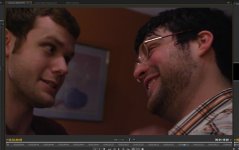
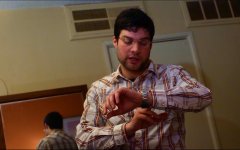
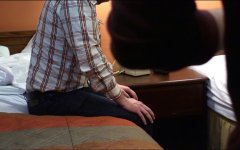
Here you can see the aliasing in the hair...this is not visible on a colaborated HDTV. However, you still see odd grain. This still was taken from a sony viao. On the mac tower at work the grain is more tamed. I did see a unacceptable amount of grain in this shoot on the HD monitor in the blacks/ blues/ greys. It was unusually blocky and jumpy. I obvioiusly cant take a screen shot from my television. But I can say that it is colaborated and I do not get this type of effect from my HVX or canon xha1. Let me know if you can see it. On my windows 7 quad core gforce 4 the blockiness is there as well. But not as bad as on the Sony. Barry in your book you mention in the section on scene files that coring can affect your grain and you can get blocky looking grain. That is the only way to describe this...besides aliased footage. Obviouly I can change my settings...as I know these are not the ideal camera settings by any means as this was a test shoot...but this has me stumped. It is a bit nerve wrecking that you dont really know what you are going to get out of this bad boy.
scene file settings at 500iso
film cam
1080 24p
detail level +6
vdetail +5
coring +3
chroma+3
gama: bpress
knee: mid
matrix: norm 2
The two shot above is a screen grab from my windows 7 computer running an amd phenom 9850 quad core 64 bit system and a radeon x1600 series graphic card. Notice the blockiness in the orange on the wall and the maroon of his shirt.
Rick Burnett
Section Moderator
I can already see problem #1, your detail settings are WAY TOO HIGH. Even at the factory 0 for both I find the noise to be too much. I go with -5 for both detail and v detail. Coring I do at +3, but chroma I do at -2 because I think the image gets too saturated. I am actually thinking of moving to -3.
What is your master ped? I am using 0 right now, but might adjust it a bit myself.
Even at the factory 0 for both I find the noise to be too much. I go with -5 for both detail and v detail. Coring I do at +3, but chroma I do at -2 because I think the image gets too saturated. I am actually thinking of moving to -3.What is your master ped? I am using 0 right now, but might adjust it a bit myself.
Thanks Rick. I will give it another test shoot under similar settings with a lower detail and see what comes up. =) My master ped is set to 0 as well. I have been testing out difference scene file combos. The last shoot had the detail level both at -4 with coring at +3 and it was better. Makes sense...I guess I just didn't expect the footage to take a turn for the worst just like that. This is what testing is for I guess.
You are really helpful Rick.
You are really helpful Rick.
Rick Burnett
Section Moderator
Believe me, this camera has such a wide range of settings it is crazy! I sat with my 7D and worked at the settings till I got something relatively similar (as I actually like noise handling on the 7D) and then changed things to more tune in what I wanted in the footage. With the settings I am using now, I've not seen the image fall apart or be too noisy. Those detail settings you had would DEFINITELY create more noticable aliasing. No question. I shot a chart from -7 to +7 detail with the AF100 and that is how I also determined the settings I wanted.
Plus you can also experiment with other sharpening algorithms outside of the camera if you feel you want to make it a little sharper. At -5, I am VERY happy with the sharpness (from what I expect from this sensor).
I sat with my 7D and worked at the settings till I got something relatively similar (as I actually like noise handling on the 7D) and then changed things to more tune in what I wanted in the footage. With the settings I am using now, I've not seen the image fall apart or be too noisy. Those detail settings you had would DEFINITELY create more noticable aliasing. No question. I shot a chart from -7 to +7 detail with the AF100 and that is how I also determined the settings I wanted.Plus you can also experiment with other sharpening algorithms outside of the camera if you feel you want to make it a little sharper. At -5, I am VERY happy with the sharpness (from what I expect from this sensor).
Rick Burnett
Section Moderator
This was just a printed out test chart that me and another user here used with the GH2 and the AF100. Nothing special about that. I also just printed one out on a laser printer as well. They are not good for determining resolution or anything like that, or inferring quality on one camera alone. But, with two cameras, you can compare two easily.