Advice on Colour correction.

D_Odell

Active member
Heello,

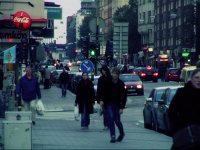
I'm in the end of a project and there is one sequence that last for 7min, which dosn't look to good. So what I would like to ask of you is an advice on a CC for this grab.

The raw as you can see is under exposed, but I appreciate any kind of attempt to bring this one to a better look.
I edit in Avid and AE, so info on the job would be most wonderful.

79813130ob1.jpg


Thanks,
David
 
ill give it a shot, but it is slightly under exposed. The skin tones versus the practiacl lights in the image will make it difficult to adjust this.
 
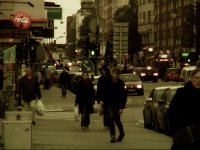
This is a quickie with curves booting the highlights and keeping the blacks the same. Highs and Midtones where brought into red/yellow territory by a little with a three way color corrector. Sorry I don't use Avid and hate CCing in AE.

From here you can grade for a more stylized look.

1203895200.jpg
 
What look are you going for? What color temperature are you interested in? and mood?

Here is what I came up with in a couple of minutes:

1203896554.png
 
Thanks for al the replies.

Well the guy who nearly falls has a disease and the take shows the impact it has for his "normal" life. I will drop a sequence later.

79813130ob1copyux2.jpg

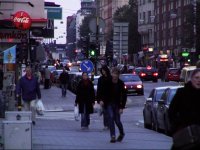
Tried on out with a grade.

And later he falls and stays at the ground for a while.

66676741bu6.jpg


The mood is somewhat high temper, sort of, this comes after a long discussion.
But several of yours are nice, but the one closest the feeling is Zak:s first one, but to dark.

Thanks each one!
 
Last edited:
added 2 mattes....one with some guassian blur, the other (in the furthest part of the street) with slightly more blur.

then just destaturated a touch / and played with magenta's in the blacks and mids, and yellow's in the whites on the 30-way cc.
and the basic darken blacks , brighten whites thing.

....a little too crushed/dark on the blacks...but yeah, was fast.

79813130ob1.jpg
 
Couple of test grabs...
 

Attachments

  • Test 1 coolish.jpg
    Test 1 coolish.jpg
    314.8 KB · Views: 0
  • test cc goldish.jpg
    test cc goldish.jpg
    284.2 KB · Views: 0
  • test cc (0-00-00-00).jpg
    test cc (0-00-00-00).jpg
    299.5 KB · Views: 0
added 2 mattes....one with some guassian blur, the other (in the furthest part of the street) with slightly more blur.

then just destaturated a touch / and played with magenta's in the blacks and mids, and yellow's in the whites on the 30-way cc.
and the basic darken blacks , brighten whites thing.

That looked nice.

I tried bring some light in levels and added a grade.

41735658rk1.jpg


Did you make the pic in AE or photoshop?

Thanks!
 
I did it in FCP 5

...I copy/pasted the clip twice then piled it ontop of itself. Then matted out the forground/the main character on the two copies. then on the first I matted (8 point garbage matte) out everything but the main guy+the plane he's walking on.

then just a little gaussian blur (3-4 points I think) on the first copy, and matted out the "farthest" part of the city....then on the second copy, I matted out everything but the "farthest" part of the city and applied more blur (6 or so points).

then just made sure to blend and soften the 8 point garbage mattes' edges the most.

...I've done it on some of my own footage recently, but it sucks for shots the pan or tilt too much...I'm just assuming this shot is stil, or moving back / thus keeping roughly the same composition.


edit>> realised it's oftly confusing the way I explained it... this may help?

Picture2.png


edit again >> just remember to soften+edge feather the mattes to the fullest.

and this isn't the original from the one I posted, I didn't save that so I made this one a minute ago. all done the same way.

and since it's oftly small - thats desaturated slightly (like 2-3 clicks) mids up 2 clicks, blacks down 3 clicks and whites up 6 clicks.
mids slightly (unnoticably) into the yellows. whites into yellow and black into magenta.
 
Last edited:
Back
Top