Advice needed - 2k raw underexposed shows heavy grain

Matthew Smith

Active member
Hi,

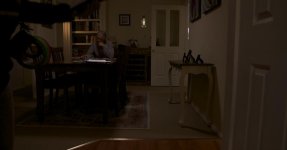
Just finished shooting for my short film and after reviewing the footage I've noticed that the DOP has underexposed a section of 2k Raw Odyessey footage.

When I bump up the brightness/gain I'm getting shocking noise (even before any adjustments it has noise), any suggestions on how to deal with the noise, I really don't want to organize an extra days shooting but might have no choice....
 
When trying to lift an under exposed image, should I be lifting gamma, brightness or gain primarily before I use the de-noiser software, thanks for your help
 
Under exposed is under exposed and it will never look as good as proper exposure.

That said you may be able to save it. Basically it is a question of making it match the rest of the shots in the scene. Use scopes to match up shots. One thing that cuts noise is to reduce saturation.

Also if you can leave most of the shot dark and use a secondary adjustments on the important parts, if those are faces then a bit of blur will both get rid of noise and often help actors look better.

Get the shots looking as good as possible w/o worrying about the noise first, then apply the NR.

You get lucky from time to time and it is possible to fix bad exposure, or whitepoint even. But it is usually a struggle, and sometimes a reshoot is the best way, instead of spending lots of frustrating hours with a mediocre result. Over exposure is worse to deal with.

Good luck and let us know how it goes.
 
Thanks for your advice Olof, I'll give it a go.

A question, does this mean that the FS700/Odyssey shooting s-log Raw is not effective in low light condition, as my previous tests always show a lot of noise in these condition? Is the setting the cause (S-log) as my AF100 never seemed to have this problem? Appreciate help to make me understand better
 
Thanks for your advice Olof, I'll give it a go.

A question, does this mean that the FS700/Odyssey shooting s-log Raw is not effective in low light condition, as my previous tests always show a lot of noise in these condition? Is the setting the cause (S-log) as my AF100 never seemed to have this problem? Appreciate help to make me understand better

off course it is. Keep in mind that recording RAW will supply you an image which has no treatment by the camera. It's just the sensor read out. Your AF-100 generates a processed image, with the 7Q RAW you have to do that in postproduction. In the beginning when I started with 2K RAW was a little worried too but I had great results also in low light industrial sceneries.
 
off course it is. Keep in mind that recording RAW will supply you an image which has no treatment by the camera. It's just the sensor read out. Your AF-100 generates a processed image, with the 7Q RAW you have to do that in postproduction. In the beginning when I started with 2K RAW was a little worried too but I had great results also in low light industrial sceneries.

Thanks Clermont, thats good to hear. I'll check out the other thread and use the tips.
 
What's your workflow? It is possible to make mistakes (very easy in fact), can you post a DNG? or email me something because there are tools to look at the raw data inside to see.

When adjusting exposure (if you're in resolve) adjust it in the camera panel in the actual debayer section, not afterwards.

12 bit linear is really 12 bit linear so underexposure can be problematic but it's also easy to think something is underexposed when it's not.

In some situations i've seen some strange clumps of noise, which i'm putting down as a result of the compressed RAW stream. Is the noise you're describing uniform over the image or clumps of? (Not blocks of noise though, as in macro blocks but irregular sponges of detailed noise - it's pretty odd and i can't say 100% it's the camera and not something in post)

cheers
Paul
 
What's your workflow? It is possible to make mistakes (very easy in fact), can you post a DNG? or email me something because there are tools to look at the raw data inside to see.

When adjusting exposure (if you're in resolve) adjust it in the camera panel in the actual debayer section, not afterwards.

12 bit linear is really 12 bit linear so underexposure can be problematic but it's also easy to think something is underexposed when it's not.

In some situations i've seen some strange clumps of noise, which i'm putting down as a result of the compressed RAW stream. Is the noise you're describing uniform over the image or clumps of? (Not blocks of noise though, as in macro blocks but irregular sponges of detailed noise - it's pretty odd and i can't say 100% it's the camera and not something in post)

cheers
Paul


Hi Paul,

I'll email it now, thanks mate
 
Last edited:
View attachment 86888This is the raw file without any adjustments

I've replied to your PM, so hopefully i can help out

The key with 'no adjustments' is the very act of debayering is a huge adjustment. For example if that was a true linear file it would be well overexposed :) So it very much depends which application and with what settings. Sometimes these RAW files do odd things in workflows that aren't tested (they can look very underexposed).I can take a look at the raw data though.

cheers
Paul
 
I would say in my experience with the FS700/7Q RAW combo that is very underexposed. Every time I get that into Resolve it pushes the whole image two stops down. Based on what I'm seeing in that picture, I'm guessing that image looked great on the 7Q. You had it properly exposed for what you were seeing on the monitor I'd say. Which translates to "underexposed" in the end. 2 stops overexposed is what I'd say.
 
Hi Matthew, here are some good news I hope. First of all: yes, I think your shot is underexposed and it would have been helpful to have it at least one stop brighter, maybe 1.5 or two.

But it's not lost. You can work on it in different ways. Import to AE, make adjustments in ACR. Apply noise filter:

acr_denoise.jpg


Unfortunately AE takes ages to render, I prefer Resolve

import your RAW into Resolve with the camera settings in color tab.
Dont worry as your image looks too dark

resolve_camera.jpg


apply the 3-D LUT (DL from C-D website) et voila..

resolve_lut.jpg


render a ProRes what ever file and import it into your NLE

here's what I did in FCP X:

applied nattress levels & curves, plus saturation

fcpx_levelscurve.jpg


applied NeatVideo denoise with a luma mask as described before.

fcpx_levelscurve_denoise.jpg


I did that very quick and very superficial, there's still a lot room for improvement
esp. for color correction and / or color grading. I just wanted to show that you can deal
with the noise.

But in general you would have had more room with brighter exposure
 
Last edited:
Thanks so much Clermond, you have been a massive help!!! I follow exactly as instructed and let you know how I go


Hi Matthew, here are some good news I hope. First of all: yes, I think your shot is underexposed and it would have been helpful to have it at least one stop brighter, maybe 1.5 or two.

But it's not lost. You can work on it in different ways. Import to AE, make adjustments in ACR. Apply noise filter:

acr_denoise.jpg


Unfortunately AE takes ages to render, I prefer Resolve

import your RAW into Resolve with the camera settings in color tab.
Dont worry as your image looks too dark

resolve_camera.jpg


apply the 3-D LUT (DL from C-D website) et voila..

resolve_lut.jpg


render a ProRes what ever file and import it into your NLE

here's what I did in FCP X:

applied nattress levels & curves, plus saturation

fcpx_levelscurve.jpg


applied NeatVideo denoise with a luma mask as described before.

fcpx_levelscurve_denoise.jpg


I did that very quick and very superficial, there's still a lot room for improvement
esp. for color correction and / or color grading. I just wanted to show that you can deal
with the noise.

But in general you would have had more room with brighter exposure
 
Somewhat late to the party, timezones and all

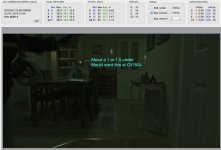
Yes, as Clermond has confirmed you are a little under from an ideal viewpoint, your skin is at an average code value of 40ish, ideally i'd put this around 100+. This is on a scale of 0 to 3840. It's linear so remember that your stops double in value. Of course it's all in context with what you're needing. Perhaps you want it super dark.

You can see that all your shadow values are held in 40 code values beneath that skin, it's useful to overexpose a little then bring it down in post, it helps with noise but also shadow detail (if that is what you are needing). The screenshot below is RAW, before colour matrixing which is why it is green. It's had a gamma of 2.2 applied so you can see some detail, normally the raw would be pretty much black except for highlights...

This may sound bad but remember in 8 bit, especially slog the total range of values are only 16 to 255, so even being underexposed you are in a better position than if you had shot 8 bit.

I've been there done it and undercooked stuff too, learning the hard way at least makes us remember better :) It's very tough in RAW sometimes.

I would say though, in Clermonds workflow try adjusting the Exposure value in Clip Decoder settings first, before applying any LUTs.

under.jpg

cheers
Paul
 
Paul is absolutely right, you can push brightness in the camera tab +1.0 up to 1.2 before it gets too noisy
 
Thanks Paul, great advice, definately taking it all on board. As you mentioned a great learning exercise, you have to start somewhere. It's great input on a forum like this that makes the journey possible!


Somewhat late to the party, timezones and all

Yes, as Clermond has confirmed you are a little under from an ideal viewpoint, your skin is at an average code value of 40ish, ideally i'd put this around 100+. This is on a scale of 0 to 3840. It's linear so remember that your stops double in value. Of course it's all in context with what you're needing. Perhaps you want it super dark.

You can see that all your shadow values are held in 40 code values beneath that skin, it's useful to overexpose a little then bring it down in post, it helps with noise but also shadow detail (if that is what you are needing). The screenshot below is RAW, before colour matrixing which is why it is green. It's had a gamma of 2.2 applied so you can see some detail, normally the raw would be pretty much black except for highlights...

This may sound bad but remember in 8 bit, especially slog the total range of values are only 16 to 255, so even being underexposed you are in a better position than if you had shot 8 bit.

I've been there done it and undercooked stuff too, learning the hard way at least makes us remember better :) It's very tough in RAW sometimes.

I would say though, in Clermonds workflow try adjusting the Exposure value in Clip Decoder settings first, before applying any LUTs.

View attachment 86953

cheers
Paul
 
Back
Top