over the last couple of weeks i developed a set of IDTs (input devices transformations) to use all the traditional photo styles of the GH4 in an ACES workflow. cinelike-d, natural or standard mode can by utilized this way like the v-log profile. an aproach that balazer tested and advised a while ago.
you can download the ready made OpenColorIO configuration set:
http://users.mur.at/ms/projects/gh4_aces/gh4_aces_1.0.1_0.2.zip
or take a look at the source code:
http://users.mur.at/ms/git/gitweb/?p=OpenColorIO-Configs.git
on most OpenColorIO based applications (natron, nuke...) you only have to choose the included config.ocio and you will get all the GH4 related input transformations.
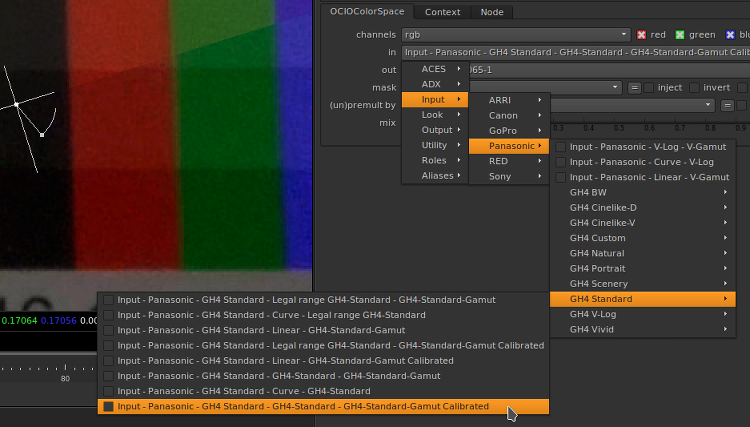
the available options may look a little bit confusing at first glance. the naming conventions for ACES color transformations suggest this notation:
first part: transfer function - second part: gamut name
colorspaces that start with 'Linear - ' will convert to or from a specific gamut but not apply a transfer function.
colorspaces that start with 'Curve - ' will apply a transfer function but not convert between gamuts.
i used the keyword 'legal' to flag the IDTs for footage recorded in 16-235 mode.
those IDTs labled with 'calibrated' use a measured 3x3 color optimization matrix to get a more accurate color rendition, while the others use only mandatory transformation constants for color transformation, but their luminosity handling is also based on empirical measurements. the 'calibrated' variants usually work very well. only v-log looks like an exception. in this very case the straight linearization may lead to more pleasant results.
a lot of confusing instructions, but you usually only have to look for entries of the form:
"... - GH4-Cinelike-D - GH4-Cinelike-D-Gamut Calibrated"
or
"... - GH4-V-Log - GH4-V-Log-Gamut"
you could also use the OpenColorIO 'ociobakelut' utility to bake 3D LUTs out of this quite complex transformations, to use them in other non ACES/OCIO compatible applications, but i would not recommend it. the benefits of the ACES workflow are strictly connected to its much higher processing accuracy in comparison to typical 3D-LUT application and a much more unified context of operation that helps to avoid a lot of mistakes.
the strive for a more accurate handling of GH4 video content was the main motivation to start this development. it doesn't want to represent just another magic bullet to get beautiful looking results out of your native footage. instead of inducing untraceable and irreversible color changes, it tries to limit its side effects to a minimum and respect given technical impossibilities. there are are always limitations that can not be transcended by given set of precise tools. it's quite trivial to compensate the luminosity behavior of most photo styles and linearize it. but on the color side the situation is much more complex. an inversion of all the gamut mappings that are baked into the usual photo styles of the GH4 looks almost impossible. if it could by done at all, it would require operations, that are hardly reconcilable with this strive for accurate and lossless processing. in this respect the corrections of this actual IDTs are quite limited. nevertheless the results look quite encouraging. the linearized representation builds an optimal ground for further manual correction and grading.
the inversion of the various gamma curves works very well for all picture styles. there are hardly any remarkable differences. even V-Log doesn't behave better.
here a comparison of the original pansonic V-Log IDT and my GH4 ITDs on the example of the natural picture profile:
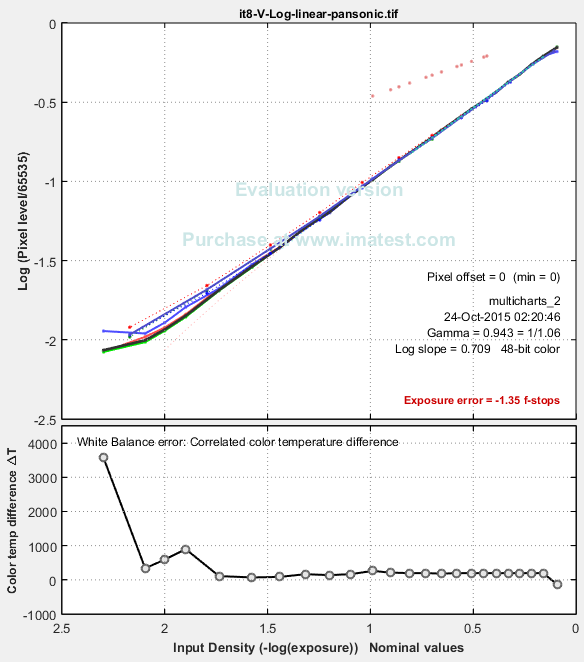
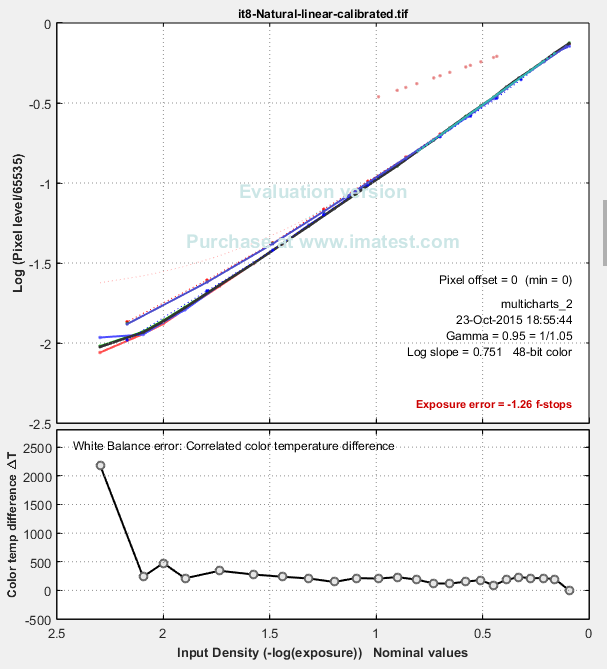
the differences on this level of linearization are neglectable. but this changes, when it comes to colors!
but, don't worry. using the luminosity linearization and a simple matrix color correction we will get acceptable results:
[please ignore the green tint / white balance in some of this screenshots! this issue does not exist in the real results!
i'm very unhappy about this misleading illustration, but i keep it, to make the deviances between different picture styles more visible.]
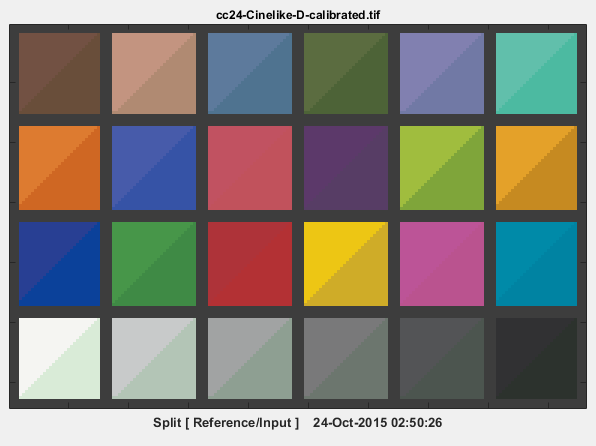
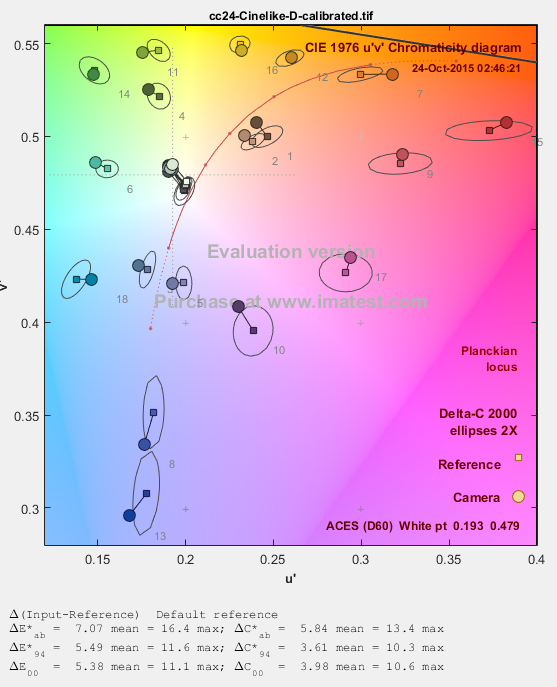
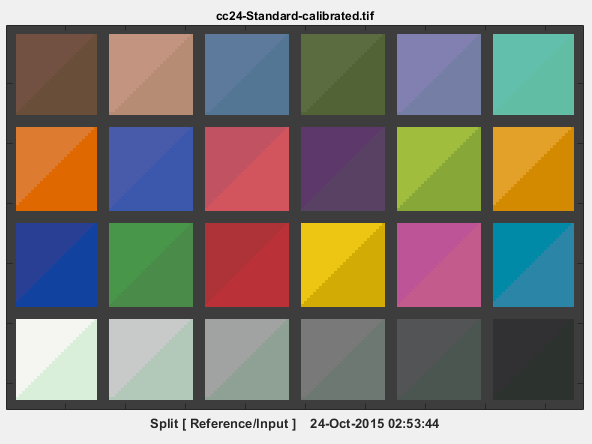
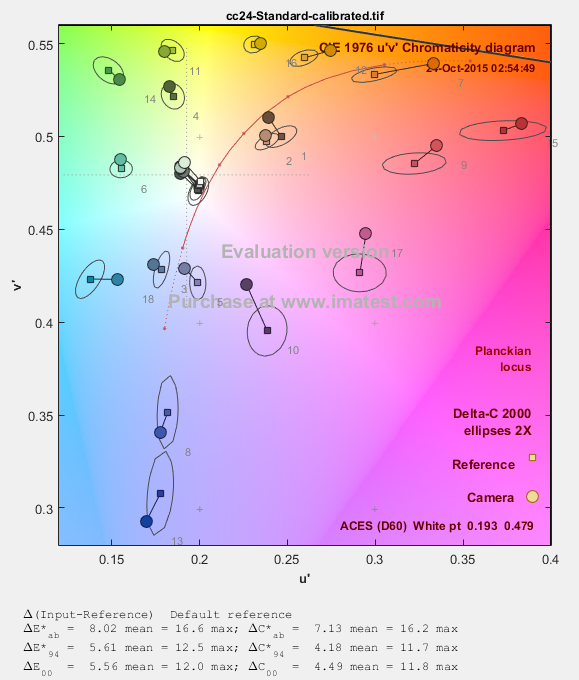
what we can not grasp by just analyzing this color checker examples, are the issues related to gamut compression and perceptual rendering in common rec709 footage. the GH4 picture styles are no exception in this respect. it's almost impossible to remove this color shifts.
this is the point, where V-log really shines! the huge V-Gamut doesn't have to twist all colors in such a way. watch the primary and secondary (especially: cyan and yellow) colors of an IT8 test chart:
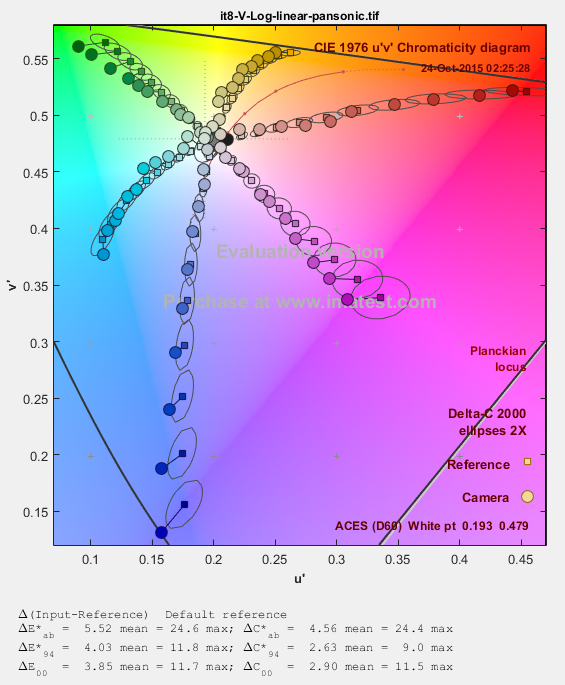
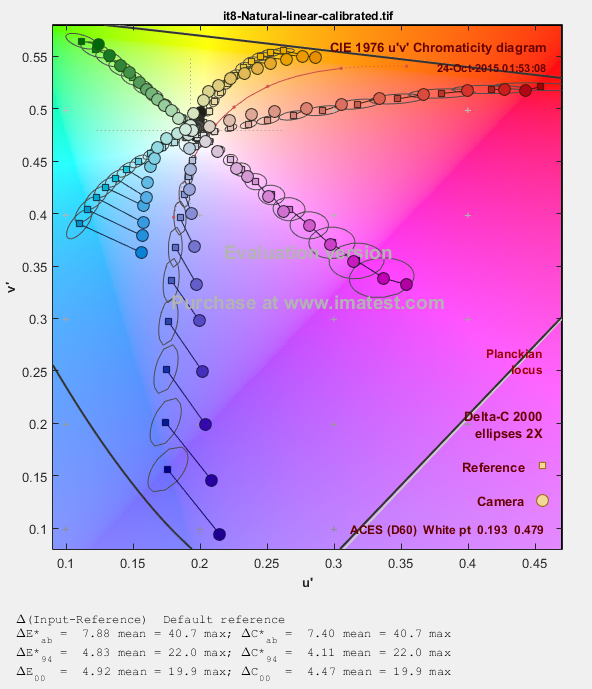
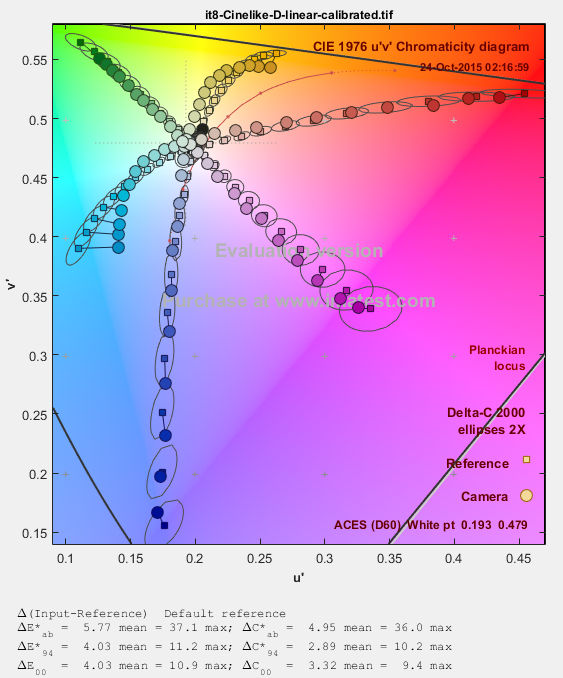
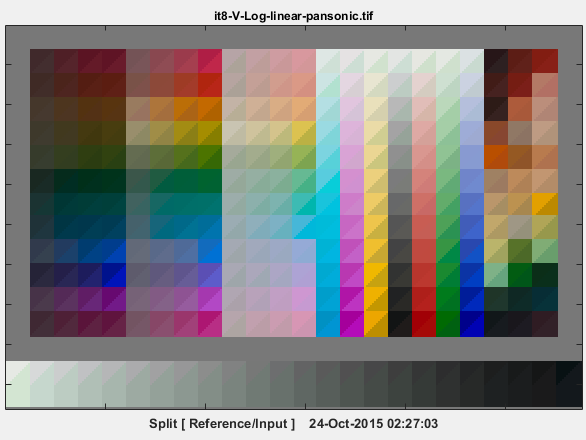
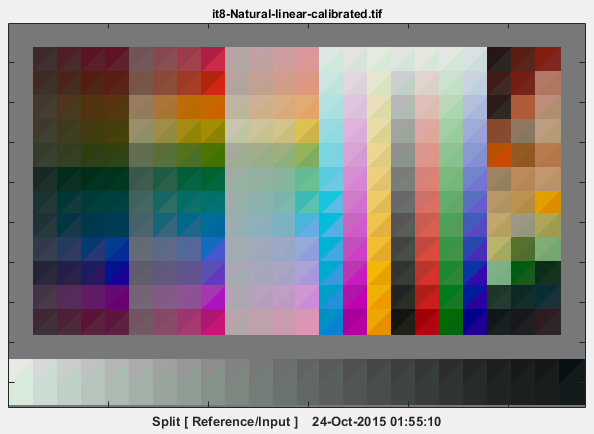
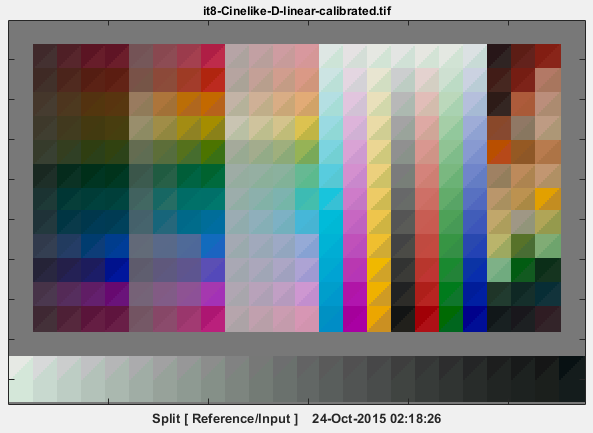
concerning accurate color rendition V-Log looks brilliant. it can not be outperformed by processing usual picture profiles. they are tainted to much by gamut mapping related issues. but otherwise the image quality of the preprocessed traditional modes is so much better, that it still looks like an very attractive alternative.
keep in mind, that this IDTs are based on measurements of the the camera behavior using default conditions. if you change the settings, the correction will not fit anymore...
i hope, somebody will find this work useful.
please report errors or feature requests. maybe i can fix them.
you can download the ready made OpenColorIO configuration set:
http://users.mur.at/ms/projects/gh4_aces/gh4_aces_1.0.1_0.2.zip
or take a look at the source code:
http://users.mur.at/ms/git/gitweb/?p=OpenColorIO-Configs.git
on most OpenColorIO based applications (natron, nuke...) you only have to choose the included config.ocio and you will get all the GH4 related input transformations.
the available options may look a little bit confusing at first glance. the naming conventions for ACES color transformations suggest this notation:
first part: transfer function - second part: gamut name
colorspaces that start with 'Linear - ' will convert to or from a specific gamut but not apply a transfer function.
colorspaces that start with 'Curve - ' will apply a transfer function but not convert between gamuts.
i used the keyword 'legal' to flag the IDTs for footage recorded in 16-235 mode.
those IDTs labled with 'calibrated' use a measured 3x3 color optimization matrix to get a more accurate color rendition, while the others use only mandatory transformation constants for color transformation, but their luminosity handling is also based on empirical measurements. the 'calibrated' variants usually work very well. only v-log looks like an exception. in this very case the straight linearization may lead to more pleasant results.
a lot of confusing instructions, but you usually only have to look for entries of the form:
"... - GH4-Cinelike-D - GH4-Cinelike-D-Gamut Calibrated"
or
"... - GH4-V-Log - GH4-V-Log-Gamut"
you could also use the OpenColorIO 'ociobakelut' utility to bake 3D LUTs out of this quite complex transformations, to use them in other non ACES/OCIO compatible applications, but i would not recommend it. the benefits of the ACES workflow are strictly connected to its much higher processing accuracy in comparison to typical 3D-LUT application and a much more unified context of operation that helps to avoid a lot of mistakes.
the strive for a more accurate handling of GH4 video content was the main motivation to start this development. it doesn't want to represent just another magic bullet to get beautiful looking results out of your native footage. instead of inducing untraceable and irreversible color changes, it tries to limit its side effects to a minimum and respect given technical impossibilities. there are are always limitations that can not be transcended by given set of precise tools. it's quite trivial to compensate the luminosity behavior of most photo styles and linearize it. but on the color side the situation is much more complex. an inversion of all the gamut mappings that are baked into the usual photo styles of the GH4 looks almost impossible. if it could by done at all, it would require operations, that are hardly reconcilable with this strive for accurate and lossless processing. in this respect the corrections of this actual IDTs are quite limited. nevertheless the results look quite encouraging. the linearized representation builds an optimal ground for further manual correction and grading.
the inversion of the various gamma curves works very well for all picture styles. there are hardly any remarkable differences. even V-Log doesn't behave better.
here a comparison of the original pansonic V-Log IDT and my GH4 ITDs on the example of the natural picture profile:
the differences on this level of linearization are neglectable. but this changes, when it comes to colors!
but, don't worry. using the luminosity linearization and a simple matrix color correction we will get acceptable results:
[please ignore the green tint / white balance in some of this screenshots! this issue does not exist in the real results!
i'm very unhappy about this misleading illustration, but i keep it, to make the deviances between different picture styles more visible.]
what we can not grasp by just analyzing this color checker examples, are the issues related to gamut compression and perceptual rendering in common rec709 footage. the GH4 picture styles are no exception in this respect. it's almost impossible to remove this color shifts.
this is the point, where V-log really shines! the huge V-Gamut doesn't have to twist all colors in such a way. watch the primary and secondary (especially: cyan and yellow) colors of an IT8 test chart:
concerning accurate color rendition V-Log looks brilliant. it can not be outperformed by processing usual picture profiles. they are tainted to much by gamut mapping related issues. but otherwise the image quality of the preprocessed traditional modes is so much better, that it still looks like an very attractive alternative.
keep in mind, that this IDTs are based on measurements of the the camera behavior using default conditions. if you change the settings, the correction will not fit anymore...
i hope, somebody will find this work useful.
please report errors or feature requests. maybe i can fix them.