AC130: AC130 vs Canon XA10

Firefox39

Active member
I just got a Canon AX10 and I thought I would do a quick comparison to the Panasonic AC130.

This is a very simple comparison so take it as such. Just compared how the cameras performed at a wedding that was very dark.

Quick Observations:
1. The Canon Camera is VERY small, looks like a toy. The AC130 is a very big camera.
2. The 10x zoom was a little limiting on the Canon, 22x on the AC130 was great.
3. The Canon has a better picture in my opinion
4. The Canon looks better to me even at higher gain settings
5. Personal preference: I like the way the Canon looks, less video-looking to me
6. Love the way the AC130 is laid out. Love all the buttons; the Canon touch screen will take some getting use to.

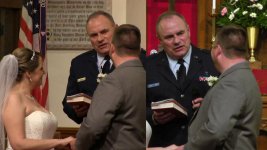
I was really surprised how well the Canon picture looked compared to the AC130. See the picture and video sample below. Both cameras were about the same distance from the alter. The AC130 was set at a gain of 12 and the Canon was somewhere between 12 and 18 of gain.

Below is how the picture profile was set up on the AC130:

Detail level: +2
Vertical detail level: +2
Detail Coring: +3
Chroma level: +3
Chroma phase: +4
Color Temp A: +2
Color Temp B: +2
Master Ped: -1
IRIS Level: -1 (I was shooting manually and it was open all the way)
DRS: I can not remember, if on, it was DRS1
Gamma: HD Norm
Matrix: Cine-Like
Skin Tone DTL: ON

XA10 is on the left, AC130is on the Right. (If needed PW is XA10)


What are your thoughts?
 

Attachments

  • CS5_MATROX_.jpg
    CS5_MATROX_.jpg
    64.2 KB · Views: 0
I think Cannon looks better, There auto focus flickering on panny during the guitar player or could be camera shaking but it look like auto focus hunting.
 
at the second part looks like your focus is not on the guitar player but the flower at the back.
the white balance is off on the ac130
Panasonic have some of the worst preset profiles on their pro cameras..

Detail level: +2
Vertical detail level: +2 (this kind of sharpening looks bad)
Detail Coring: +3 (in camera noise reduction should be turned off and use something like neat video in the post.) you get nasty video look, turn down to -5 or -7
Chroma level: +3 (I have mine set at -6 to -7, normal setting on ac130 is too saturated)
Chroma phase: +4 (you trying to match XA10?)
Color Temp A: +2 (you trying to match XA10?)
Color Temp B: +2 (you trying to match XA10?)
Master Ped: -1
IRIS Level: -1
DRS: I can not remember, if on, it was DRS1 (this will add more noise to the shadow area
Gamma: HD Norm
Matrix: Cine-Like
Skin Tone DTL: ON (this soften the orange color... look nasty should turn this off !!)

the AC130 have a super super zoom compare to the XA10. which the ac130 zoom will more likely produce purple fringe thats associate to the videolook.
with my test at the wide end you need to stop down to at least f2.2 to reduce that chromatic abbreviation on the tele end you need to stop down to F4.2 to reduce the problem...
 
Last edited:
dxl,

Thanks for your input, I will look at the picture profile and adjust. I was trying to match the Canon with this picture preset. I was going for a warm "usable" preset that I would not have to adjust in post. I like color, that is why the Chroma is set so high.
 
Hi Firefox

I would shoot some test footage first if you are going as drastic as -6 or -7 on Chroma!!! The default Chroma Level from the factory is zero and the colour is already undersaturated...I would think that going to -7 will give you an almost monochrome image!!! I run my Chroma at +3 for weddings and the preset on Panny's Spark Scene file is +4 ... I do agree that Skin detail should be off unless your subject has bad acne!!! It over smooths way too much!!! I shot my initial scene files on S1 (all zero) and then S3 (Spark) and compared the two before deciding what was too much and what was too little. I find that any negative autoiris setting means I need to adjust iris so I leave mine at zero ....unless you are shooting in snow on on a bright beach then a negative iris does help !!

Chris

Chris
 
Re the two images. The officials badge is blue for Canon whereas it is gold in the other. And, in the Canon image there is no detail to the official's jacket (you cannot see the edge of the lapel). Also, The color of the groom's suit is totally different.


Did you do a manual white balance on the Panasonic?
 
The Panny seems out of focus at the altar... did you focus manually? If not, try it, for long steady shots!
 
The Panny seems out of focus at the altar... did you focus manually? If not, try it, for long steady shots!

I did use manual focus on the AC130 for most of the ceremony. The Canon was on auto-focus, face detect. Also, on the AC130 I was using manual white balance (dialed in at 2700K) and the Canon was on auto white balance.
 
At ceremonies I switch to manual focus, use the auto button to nail the focus and then leave it in manual. However the AWB is always on ..I would suspect the bluish face of the officiant and the badge would be some daylight creeping in that the 2700 preset would never correct!! You can also "help" the AWB too by doing a zoom into anything white (keep it in auto) and wait until it corrects itself and then zoom out and leave it...even handheld at reception with an LED videolight I will zap a white tablecloth for 30 seconds to establish a reference white for AWB and it works great while the camera is running ..if you are doing occasional cutaways and shut the cam down then you do need to find something white to re-establish a reference point. Because my LCD's have 3 X magnification I can usually see pretty instantly if the balance is wrong or right or even needs a manual balance... whites will be pretty close to white on the LCD if the WB is correct (the only colour the LCD is inaccurate with is purple!! It shows as blue!!! but footage is accurate!)

I've shot 8 weedings since February when I changed from HMC82's to AC-130's and the auto-focus works great as long as you keep moving...it only seems to fail on static shots so at weddings I'm in manual for ceremonies and speeches ..the rest AF handles footage perfectly!!

Chris
 
I'd love to hear how they both performed at the reception - in low light. THAT's where things can get really ugly with inferior equipment.
 
Back
Top