
tylerdlugolecki
Member
Hello,
So I've had the ac130 for about 2 weeks now and I've been essentially reading as much as I can about this camera before I use it for any weddings/events. One problem I keep running into while testing the camera are these red and green screens that show up when I start the camera. It looks like the ND filter is on but the switch is off(as you can see in the red screen example). While it is red the ND 1/4 flashes on the screen(as pictured). Since I'm rather knew to Panasonic and this level of camera I would assume it is an error on my behalf. What perplexes me though, is the fact that it will be normal until I turn off and back on. After it comes back on the picture shows up as red regardless of any settings adjustment. When I turn off then back on again, I get a green overlay. Eventually the picture goes back to normal after shutting off and back on a few times. This has happened on two separate occasions. It records to the card in that tint so it isn't the LCD or vf.
Again, it's probably my own error but I want to make sure just to be safe. Any help would be great.
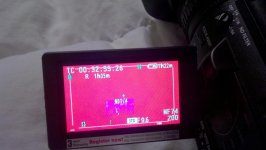
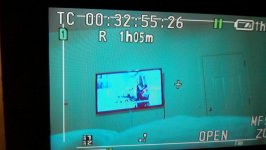
So I've had the ac130 for about 2 weeks now and I've been essentially reading as much as I can about this camera before I use it for any weddings/events. One problem I keep running into while testing the camera are these red and green screens that show up when I start the camera. It looks like the ND filter is on but the switch is off(as you can see in the red screen example). While it is red the ND 1/4 flashes on the screen(as pictured). Since I'm rather knew to Panasonic and this level of camera I would assume it is an error on my behalf. What perplexes me though, is the fact that it will be normal until I turn off and back on. After it comes back on the picture shows up as red regardless of any settings adjustment. When I turn off then back on again, I get a green overlay. Eventually the picture goes back to normal after shutting off and back on a few times. This has happened on two separate occasions. It records to the card in that tint so it isn't the LCD or vf.
Again, it's probably my own error but I want to make sure just to be safe. Any help would be great.
