A7siii Yellow Image | Aperture 300d ?

John Foundas

Well-known member
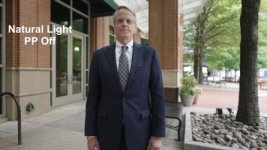
Been getting a 'yellowish" image when using the Aperture 300d LED on standups. Under natural light camera checks out, different lenses are fine.
Even with a proper white/grey card balance, it's still resolving yellow. I even manually leaned it towards blue in the WB function and it's still off.

Anyone had issues with the camera leaning yellow or issues with the 300d?

PP Off
Screen Shot 2021-05-14 at 9.03.47 PM.jpg


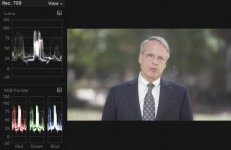
Graded

Screen Shot 2021-05-14 at 9.10.55 PM.jpg
 
Does the graded one look natural on your monitor?

Or a little blue? A lot blue?

(Or is that the graded/painted one from the camera just for reference?)

___

Top one looks warms, but nothing crazy. A couple of things could be going on here, including both camera settings and post handling.
 
I graded it just a bit towards blue.
I fell like the CRI of the light isn’t accurate. It’s not a white light.

Camera settings are all factory using PP off

If I had to send off the raw files to a client I would be very apprehensive.

Weird
 
That family of lights is extremely popular...I've never heard that complaint before but that also doesn't mean the CRI on your unit could be off.

But I think it maybe could be a viewing/monitor issue as well as the image on the bottom looks really blue.

Not like I'm tripping on LSD blue, but the jacket and hair shouldn't be the color they are...at least on my monitor.
 
From where I'm standing top one looks a touch green (natural light coming through trees?), bottom one looks extremely blue.
 
I agree, the truth lies somewhere in the middle. Hard to say if it is the light or the camera without testing both with other cameras involved. Do you have any other cameras to test with?
 
From where I'm standing top one looks a touch green (natural light coming through trees?), bottom one looks extremely blue.

That's a good observation, there was a solid canopy. However, my leaning towards the light issue is that when I back the light off (intensity) it did become less yellow.
Under natural light, the cam image looks amazing.

Screen Shot 2021-05-11 at 5.42.48 PM.jpg
 
That family of lights is extremely popular...I've never heard that complaint before but that also doesn't mean the CRI on your unit could be off.

But I think it maybe could be a viewing/monitor issue as well as the image on the bottom looks really blue.

Not like I'm tripping on LSD blue, but the jacket and hair shouldn't be the color they are...at least on my monitor.

I'm checking into this more today...
I've shot plenty of footage with this camera and produced quality images. With the intro of the 300d as a key light, things get yellow.


Screen Shot 2021-05-11 at 7.57.01 PM.jpg
 
Well, it looks like you're using FCP which means you're using a Mac so unless it's a Mini (or MP) with a non-Apple monitor (or really old), it's highly doubtful your monitor is the issue as checking on any Apple screen from the last few years before mastering is always at the top of the checklist as a simple way to see how much of the universe will see your product.
 
Is the 300d an early version? I've read that LED lights get gradually more green over time. You could try adding 1/8 minus green to the light.
Or grading the image (slightly) towards magenta rather than blue.

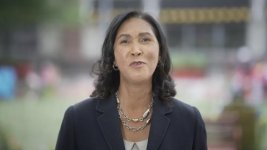
That said, her shirt and the walls of the building behind are white / neutral in the uncorrected image. Maybe try just pushing mids towards magenta?
 
Is the 300d an early version? I've read that LED lights get gradually more green over time. You could try adding 1/8 minus green to the light.
Or grading the image (slightly) towards magenta rather than blue.

That said, her shirt and the walls of the building behind are white / neutral in the uncorrected image. Maybe try just pushing mids towards magenta?


I've put in a support ticket with Ap, so we'll see about the lot number. I'll give the mids a push as suggested, TY!
 
Looks like the AP 300d is balancing around 4900. No Bueno.

It's unclear if you cycled through the camera's white balance while setting up that shot or just adjusted the matrix section while @~5600K, but knocking the WB from ~5600K to 5200K/5000K/4800K would fix it right away if you're keeping that light.
 
It's unclear if you cycled through the camera's white balance while setting up that shot or just adjusted the matrix section while @~5600K, but knocking the WB from ~5600K to 5200K/5000K/4800K would fix it right away if you're keeping that light.

Yes, thank you. I have been adding a couple of points to the blue in the matrix section to get by.
 
Well, it looks like you're using FCP which means you're using a Mac so unless it's a Mini (or MP) with a non-Apple monitor (or really old), it's highly doubtful your monitor is the issue as checking on any Apple screen from the last few years before mastering is always at the top of the checklist as a simple way to see how much of the universe will see your product.

It's worth bearing in mind that the situation where all computers are Apple Macs and all cellphones are iPhones is really a rather USA-specific thing. Outside the USA, ownership of Apple gear is much, much rarer. I live in the UK and I know exactly one person who owns a MacBook and an iPhone. Otherwise it's all Windows and Android. International productions take note.

My impression is that phones are generally better than laptops.
 
Back
Top