A7sII Aliasing In 4K 24p

hopkins802

Well-known member
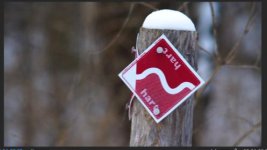
Has anyone noticed any severe cases of aliasing / moire with their A7sii in 4k mode? I really never had until the other day. I was just shooting some random stuff on a nature walk, and I shot a sign that has some fine, detail on it.

When I scrub through the shot frame by frame in Premiere, there is no aliasing, but as soon as I play it back, it looks god awful. Is that normal? Like I said, this is my first instance where the aliasing was unusable. Never had any aliasing in 1080 24p 60p or 120p. Luckily I shoot mostly weddings where intricate patterns don't appear very often.

I believe the PP was a combo of the Cine 4 gamma with the Movie color.

I exported a standard H.264 version and also a Quicktime with the CAliasingTest_FreezeFrame.jpgAliasingTest_FreezeFrame_DuringPlayback.jpgineform codec to see if the compression was the issue. Vimeo actually helps smooth out the aliasing a lot, but I'd still like to know if anyone has had any issues where it was un-usable.
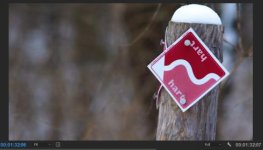
I've attached images of what the frame looks like as a still and then during playback as well.

Thanks!
Dan
 
Most the aliasing goes away when i downconvert to 1080p. Pretty sure its my monito above all else that creates issue
 
Are you sure it's not a scaling issue in Premiere? Play it back at 100% and check if it is still there. Also check that your "playback" an "paused" resolutions are the same. And try watch it in another program too, of course. The fact that it is appearing on an area that looks like it should be a solid colour is what makes me think it's not actually a problem with the recorded files. I could be completely wrong though!

I've often found what I though was aliasing but turned out to just be Premiere doing a rough job on the scaling in the preview window (keep in mind this is highly compressed long-gop footage which essentially needs to be unpacked and rebuilt in realtime, as well as scaled to fit the program window.
 
Are you sure it's not a scaling issue in Premiere? Play it back at 100% and check if it is still there. Also check that your "playback" an "paused" resolutions are the same. And try watch it in another program too, of course. The fact that it is appearing on an area that looks like it should be a solid colour is what makes me think it's not actually a problem with the recorded files. I could be completely wrong though!

I've often found what I though was aliasing but turned out to just be Premiere doing a rough job on the scaling in the preview window (keep in mind this is highly compressed long-gop footage which essentially needs to be unpacked and rebuilt in realtime, as well as scaled to fit the program window.

Yeah, I tried playback both at 1/2 and full. Same issue. Also, here is the exported file on Vimeo: https://vimeo.com/204291764/26bb6abff7

I have noticed a small amount of aliasing when playing back in premiere, but it's always gone away after the file was exported as an .mp4 or .mov. I've never seen it this bad after updated to Vimeo. The sign appears to be solid red, but I think in realize there are tiny stripes of light red, dark red.

I could try playing it back in a 4k sequence, I haven't tried that yet.
 
One other thing, I doubt this matters, but this was shot with the Takumar 200mm 3.5. Which is a 50 year old lens with hardly any coatings, so CA and contrast is much different than modern lenses. I only mention this because I've never noticed aliasing at all with any other lens.. Perhaps I should bring my Sigma Art back to the same sign and give it a shot.
 
Yeah both R2 and S2 have moirè and aliasing...and depending on the settings it can get quite bad but even the S2 @ full frame is not immune...
 
Yeah both R2 and S2 have moirè and aliasing...and depending on the settings it can get quite bad but even the S2 @ full frame is not immune...

Just curious to why I haven't seen this before at all. I've shot plenty of 4k full frame and have been fine. Can you expand on which settings you're referring to? Sharpening is always down in camera, though I may have had it on 0 instead of -7. I also may have shot this in the "Stills" PP because I was switching back and forth that day. In that case, sharpening may have been higher...Hmm.
 
Just curious to why I haven't seen this before at all. I've shot plenty of 4k full frame and have been fine. Can you expand on which settings you're referring to? Sharpening is always down in camera, though I may have had it on 0 instead of -7. I also may have shot this in the "Stills" PP because I was switching back and forth that day. In that case, sharpening may have been higher...Hmm.

The reason you may not have seen it before is not necessarily because of your settings. It also has to do with the relationship of your distance to the fine detail, as well as your focal length. Often 1 foot before or 1 foot after your focal point there may be no issue. What's happening is that the detailed information is falling into direct corrrelation with the pattern or tram of the sensor itself. So the information is being lost. It may not happen often but it can occur on almost all digital cameras.
 
The reason you may not have seen it before is not necessarily because of your settings. It also has to do with the relationship of your distance to the fine detail, as well as your focal length. Often 1 foot before or 1 foot after your focal point there may be no issue. What's happening is that the detailed information is falling into direct corrrelation with the pattern or tram of the sensor itself. So the information is being lost. It may not happen often but it can occur on almost all digital cameras.

Interesting, thanks for the insight. The focal length was 200mm, in the past I've only had aliasing on wide lenses. Either way, I'll have to keep an eye on it, thanks!
 
Back
Top