a7s skin tones: slog2 vs pp off (shogun 4k)

Last one- wanted to see if I could do a grade in Resolve 11 Lite from scratch with no LUTs and no Photoshop. This grade done on a 2014 MacBook Pro Retina, no display calibration (generally looks better as Apple's built in display is more or less factory calibrated). Prior grades done on the Mac Pro in Win7 (calibrated Dell 30" display). Skin blemish fixes were just to see if possible in theory (would spend more time if not practicing). 2 nodes for color and 5 nodes to fix skin. Didn't add noise/grain as not built into Resolve (can do with OFX plugins, external files, mattes, etc.). When models/actresses complain about their blemishes, I ask if they consume a lot of sugar/sweets. Fresh squeezed lemon, lime, and stevia with sparkling mineral water is a healthier alternative, with a net positive pH effect on the body: pro alkaline (tastes better to me too). Will not promote skin issues and will help prevent them.
RH2_R_1.1.1.jpg
 
Hi Terrence, love your grade man. How did you do it?

Hi Mjfan,

Thanks, I've found working with Slog-2/S-gamut it's almost critical to use a X-rite colour checker conversion to get consistent results. (Since I wasn't there I just used some footage I had of one. Then converted the gamma to Slog-2 and colour space to P3-D60. This provides me with the best results according to my tests.)

I then applied a LUT that I made, which can be seen here: https://vimeo.com/108150808

After that was applied I added a Luminance desaturation curve, making sure anything past a certain brightness the saturation would decrease

(This is based on research from this article:
http://www.dvinfo.net/article/post/making-the-sony-f55-look-filmic-with-resolve-9.html)

Apparantly this is why the Alexa has the fabled alexa look, any way to end it all off I added some sharpening and some midtone detail, while obviously adjusting the lift gamma and gain,
 
FYI, "pp off" isn't one particular thing. pp off = use the currently active creative style. That's jpeg settings. You may be shooting Standard, or Deep, or even black and white. It is all "pp off".
 
The problem is not S-log2. S-log2 is great. The problem is sgamut. S-gamut sucks, unless you use an official LUT (which I wouldn't know where to find). Sgamut is not yellow-ish, or red-ish, it's even worse: it depends on how you expose.

https://vimeo.com/104329851

Check out my Flaat settings. It's a custom profile based on Slog2 and Cinema color, with some tweaks for better color accuracy.
 
Still don't really understand why people complain about SLOG2.

Whitebalanced to white in bottle label, pulled down exposure slightly, slightly softened the whole image with ACR clarity adjustment, added Impulz SLOG2 to Vision3 50D DP FC LUT... could spend a lot more time but just wanted to show SLOG2 doesn't have to be complicated. If it had been exposed down and whitebalanced a bit more accurately on set you can just throw on a LUT and have a really good starting point.

What Creative Style did you use for the PP-off version? Some of those can look quite good but I find they all hide about 1-3stops of shadow detail that you can see in picture profiles. Even LIGHT -3,-1,-3 which might be me goto alternative for avoiding blue-light issues and seems to preserve the most DR, still clips off at least a stop of shadows that are in SLOG2 and some cinegammas.

timeline1.00_00_20_07.Still009.jpg

I should note my monitor isn't awesome and find I sometimes pull up shadows a bit too much to compensate for the way it crushes my shadows a little, so maybe imagine the image with crunchier blacks if it looks washed out to you.
 
Last edited:
Jpeg color issues? Your shift when you first posted was so wacky. I don't seem to be having any issues. If I load this page, my Resolve window, and the exported Jpeg I used for this post sitting on my desktop, they all look identical. It's called color management.

Screen shot of the DVXthread and the Jpeg used to upload (including the screen shot too which is a PNG).
View attachment 98183

What matters is that his NLE is color managed, but the web browser he is using is not color managed. I've made a video explaining color management that can explain this.
 
FYI, "pp off" isn't one particular thing. pp off = use the currently active creative style. That's jpeg settings. You may be shooting Standard, or Deep, or even black and white. It is all "pp off".

Still don't really understand why people complain about SLOG2.
Whitebalanced to white in bottle label, pulled down exposure slightly, slightly softened the whole image with ACR clarity adjustment, added Impulz SLOG2 to Vision3 50D DP FC LUT... could spend a lot more time but just wanted to show SLOG2 doesn't have to be complicated. If it had been exposed down and whitebalanced a bit more accurately on set you can just throw on a LUT and have a really good starting point.
What Creative Style did you use for the PP-off version? Some of those can look quite good but I find they all hide about 1-3stops of shadow detail that you can see in picture profiles. Even LIGHT -3,-1,-3 which might be me goto alternative for avoiding blue-light issues and seems to preserve the most DR, still clips off at least a stop of shadows that are in SLOG2 and some cinegammas.
I should note my monitor isn't awesome and find I sometimes pull up shadows a bit too much to compensate for the way it crushes my shadows a little, so maybe imagine the image with crunchier blacks if it looks washed out to you.

Hey sorry, yeah I should have mentioned it was just the 'neutral' setting in camera, with no additional changes (to saturation or sharpness, etc).
Also, I actually don't have any issues really with slog2/sgamut. It does take a bit more time to grade compared to other logs that I've used in the past (like redlogfilm) but with any decent coloring program you can get the look you want, and all the extra latitude is nice to work with.
(btw your image looks fine nyvz, not too washed out at all).

it's been pretty cool checking back and seeing all the ways people have chosen to color the footage, some of it's certainly inspired me (if not for this particular shoot, for future ones).
i just wanted to see what it'd be like to actually shoot with the image we were lighting off of, so thats why I rolled a couple takes outside of slog2. Honestly I'm finding that because I'm not trying to pull out a ton of the warm/amber light that it's pretty nice to work with. The skin tones are still malleable enough to tweak them to where I want them, and because I'm not trying to lift a ton from the shadows (although actually it looks like it could pump up a stop before looking bad) the image looks great.
Ultimately we may use an slog2 take for performance reasons, but if we settle on the ppoff (netural) I'd be just fine with that.

Lastly, the slog2 shots were done with sharpness at 0, instead of -7. Anyone see any downsides to that in the images provided?
 
I took a crack at the images. I really wanted the colors of the drink to match lemon, and the mountain dew to really pop to it's original color. The rest was taken through an ImpulZ Cineon LUT workflow.

01.jpg02.jpg

I gave her eyes a big pop since I felt like it was a big part of the story being told here. Also the drink (since it seems like a drink ad) was juiced up to really sell the lemon.
 
What matters is that his NLE is color managed, but the web browser he is using is not color managed. I've made a video explaining color management that can explain this.
I didn't need this video. He did. It's not even a good video. You didn't explain what Srgb and Abode98 are designed for. Or Prophoto RGB. When or why to use them. Much less video specs vrs print vrs web. What devices use Srgb vrs adobe98, or CYMK. When or why to use them.

Color space is like a zip code and the image is like a piece of mail. You can put the address on the mail (the color look) but without the zip code (the color space), the mailman has no idea where to deliver it to.

Finally, who would use a web browser that is not color managed especially if they deal with imaging? That would be like being a plumber carrying around a weed eater.
 
With all the artists I train I find that going that deep into color management is so difficult that the main principles of why we color manage get lost. Its a 101 intro level video designed to explain to people that Color Management is a thing that exists and is probably messing with your colors.
 
The original poster (Casey) mentioned browser color issues after his first set of images. I was going to reply but instead started practicing on his images (unfinished post below):

------------------------------------------
(interestingly, and maybe the more tech-savvy people will know, but the jpeg is a bit more saturated and slightly more contrasty than how it looks in my nle)


If you're saving from Photoshop, try unchecking "Convert to sRGB". Or bring a TIFF into PS and Save for Web with sRGB turned off (perhaps also try not embedded color profile, etc.). I've found different browsers also render color differently. For a color critical post, I'll sometimes tweak the still after seeing it in the browser, and re-upload a few times until it looks better. Skintones are the trickiest.
------------------------------------------

I tried all these combos- didn't work: Chrome still causes a color shift (again, I changed the second image even more- the color shift wasn't that dramatic). Chrome is the number one browser in the world, followed by IE, Firefox, and then Safari on OSX. While Safari may have the best color management, it's used the least, so it's important to make sure images look good on the top browsers. http://en.wikipedia.org/wiki/Usage_share_of_web_browsers

http://cameratico.com/tools/web-browser-color-management-test/

Shows Chrome supports v2 ICC, not v4 ICC. In any case, there's a color shift and something to be aware of, especially for skin tones. For important images/video I check in all browsers, Windows & OSX, and on HDTVs. We can't change the browsers or users potentially wild HDTV colors, however we can create a 'centered/balanced/calibrated' image which won't go totally nuts when viewed on an uncalibrated device.

Christopher- Alexander's video was cool- didn't see any issue with it or need to going into more detail given the intended audience. Your Ke$ha photos looked natural and nice; why didn't you fix the color on your grade for Casey's image? (you mentioned too yellow)

Samuel- SGamut is tricky, since color is not linear (which Sony fixed with SGamut3.cine). I found F65 and Alister's LUTs to work OK (located via google), however I think working from scratch with no LUTs in Resolve can work well too:
http://www.dvxuser.com/V6/showthrea...un-4k)&p=1986523249&viewfull=1#post1986523249

A questions of perception for everyone: does that image have natural, realistic skin tones? The primary goal was to provide wide tonality and color in skin tones and all scene colors. Many of the other grades (including some of my earlier PS versions) have limited skin tonality, some starting to look like colored B&W or sepia. While those are cool looks for various applications, getting realistic and accurate skin tones allows us to better understand cameras and color settings. And once we have natural and accurate color, from there we can go any direction we desire. It's not so easy and sometimes impossible to go the other way.

I bring up the question of perception, as even though many of us are using calibrated systems, we perceive color differently, sometimes dramatically, as illustrated here: http://www.wired.com/2015/02/science-one-agrees-color-dress/ . This caused a lot of heated debates!
 
jcs, mine were taken as snapshots right out of premiere, and i'll be the firs to admit i'm not an expert or even super knowledgeable about color management, and though I'm rarely the person that 'finishes' the stuff I shoot, i should still learn more about it.

as for your last question about skin tones, I think the close up you colored just before your 'last one' has the most 'natural' skin tone of the bunch you graded. and while for the finished version of this spot we'll likely push the skin more amber, you're totally right that one of the best ways to judge and understand how this camera acquires an image is to get accurate/natural skin tones when grading.
 
Thanks Casey, the 2nd to last close up was done in Photoshop. My last wide was the most accurate of the wides for natural skin tone to my eye (done in Resolve). Did any of the other examples look more natural/accurate? The goal is to understand what other people see to improve future skin tone work.

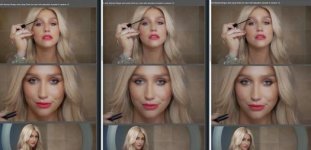
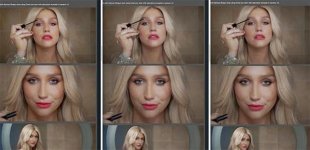
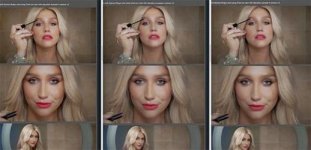
Great example Christopher- three browsers showing 3 different color renderings:
C_Kesha.jpg

I enlarged in PS, then saved out as PNG, uncompressed with color profile file here.

The left image has the most saturation and red in the skin and lips, as well as more red in the shadows. The hair and background are more yellow.
The middle image has more red & blue vs. the third image, the skin is more neutral, highlight between eyes on top image has less color vs. left & right image (less specular).
The right image is slightly warmer (more red, less blue) and has slightly more saturation vs. the middle.

Looking at the bottom row of images the left most has brighter highlights, more red, the middle least red, flatter, rightmost is between the first two.

Guessing browsers: Safari, Chrome, Firefox. The left and right images are the most similar, with Safari and Firefox historically providing the best color: http://www.gballard.net/psd/go_live_page_profile/embeddedJPEGprofiles.html
As for the order- who knows, would need to see original in Photoshop to better guess.

Not major color shifts in this case, but sometimes the changes motivate us to redo the image/video.
 

Attachments

  • C_Kesha.jpg
    C_Kesha.jpg
    20.8 KB · Views: 0
Last edited:
I took a crack at the images. I really wanted the colors of the drink to match lemon, and the mountain dew to really pop to it's original color. The rest was taken through an ImpulZ Cineon LUT workflow.


I gave her eyes a big pop since I felt like it was a big part of the story being told here. Also the drink (since it seems like a drink ad) was juiced up to really sell the lemon.

I really enjoy how golden and stylized everything looks on your grade, and the soda itself looks great being so yellow. What did you grade in?
 
Back
Top