
Navigation
Install the app
How to install the app on iOS
Follow along with the video below to see how to install our site as a web app on your home screen.
Note: This feature may not be available in some browsers.
More options
You are using an out of date browser. It may not display this or other websites correctly.
You should upgrade or use an alternative browser.
You should upgrade or use an alternative browser.
A7S PicPro Settings
- Thread starter Kholi
- Start date

Samuel H
Major Contributor
Right now I'm sticking to cinema, based both on this test and my own ones. I still have to test k-log. He said he prefers pro, and it does have very nice colors indeed, but to me it seems noisier.

You guys are free to use the thread to post settings, just going to drop these here:
Slog2 PicPro
Black Level: 0
Gamma Slog: 2
Black Gamma > Range: Middle , Level: -3
Knee > Mode: Auto , Auto Set > Max Point: 95 , Sensitivity: Mid
Colore Mode: Pro
Saturation: +8
Color Phase -2
Color Depth > R+1, G-1, B+2,, C-2, M-1, Y-3
Detail > Level, -5 Adjust > Mode; Manual, V/H Balance: -2, B/W Balance Type3, Limit: 0, Crispening:0, hi_light Detail: 0
White balance > Manual > Grid setting B 1 (one to the left)
3000-3600 = Tungsten
5000 - 5600 = Daylight
6100 - 7000 = late day or shade/shaded interiors in daylight
Take care:
According to the manual the Knee values are not used if Knee is set to "Auto" mode.
"When selecting [Still], [Cine1], [Cine2], [Cine3], [Cine4], [ITU709(800%)], [S-Log2] in
[Gamma], [Knee] is set to [Off] if [Mode] is set to [Auto]. To use functions in [Knee], set
[Mode] to [Manual]."

Rishaar
Active member
Did a quick shoot last month with Kholi's profile, really liked the results.
It was my first try with the a7s & i didn't have time to get used to it ...it was a very FAST shooting, i didn't take the time to adjust the white balance and exposure as i would have normally.
All i can say is that the footage was very forgiving for my mistakes
All shot on natural light, 60p in Crop mode, Sigma 24-105 with SpeedBooster, added a quick curve in filmconvert (for F55 Slog2):

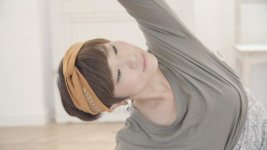
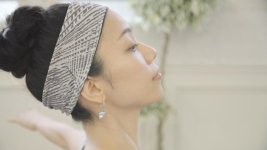

It was my first try with the a7s & i didn't have time to get used to it ...it was a very FAST shooting, i didn't take the time to adjust the white balance and exposure as i would have normally.
All i can say is that the footage was very forgiving for my mistakes
All shot on natural light, 60p in Crop mode, Sigma 24-105 with SpeedBooster, added a quick curve in filmconvert (for F55 Slog2):
Last edited:

Noah Blackwell
Active member
That looks super great, Rishaar. What project is this video for?
Rishaar
Active member
thanks a lot Noah !
this was for a yoga wear brand here in Japan (realstone)
For budget reasons, i had to do everything in 3 hours, alone, so i took many many shortcuts, no lighting etc... that's what i said the footage was VERY forgiving.
here is my final version if you fancy a look
this was for a yoga wear brand here in Japan (realstone)
For budget reasons, i had to do everything in 3 hours, alone, so i took many many shortcuts, no lighting etc... that's what i said the footage was VERY forgiving.
here is my final version if you fancy a look
Rishaar
Active member
Thank you Samuel, that means a lot coming from you!
This Camera has a lot of potential to unlock, but i really felt the need for good monitoring.
Also, i could witness the "highlight aliasing" issue in one shot, but 99% of the time it wasn't there.
I'd like to try your recent profile too, looks great.
This Camera has a lot of potential to unlock, but i really felt the need for good monitoring.
Also, i could witness the "highlight aliasing" issue in one shot, but 99% of the time it wasn't there.
I'd like to try your recent profile too, looks great.


Samuel H
Major Contributor
I did see the highlight aliasing issue in the arm-in-front-of-window shot, but I still think it's a relatively minor issue that most people are not going to notice.
(also: thanks but I don't consider my opinion that important in these matters: I'm the one who has a lot of technical knowledge but not so great artistical qualities; I did like it but there are much better qualified forum members around)
(also: thanks but I don't consider my opinion that important in these matters: I'm the one who has a lot of technical knowledge but not so great artistical qualities; I did like it but there are much better qualified forum members around)
thanks a lot Noah !
this was for a yoga wear brand here in Japan (realstone)
For budget reasons, i had to do everything in 3 hours, alone, so i took many many shortcuts, no lighting etc... that's what i said the footage was VERY forgiving.
here is my final version if you fancy a look
I'm usually not a fan of the flat look but this looks pretty great. It works for this content. Good stuff, man.
It keeps the material soft and approachable. I have to learn how to do this on purpose. haha.
Rishaar
Active member
Thank a lot Kholi!I'm usually not a fan of the flat look but this looks pretty great. It works for this content. Good stuff, man.
It keeps the material soft and approachable. I have to learn how to do this on purpose. haha.
I don't usually keep things flat neither, not a fan of creamy look, BUT this time it was intended to fit the overall atmosphere.
What i found great with this profile is that it keeps a good amount of saturation and looks great out of the camera, so it's quite easy to work on in Post.
Your profile saved my day that time, so again thank you!
Thank a lot Kholi!
I don't usually keep things flat neither, not a fan of creamy look, BUT this time it was intended to fit the overall atmosphere.
What i found great with this profile is that it keeps a good amount of saturation and looks great out of the camera, so it's quite easy to work on in Post.
Your profile saved my day that time, so again thank you!
What tweaking did you do to this after shooting? The big thing for me is that there's still a black reference in nearly every cut, and it really helps the flatter look out in a way that I'm pretty much going to try to learn soon. I've tried it before, but could never get it to a place that I felt looked as nice as this does.
Also, sorry if it was mentioned, what glass did you use?
Edit: I look at this footage, and if it were the FS7 demo Sony would probably have my money. hahaha I wonder if we'll need to tweak the FS7 out the same way that we've gone and beat the A7S up? If so, I need to get my grubby hands on the FS7 stat.
Rishaar
Active member
What tweaking did you do to this after shooting? The big thing for me is that there's still a black reference in nearly every cut, and it really helps the flatter look out in a way that I'm pretty much going to try to learn soon. I've tried it before, but could never get it to a place that I felt looked as nice as this does.
Also, sorry if it was mentioned, what glass did you use?
Edit: I look at this footage, and if it were the FS7 demo Sony would probably have my money. hahaha I wonder if we'll need to tweak the FS7 out the same way that we've gone and beat the A7S up? If so, I need to get my grubby hands on the FS7 stat.
I did notice that: it's high-key, but not milky black and washed up, because there's always a black pot in the background or something like that. Neat.
Wow guys!! you really know where to look !!
- The place we shot in had that creamy-antique look and i was worried i would have a hard time to bring back contrast later, so tried to keep some black in the picture.
- Regarding the tweak in post, Filmconvert, this is the type of settings i used (each shot slightly different % but very close to that):
Sony f55 slog2 Normal, Exposure - 0.020
Film: KD5213 Vis3, super 35, Color:75%, Curve:75%, Grain:0%
Saturation: 105% (just to punch a bit the skin tones)
Color correction: almost none
Levels: This is where i tweaked the most. Playing with the Black and Mid points really helped to bring back some life in the black while keeping the creamy look.
I believe film convert has some good magic goin on here
Rishaar
Active member
Thanks and great point !I really liked this. I've disliked how noisy the A7s looks most of the time. Your piece hides the noise and looks fantastic.
Yeah it's actually pretty noisy usually, this time the place was kind of bright and not to many shadows for the noise to appear. I keept everything ETTR +2 stops nonetheless, i believe it helped.
Thanks and great point !
Yeah it's actually pretty noisy usually, this time the place was kind of bright and not to many shadows for the noise to appear. I keept everything ETTR +2 stops nonetheless, i believe it helped.
Noisy? I'm confused here. I've read a lot about the A7s and most of the time how well it handles the noise...
Last edited:
Rishaar
Active member
Slog-2 is actually pretty noisy, i guess that's the price to pay for a better dynamic rangeNoisy? I'm confused here. I've read a lot about the A7s and most of the time how well it handles the noise...