a7s Green Screen settings/best practices

drbadass

Member
Hey folks-- have a green screen shoot coming up in a couple weeks, just wanted to get your thoughts on settings (picture profiles etc.) to get the best results. Haven't come up with much by searching but did see this video where the author suggests using Cine4 profile rather than slog2: https://www.youtube.com/watch?v=JPOPN40NfLk

Thoughts?
 
Hey folks-- have a green screen shoot coming up in a couple weeks, just wanted to get your thoughts on settings (picture profiles etc.) to get the best results. Haven't come up with much by searching but did see this video where the author suggests using Cine4 profile rather than slog2: https://www.youtube.com/watch?v=JPOPN40NfLk

Thoughts?

If at all possible you should try and get a hold of an external recorder, having 4:2:2 rather than 4:2:0 chroma subsampling should make getting a good key a lot easier. Picture profile shouldn't really matter that much in my opinion. Many promote using cine4 since you can shoot at lower iso's considering s-log2 has a min of 3200 and s-log2 with s-gamut is notoriously hard to grade properly without color shifts.
 
If at all possible you should try and get a hold of an external recorder, having 4:2:2 rather than 4:2:0 chroma subsampling should make getting a good key a lot easier. Picture profile shouldn't really matter that much in my opinion. Many promote using cine4 since you can shoot at lower iso's considering s-log2 has a min of 3200 and s-log2 with s-gamut is notoriously hard to grade properly without color shifts.

a7s only spits out 8-bit 4:2:0 though right? I have a Hyperdeck Shuttle I can use, but I'm not sure it will make any diff. Would be happy to be wrong about this.
 
I believe the hdmi outputs 8bit 4:2:2, 4:2:0 internal. If the shuttle supports 4k I would consider that as well, down scaling 4k to HD can decrease the subsampling to 4:4:4 - 10bit is a myth though. It would be interesting to know which approach is better, keying 4k 4:2:2 or downscale and key HD at 4:4:4.
 
Last edited:
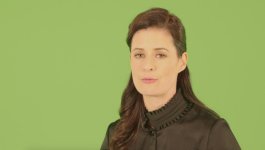
Couple samples & settings - I'm not doing the post, but I did a quick few tests on lunch to make sure everything was looking good, should be easy enough to do the post work - Can't say definitely this is 'the best', but its what I used and myself (and the client) were happy with the results.

Main Angle - C100
WideDR
c100_greenscreen.jpg

2nd Angle - A7s PP6, Gamma: Cine4 - Color Mode: Cinema
a7sgreenscreen_1.jpg

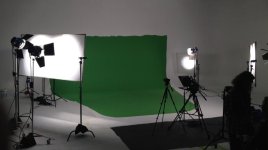
Setup
greenscreen_setup.jpg
 
If you increase the shutter you will pull cleaner keys. Motion blur makes it tough to get the edges clean.
 
It certainly is! heh - Greenscreen WB I've always found a tad tricky - Will do it with GS Lights off next time for sure to avoid an extra step or two to colour correct the image!
 
If you increase the shutter you will pull cleaner keys. Motion blur makes it tough to get the edges clean.

Where do you draw the line balancing that and trying to keep a somewhat cinematic look? I feel like 1/60-1/80 shutter is probably about as far as I'd feel comfortable pushing it (?)
 
I've shot both greenscreen and bluescreen with the A7s. Here's what I've found:

Exposure: Use the camera's spot meter and aim it at the part of the screen where the subject will be.
* * * * * * * Greenscreen - set exposure for 1/3 stop above zero.
* * * * * * * Bluescreen - set exposure for 1/3 stop below zero.

Picture Profiles: Any of them are fine, but I would recommend NOT using slog2. Basically, you want to get the picture looking right in-camera, because any post manipulation will put more stress on the keyer. And with 8 bits, you don't have much to work with in the first place.

Sharpness: I strongly recommend that you do tests with the particular lens that you will be using. It's easy to make a blanket statement and say turn sharpness down to the minimum. But in my experience, some lenses work better at higher settings. On the other hand, some work best at minimum. So, test, test, test.
 
Back
Top