A7S colored highlight peaking?

Airwolf

Active member
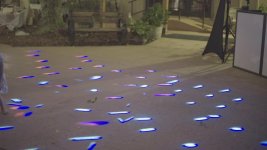
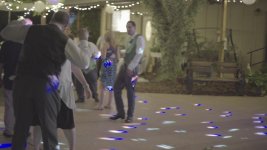
So i've experimented with the A7S at a few weddings, and I just put it away because at high ISO's, any colored light in the room turns into this awful blue highlight, it looks like complete trash. Is something wrong with my camera?

I believe these were taken at a stupid high ISO, something like 200,000 - as it was pitch black other than the DJ lights. But that's the beauty of this camera right?

 

Attachments

  • a7s-1.jpg
    a7s-1.jpg
    61.9 KB · Views: 0
  • a7s-2.jpg
    a7s-2.jpg
    48 KB · Views: 0
  • a7s-3.jpg
    a7s-3.jpg
    49.1 KB · Views: 0
Looks like LED with too much color. I had similar artifacts with many cameras when shooting stage plays and musicals with LED lights, they pump up so much color that even people against a white backdrop partly disappeared. I could get "decent" results by lowering the saturation of the blue channel only, but it is very compressed as well...
 
The funny thing though is that it's only with the a7s. My 5d mk 3 and c100 do not exhibit this issue.
 
It's a Sony issue. They seems to have more problems with strong LEDs. I've had it with the nex7 and nex5n. canon 7d, 5d mark III have never done it quite as bad Sony seems to do. Try adjusting white balance.
 
^ that

It happens on my 5N too: blue lights make it freak out. The only solution I've found is underexposing until it goes away; which is not even an option in most cases. See mixed success/failure results here.

edit: btw, you can see it in the sky too on the a7s+slog2: overexpose by more than 3 stops and it goes wild just before it goes pure white. It seems the Sony processing doesn't like it at all when the blue channel is clipped but the others aren't.
 
Last edited:
What picture profile did you use?

A similar thing happens on nearly all sony cameras when using non-slog gammas and/or non-sgamut matrices. It happens on f3, fs100, fs700, etc (probably f5/55 too) where when one color channel clips it just causes big color shifts. I did a brief test of it on the a7s and it seems to be best avoided using s gamut, but it wasn't nearly as clear of a difference on the a7s as it was on the fs700 where using slog2 gamma fixes the issue completely. The issue may still be there in s gamut on the a7s.

I've never seen it so bad but I have found that even if you shoot very low saturation or black and white the issue still shows up as a strange luma discontinuity where one color channel clipping still makes the luma turn black. I usually shoot in a way and with gamma curves that minimize the issue, so when I see it it usually isn't as bad as the shots you posted. Basically my recommendation would be try slog2 and sgamut and underexpose to avoid clipping of bright, saturated colors, especially primary colors.
 
Yeah, that's a Sony thing that needs to go away. I've never seen that in any other cameras I've used from other manufacturers. It's one hell of an event camera but with modern stage lighting, there's going to be some challenges. My advice is to shoot tight on groups that aren't being hit and shoot a lot of that footage cause you'll need it to avoid blue martian face in the edit.
 
Same problem here, I wasn't using profile for the reception but I will try slog2. Thanks.
 
I wonder who can we contact at Sony about this, my 5D Mark 3 didn't do this so as all of my old camera.
 
The funny thing though is that it's only with the a7s. My 5d mk 3 and c100 do not exhibit this issue.

May I ask...why did you shoot at 200,000 ISO with the A7s and since you did...how can you match that footage in post with the 5Dmk3 and C100 which are both excellent low light performers, but they can't make night to look like day!
I believe footage from the Canons should be MUCH better...darker of course...but it was dark right? Why to change that at a wedding dance floor?
Sorry for asking that and being probably off topic...just being curious...:-)
 
The C100 and 5D were working alright but it was still pretty dark, I thought it would be a good opportunity to test out the A7S's low light performance. Which unfortunately now seems completely useless since most DJ's use LED lighting like this. I was really hoping my camera was defective or something but from what I am hearing it clips the blue channel when it's overexposed? That just doesn't make any sense.
 
The C100 and 5D were working alright but it was still pretty dark, I thought it would be a good opportunity to test out the A7S's low light performance.

Aaa ok...understood. Thanks for answering! Im shooting with Canons, but Im watching closely the A7s since its release and its low light performance is on top of the things I like about it. I also shoot weddings in similar conditions (those LEDs are popular everywhere) so Im interested about that issue...I hope Sony will fix it somehow...
 
I've been on the phone with Sony tech support for about an hour now. Unfortunately their support is pretty bad. The Canon line is much better. They are giving me the run around, asking which settings and lens I was using, etc. The only thing at fault here is the camera itself.
 
I think a faster way of dealing with the problem than waiting on Sony to fix this persistent issue is to bring your own lights. Overpower what the DJ is using and just keep moving your light around the dancefloor as the reception goes on (different angles). You can also ask whomever is working the lights to maybe stay away from blue, pink or purple.
 
If your camera (from any manufacturer) is giving you artefacts as in the OP, send it back for repair. It's a defect and cannot be tolerated in any way. Whether it's a defect in all the cameras or yours is another matter I have no knowledge of.
 
If your camera (from any manufacturer) is giving you artefacts as in the OP, send it back for repair. It's a defect and cannot be tolerated in any way. Whether it's a defect in all the cameras or yours is another matter I have no knowledge of.

Why would you send it in if it's a problem in all cameras? Then you waste your own time and possibly money and don't have a camera to use and won't get back a better one.

That said the issue in the OP does seem worse than I've ever seen it before. But just point your camera at an RGB ramp chart that is lit or on a computer screen exposed partly blowing out and see if you can adjust your settings to reduce or fix the color shift in each color as it blows out.
 
Here are two more from a previous event, s-log 2, straight from camera. In this instance the DJ had purple LED lights all around the room on the floor lighting up the walls, so the entire background was like this.

C0062.MP4.Still001.jpgC0063.MP4.Still001.jpg
 
Here are two more from a previous event, s-log 2, straight from camera. In this instance the DJ had purple LED lights all around the room on the floor lighting up the walls, so the entire background was like this.

View attachment 90567View attachment 90568

Nm, scratch that, this is something else. Send in your camera.

Only other thought is did it look like that in the camera? Might be a decoding issue? That just looks crazy. unmodified pp7 slog2? Or us it possible your color mode and color depth are not sgamut and 000000?
 
OK folks, a problem has come up. The only real question is, can a solution be found? And the only way to do that is, you first must be able to reproduce the problem under controlled conditions. In other words, somebody with an A7s needs to get the type of light that's causing this problem. Then you can run tests and find out exactly what the limits of the camera are, and how to avoid them.

Master your equipment. Don't let it master you.
 
Back
Top