a7s and shogun test shoot in 4k

caseywilsondp

Well-known member
after my first try using the a7s/shogun combo i wanted to test out what i'd learned from my mistakes.
here is a test shoot for a dinner scene for an upcoming feature. shot entirely at 12800 iso with controlled tungsten lighting.
after that other thread about how the a7s destroys skin tones, im not sure what everyone is talking about, i think here they look quite filmic, and thats with my very limited coloring abilities.
ultimately i think skin tones are how you grade and how you light (i think the other thread the guy lit with with LEDs, which are not full spectrum) and i think you could get pleasing skin tones from any camera.

2nd review here with pictures/video

4k video of some snippets of the dailies:

nikon 28-70 and 80-200 shot between 2.8 and 4
slog2

i'm still learning this camera. 8 bits certainly is crippling in post... so i'm excited for LUTs to come to the shogun so i can shoot with a better end-image in mind.
 
Last edited:
Nicely done. Looks very filmic. 12800 ISO sounds high, but I guess you were shooting at slightly higher than optimum T-stops. Have you tried grading with Colorista III (or II) without applying a specific LUT? I'm getting very nice results from the plugin. But good job! Nice skin and scene tonality.
 
Nicely done. Looks very filmic. 12800 ISO sounds high, but I guess you were shooting at slightly higher than optimum T-stops. Have you tried grading with Colorista III (or II) without applying a specific LUT? I'm getting very nice results from the plugin. But good job! Nice skin and scene tonality.
thanks. my last video i colored without luts in speedgrade, and i think i was able to dial in the look i wanted after some time (minus having some shots not turn out because of not properly exposing). here the luts were used because we already had a look in mind that the lut could deliver (pretty close at least) and could save some time in post.
i've found that i really enjoy coloring raw and raw-like codecs (like redraw), as its amazing to be able to push the image in insane directions and still have it hold together. the a7s isn't quite as robust even with it's slog2 so i think i might design some luts of my own eventually and shoot with them once the shogun starts supporting it.
 
Thanks for sharing.
I'd back off on the NR, lots of skin texture is killed in these.
Are you shooting with s-gamut color?
 
Thanks for sharing.
I'd back off on the NR, lots of skin texture is killed in these.
Are you shooting with s-gamut color?

Funny you mention that, it's maybe %30 max nr in neat video, I feel like it's pretty subtle compared to the ungraded image (you can see that on the link I posted), but I could try and go maybe 10%. Just wanted to take the edge off the grain (you can still see it after all). And yes sgamut.
 
Funny you mention that, it's maybe %30 max nr in neat video, I feel like it's pretty subtle compared to the ungraded image (you can see that on the link I posted), but I could try and go maybe 10%. Just wanted to take the edge off the grain (you can still see it after all). And yes sgamut.

I rarely go above 15-20% in NV, it can be pretty strong sometimes. :) Also, cleaner noise (from raw images or good codecs) seems to work very well with low values in NV.
To be honest, I quite like these particular images with no NR at all, but then again I am not looking at them in motion and a little bit of NR will most likely be beneficial.
Here is a quick pass with no NR, hope you don't mind:
https://lh4.googleusercontent.com/-...AAAAAAAADT4/mKymo1JK4SU/s0/Untitled_1.2.1.jpg
There is some pleasant texture in chin and cheeks which goes away in the NR version. I also intentionally stressed the image with somewhat higher contrast and pushed the blues to see how they hold, considering the tungsten lighting. Actually, you can see they are pushed near the breaking point here but still useable.
 
I don't mind at all! as i've said before, i'm certainly no colorist, so i appreciate you taking the time to try your hand at it. I'll try dropping the NR to 10%, or maybe even totally remove it once the final scene gets edited. thanks! also i think youtube does also get rid of some detail (as you can compare the images to the youtube version). honestly i was pretty pleased when we pulled it in to see just how little the noise affected the image (considering we shot it at such a high iso!). most things i shoot i don't get involved a lot in the post process, as they go straight to an editor and out to somewhere else, so i'm doing a bit of learning when it comes to coloring/denoising.
 
In my experience it's all about having a good quality noise profile.
With the right profile you can crank up the noise reduction and not lose a bit of texture.
Start by building some noise profiles shooting at this image right off the screen and keeping it way out of focus...

http://www.neatimage.com/im/target/NICalibrationTarget1600color.png

Use the exact same picture profile in camera as the one you used to shoot your footage in.
Try different exposures to see what works best for you.
The best exposure should yield a noise profile with 85% or better quality.
Try having your screen calibrated to the same color temperature as in camera white balance.
Here's what mine looked like:
profilepicture.jpg

I usually do a bunch of profiles for different iso settings and save them for future use.

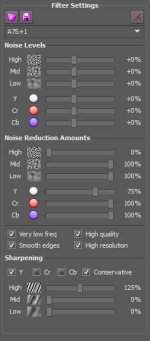
With regards to noise reduction settings, I try to use some spatial noise reduction and mix it with one or two frames of temporal noise reduction.
Here are the settings I commonly use for SLOG2 footage.
nv.jpg
You can dial it up or down to your taste depending on how much you're pushing your image.
For most things you can get away with less.
If you try to dig deep into your shadows you might need even more.

Hope it helps. Remember to have some fun. :)
 
I think the lady with the wine glass looks better than the follicle-challenged dude, probably due to the difference in her vs. his lighting and makeup.

But, let's not forget that this was at 12800 ... which makes this a remarkable development of the technology and a cinematographer's ability to get fine images under previously unfathomable circumstances.

FWIW, I saw these on YouTube before seeing Casey's post and thought the footage looked great for a casual viewer. Pros will nitpick but I ain't really one of them. I also think A7s+Shogun combo rocks.
 
Looks pretty cinematic and the skin tones look good. It's even better than your Lulu's Ad. Did you grade differently?
 
I think the lady with the wine glass looks better than the follicle-challenged dude, probably due to the difference in her vs. his lighting and makeup.
I also think A7s+Shogun combo rocks.

Haha funny, I feel the opposite, but I suppose this is really all very subjective, isn't it?

Looks pretty cinematic and the skin tones look good. It's even better than your Lulu's Ad. Did you grade differently?

Yeah I exposed this (more) properly for slog2 than the lulus ad. Knowing what I know now, I'd have shot that quite differently... The lulus spot required a lot of pulling up of shadows, which this camera doesn't handle super well, thus the less detailed look.
 
^ RE: exposure: what exactly do you mean? I always overexpose by one stop with respect to what Sony says I should do, but I only record internal 1080p. Would you do the same with external 4K? (already read somebody else's opinion about this, but well, the more the merrier)
 
Samuel, in my experience I think you'd want to shoot essentially the same way, by over exposing and pulling down. The shogun let's me use false colors which is great so I can zero in on the mid tones and light the fill side of my actors around one stop higher than I might normally while still protecting highlights and keeping shadows separated from my mids. My first shoot, the lulus one, I felt by exposing normally like I would on red or canon, the mid tones got crushed into the shadow area, and while red can easily pull up a couple of stops, the a7s just doesn't have that flexibility.
It's a bit early here so I hope that made sense.
 
Looks great!

I think it could have been a little less bright in the restaurant. This camera is crazy good for this type of shots.
 
Erik I think I agree, and I think I'll try and pull down the background for the final edit. Ultimately this is one of the reasons I'm excited to put LUTs on the shogun so I can more accurately dial in lighting set-ups. for this shoot I was certainly erring on the side of caution.
 
Erik I think I agree, and I think I'll try and pull down the background for the final edit. Ultimately this is one of the reasons I'm excited to put LUTs on the shogun so I can more accurately dial in lighting set-ups. for this shoot I was certainly erring on the side of caution.
Oh yeah! You have lots of room in post even though it's 8 bit you nailed it and I think the final grade is going to look really good.

I read your blog post on the shoot and it's very informative. Thanks for sharing. I have the Odyssey 7Q+ and it has LUTS for Slog 2. I haven't used it yet but looking forward to it. I sent my Shogun back after testing both.
 
Haha funny, I feel the opposite, but I suppose this is really all very subjective, isn't it?...
Plus, people here will pay attention to a minutia.

FWIW, I saw a recent GH4+Shogun clip online and it reminded me of that DR test that folks did on a Samsung NX1 thread - a black couch about a dozen feet away from a window ... except, there was no detail on the couch ... none ... nada ... so, as a cinematography project, this was a fail ... but really, does an average viewer care that a three second shot had absolutely crushed blacks in the scene where it didn't matter from the storyline aspect of the entire clip? ... pretty much no one would either notice, be bothered or remember this at the end.
 
Samuel, in my experience I think you'd want to shoot essentially the same way, by over exposing and pulling down. The shogun let's me use false colors which is great so I can zero in on the mid tones and light the fill side of my actors around one stop higher than I might normally while still protecting highlights and keeping shadows separated from my mids. My first shoot, the lulus one, I felt by exposing normally like I would on red or canon, the mid tones got crushed into the shadow area, and while red can easily pull up a couple of stops, the a7s just doesn't have that flexibility.
It's a bit early here so I hope that made sense.
It made a lot of sense, thanks :)
 
Oh yeah! You have lots of room in post even though it's 8 bit you nailed it and I think the final grade is going to look really good.

...I have the Odyssey 7Q+ and it has LUTS for Slog 2. I haven't used it yet but looking forward to it. I sent my Shogun back after testing both.

I'd be very interested to see some results from using LUTS. are they just monitoring luts or do they burn into the final image?
 
Plus, people here will pay attention to a minutia.

FWIW, I saw a recent GH4+Shogun clip online and it reminded me of that DR test that folks did on a Samsung NX1 thread - a black couch about a dozen feet away from a window ... except, there was no detail on the couch ... none ... nada ... so, as a cinematography project, this was a fail ... but really, does an average viewer care that a three second shot had absolutely crushed blacks in the scene where it didn't matter from the storyline aspect of the entire clip? ... pretty much no one would either notice, be bothered or remember this at the end.

exactly, no average viewer will care about 90% of what gets discussed in our various forums, the benefits and deficits of particular cameras and various logs... but that being said, i think they can help us as users get the best out of our cameras... or that's the hope at least. but we probably shouldn't get bogged down by the minutia, as you pointed out.
 
Back
Top