F3: A Story of S-Log Post Processing & LUTs (or how to get closer to the Alexa)

Nate Weaver

Veteran
I've been doing a lot of experimenting in Resolve lately, trying to figure out why the Alexa looks so much better, and how to get the most of my S-Log footage. Early on, I had only an inkling that the "proper" S-Log LUTs I had been applying to my F3 S-Log footage were somehow bogus. Applying a LUT made for Alexa Log-C looked much better, but I had to adjust my black level and gain pretty severely before applying an Arri LUT. I wasn't sure if this was wrong, right, or somewhere in-between. All I knew was it was the only way I could get an image I was happy with.

Applying an Arri Log-C LUT somehow made the image come alive for me, getting an image that I just couldn't replicate applying saturation and monkeying with contrast. I suspected there was some "special sauce" in the LUT, since it was a "3D" LUT and I knew a 3D LUT has the ability to manipulate color and contrast in almost any way you can imagine, as opposed to a 1D LUT, which is Sony's format of choice. By the way, a 1D LUT, just like the ones they build into the F3 and the rest of the Sony Cinealta line, can only manipulate contrast on a per-channel basis. It can't add saturation, and it can't skew colors around, other than just changing overall color balance with RGB curves and levels. Unhappy with how your live SDI looks shooting S-Log, even with a 709 or HG800G33 LUT applied? The 1D LUT is probably why, it can't add saturation with it's contrast.

I got involved in a LUT discussion on Sony's own F65 forum, and one of Sony's product managers sent me a "in-progress" 3D LUT for S-Log2 and F65 users. Applying it to my S-Log2 sample clips from the F55 (courtesy of Ned Soltz) was a huge "aha" moment. I finally saw an image comparable to Alexa.

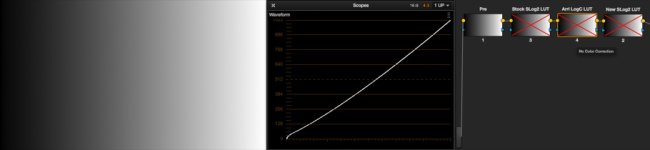
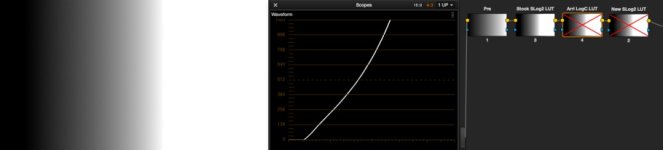
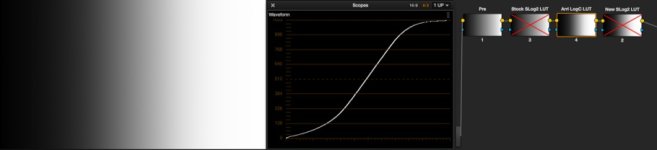
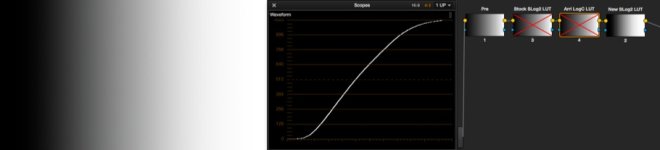
While thinking about this, I hatched an idea to get a technical view of what each LUT in question is doing to an image. I created a linear greyscale ramp, brought it into Resolve, and applied each LUT I've been working with. Looking at the waveform gave a very good window into *exactly* what each LUT is doing to your image.

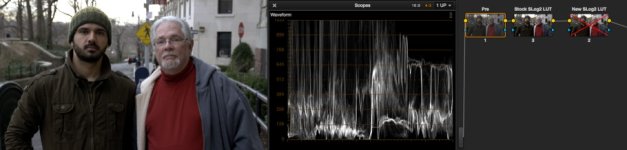
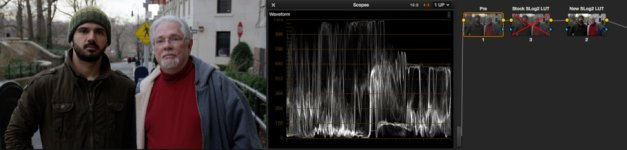
Below, I give you a story told in screenshots. Hopefully examination will be somewhat self-explanatory, and I hope Ned is once again ok with this footage going public.

Pay close attention to the highlights in the sky on each shot.
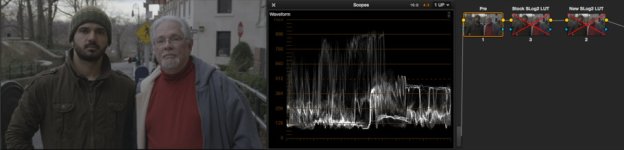
Frame1_SLog2_noLUT.jpg
Frame2_SLog2_StockSlog2LUT.jpg
Frame3_SLog2_NewSlogLUT.jpg
Frame4_Ramp_noLUT.jpg
Frame5_Ramp_StockSlog2LUT.jpg
Frame6_Ramp_ArriLogCLUT.jpg
Frame7_Ramp_NewSlog2LUT.jpg
 
The short story is that while a LUT is usually referred to as a utility tool to make your log footage look right, and can be mathematically "correct" or "incorrect" from an engineers point of view (often the people making or talking about said LUTs)...

...the truth of the matter is that it takes an eye for what looks good to make a truly good one.

This is what is in the Arri Alexa LUTs that are so widely available (and kudos to Arri for getting them out there). Some engineer with a good EYE for pleasing images made sure there was nice toe and highlight roll-off in there.

Judging by this new S-Log2 LUT somebody at Sony US just sent me, maybe Sony is getting it too. These high quality LUTs need to be distributed far and wide.
 
Great research Nate! A couple of months ago I was messing around in Resolve for the first time and for the fun of it I applied the Arri Log-C LUT to some S-LOG footage, while it definitely needed some tweaking it was a much better looking start point then any of the S-LOG LUT's I've come across.
 
Great research Nate! A couple of months ago I was messing around in Resolve for the first time and for the fun of it I applied the Arri Log-C LUT to some S-LOG footage, while it definitely needed some tweaking it was a much better looking start point then any of the S-LOG LUT's I've come across.

You know, I probably just could have typed what you did and saved everybody from my stream-of-conciousness :D , but learning what you did months and months ago just had me asking "why" for almost a year!
 
Nate, I thought that was a great visual explanation - thank you.

Any idea when that new S-Log2 LUT is going public? It looks much closer to what people need with these new F's
 
nice info Nate, Thanks.
I'm shooting S-Log out the Sony F35 into Gemini 10bit 444, and I'd like to know what you recommend in terms of LUT options. This is a new world to me, as I used to shoot then grade FS700 8bit 4:2:0 footage straight in Premiere pro, but now this new workflow is a new beast to tame.
Resolve? After effects? I'm sure I wont get best results grading in premiere, and i've never tried resolve.
 
If there are LUTs that somehow makes S-log footage nice by default that would be great but I find it works better to adjust black/white just until clipping and place the midrange were you want it. Chroma usually added and if needed tweaked.
 
I have wondered why s-log corrects differently than Alexa (or Reds or Canons) as well. heres what i came up with.

The Alexa's log curve is such a way that one could simply add contrast (which equally steepens the curve in the shadows and the hilights) and it comes out looking pretty good. Doing this with S-log makes the final curve look like rec709...the video look. So to get the film look from s-log, one has to be pretty tricky.

If you use Premiere, throw on a cineon converter and play with the settings. To my eyes, it's more filmic than any other LUT available. But its really contrasty. But I asked myself...why does it look that way? So i spent alot of time with waveforms and charts and testing to find out how to grade s-log to get that nice Alexa look. Finally i made a preset using stock tools that I think is spot on for a starting point using a combination of multiple rgb correctors and rgb curve. The preset breaks down like this:

layer 1: rgb corrector- master adjustments (use this to make master ISO-like adjustments)
layer 2: rgb corrector- masked for shadow adjustment (boost the shadows a bit)
layer 3: rgb corrector- masked for highlight adjustments (nice rolloff for highlights)
layer 4: rgb corrector- skintones only (skintones always look red with s-log, this fixes that)
layer 5: rgb curves- main contrast curve, modeled after cineon curve (this is where the magic is)
layer 6: fast color correction- saturation boost

If anyone uses Premiere, would be happy to share the preset. I have been very happy with it, and surprised how well it works when dropped on s-log footage.
 
Ill get it uploaded this afternoon, I'm not in the studio this morning. I will also add a read me with direction on how to best adjust the settings. Looking forward to hearing your opinion about it, maybe see some corrected footage. :)
 
Thanks, Richard. That is very interesting and I as well would like to try it.

If the screen grabs Nate posted look awfully like the Raw footage I sent him, it is because we shot the same scene SLog2 and Raw. I, of course, am the distinguished-looking middle-aged guy wearing a red turtleneck just to get some color into an otherwise very drab day in NYC. The other hip-looking guy is Timur's cousin, and Timur was behind the camera. Lens was my Red 18-50.

The SLog2 footage was XAVC 23.976 recorded directly to SxS Pro+ card. While the codec was still pre-release, that two-shot was fine.

We are all very appreciative to Nate for working through the color science and helping to give us a little more understanding of how to bring out the best in the images.

Ned
 
You know, I probably just could have typed what you did and saved everybody from my stream-of-conciousness :D , but learning what you did months and months ago just had me asking "why" for almost a year!

Haha, Nah.. Your description was way more informative.
 
Nate, what was the "proper" LUT you were applying to SLOG footage on the F3 to bring it back to a "base" level? Did you make it yourself or actually get it from somewhere like Sony, etc.. ?

The ARRI or Alexa LUTS as you know will contain mappings specific to the sensors being used in those cameras as well as their specific log curve, plus have added to them the meticulous highlight handling (or highlight wrangling as I like to call it). This gives the final appearance of smooth highlights that roll-off pretty and subtle much like film characteristics.

I was unaware of any LUTs Sony has provided for the F3 so what I did was use a single filter in Premiere (or After Effects) which can be used very easily to perform a simple de-LOG (apply LUT) to my video before editing so I had a "base" to start with for editing and then from there worry about highlight shouldering and further grading.

The filter I used in Premiere to de-LOG was the "Fast Color Corrector". Simply increase the INPUT BLACK level and decrease the OUTPUT WHITE level.'
Untitled_zps8ba6fe4c.jpg


In After Effects that filter is not available so you can use "Levels" and adjust the exact same parameters.

Untitled_zps4653c42e.jpg


As I mentioned this first step only removes the LOG look so you from there you can start to grade your footage with CURVES or any other tool/method you are familiar with. For really good highlight handling you can apply another curve and really just focus on the smoothening off the highlights. If you're lazy you can also try the "Auto Shoulder" fllter found in the Magic Bullet suite by Red Giant Software.

If you search google for "apply lut to slog" you can find more details I wrote on the process.
 
Nate, what was the "proper" LUT you were applying to SLOG footage on the F3 to bring it back to a "base" level? Did you make it yourself or actually get it from somewhere like Sony, etc.. ?

I paid for a gentleman in Europe to make me one, which I never used because it looked bad. I also tested a trial Pomfort, and another companies' NLE plugin. All looked not-so-hot. I now realize one or two of those were hard clipping, just like the S-Log2 LUT newly included in Resolve.

The ARRI or Alexa LUTS as you know will contain mappings specific to the sensors being used in those cameras as well as their specific log curve,

Yes, and it's kinda worth it to talk about. Arri Log-C puts back and white at different IREs. If you make a correction to Sony S-Log putting the blacks and whites at similar IREs, then apply their LUT, things work out much better than anything that was previously available.

I was unaware of any LUTs Sony has provided for the F3 so what I did was use a single filter in Premiere (or After Effects) which can be used very easily to perform a simple de-LOG (apply LUT) to my video before editing so I had a "base" to start with for editing and then from there worry about highlight shouldering and further grading....

Well, yes, and I was doing something similar. I went on about over a year ago trying to tell people that they needn't worry about LUTs and such for S-Log if they didn't want to, they could just monkey around and make it work.

And that's fine, but I think what I was trying to pass on now is that good LUTs can do things, and get better looks that you just can't manage with other tools. In fact, the gentleman at Sony who passed me this new LUT is calling it alpha/beta, which is to say there's a lot of thought and time being put into it, and they're putting it out to be tested and get comments.
 
I definitely agree looking at the other LUTs are worth it, even the film stock emulation's that Juan M. was playing around has me intrigued. (which you had pointed out in another thread)

True with a little "re-work" of the "professional" LUT's its quite possible to remap some of the IRE values (2% black, middle grey, 90% white) and end up with a very decent starting point. I'm actually thinking a step further and would like to develop a few good Sony LUTs from scratch so that subsequent tweaks would not be needed... but if the beta version is looking good, perhaps it will fit the bill.
 
...Well, yes, and I was doing something similar. I went on about over a year ago trying to tell people that they needn't worry about LUTs and such for S-Log if they didn't want to, they could just monkey around and make it work.

And that's fine, but I think what I was trying to pass on now is that good LUTs can do things, and get better looks that you just can't manage with other tools. In fact, the gentleman at Sony who passed me this new LUT is calling it alpha/beta, which is to say there's a lot of thought and time being put into it, and they're putting it out to be tested and get comments.
It's always felt slightly comical to me to apply a ghetto LUT made using curves to the footage from a camera costing tens of thousands of $'s. I'm really glad that Sony is working on this.
 
Is it possible to get that Sony Slog 2 LUT yet? Also is it equally good for plain vanilla Slog?

I've played around a bit in FCP7 with Slog and after having terrible luck using the standard tools or any of the so-called LUT's that were available, I got the LUT Buddy plug in from Red Giant , then downloaded the Arri Alexa LUT and that finally looked good in the center of the image but I was still losing highlight information and felt i could get a little more out of my shadows so I added my favorite free plug-in Shadow/ Highlight Plug in from Too Much too soon (There's also one from Lyric and they work a little differently I think my favorite was the TMTS but I forget.). Anyway that stretched out the knee and toe and looked pretty good to me . (Unfortunately in LUT Buddy as I recall you can't do much to the shape of the curve hence the Shadow Highlight plug in)

So I ended up with a tripack of ( in this order):

1- 3 way color corrector (gamma wheel gets the exposure in the center of the LUT so it works properly and also gives you some quick sat & flesh tone adjustment - you want to adjust it while all 3 plug-ins are running though - there may be better ways to adjust the exposure that I haven't played with though)
2- LUT Buddy with Arri Alexa LUT
3 - Shadow/Highlight ( holds and adjusts the knee & toe)

Its very quick to use and the only way I could get anywhere in FCP. I haven't used it for any jobs though so its just an experiment - also I don't have any Alexa footage to compare to so i don't know if it gets close to that look.

I'm just starting to play with Resolve which looks way better for this sort of thing but I couldn't use it on my old computer at all and plenty of us are still using FCP 7.

Lenny levy
 
Last edited:
Back
Top