

Nate Weaver
Veteran
I've been doing a lot of experimenting in Resolve lately, trying to figure out why the Alexa looks so much better, and how to get the most of my S-Log footage. Early on, I had only an inkling that the "proper" S-Log LUTs I had been applying to my F3 S-Log footage were somehow bogus. Applying a LUT made for Alexa Log-C looked much better, but I had to adjust my black level and gain pretty severely before applying an Arri LUT. I wasn't sure if this was wrong, right, or somewhere in-between. All I knew was it was the only way I could get an image I was happy with.
Applying an Arri Log-C LUT somehow made the image come alive for me, getting an image that I just couldn't replicate applying saturation and monkeying with contrast. I suspected there was some "special sauce" in the LUT, since it was a "3D" LUT and I knew a 3D LUT has the ability to manipulate color and contrast in almost any way you can imagine, as opposed to a 1D LUT, which is Sony's format of choice. By the way, a 1D LUT, just like the ones they build into the F3 and the rest of the Sony Cinealta line, can only manipulate contrast on a per-channel basis. It can't add saturation, and it can't skew colors around, other than just changing overall color balance with RGB curves and levels. Unhappy with how your live SDI looks shooting S-Log, even with a 709 or HG800G33 LUT applied? The 1D LUT is probably why, it can't add saturation with it's contrast.
I got involved in a LUT discussion on Sony's own F65 forum, and one of Sony's product managers sent me a "in-progress" 3D LUT for S-Log2 and F65 users. Applying it to my S-Log2 sample clips from the F55 (courtesy of Ned Soltz) was a huge "aha" moment. I finally saw an image comparable to Alexa.
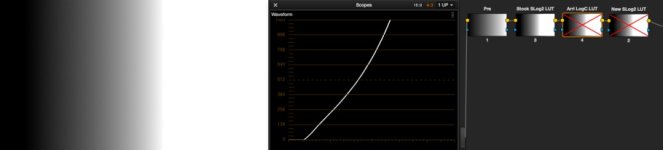
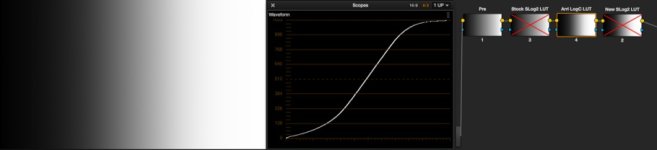
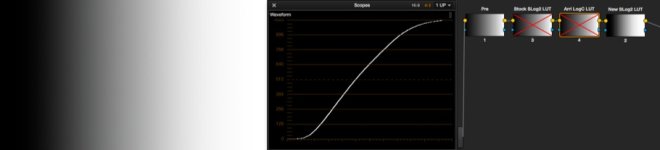
While thinking about this, I hatched an idea to get a technical view of what each LUT in question is doing to an image. I created a linear greyscale ramp, brought it into Resolve, and applied each LUT I've been working with. Looking at the waveform gave a very good window into *exactly* what each LUT is doing to your image.
Below, I give you a story told in screenshots. Hopefully examination will be somewhat self-explanatory, and I hope Ned is once again ok with this footage going public.
Pay close attention to the highlights in the sky on each shot.
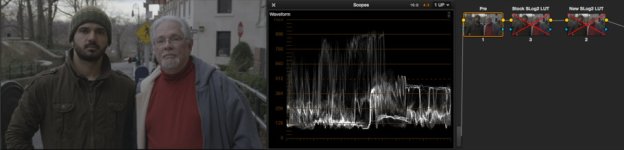
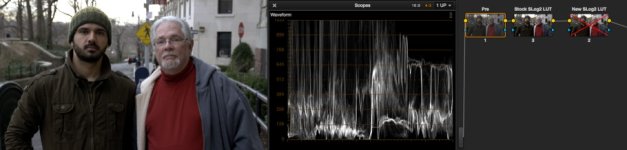
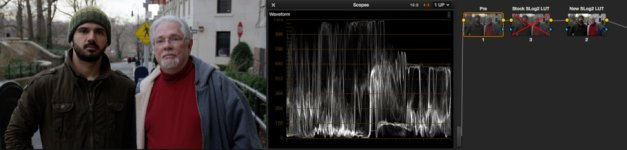
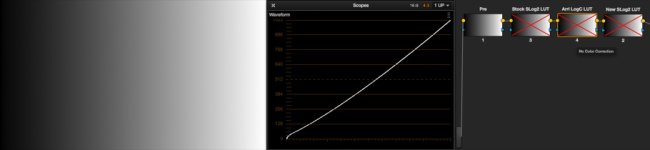
Applying an Arri Log-C LUT somehow made the image come alive for me, getting an image that I just couldn't replicate applying saturation and monkeying with contrast. I suspected there was some "special sauce" in the LUT, since it was a "3D" LUT and I knew a 3D LUT has the ability to manipulate color and contrast in almost any way you can imagine, as opposed to a 1D LUT, which is Sony's format of choice. By the way, a 1D LUT, just like the ones they build into the F3 and the rest of the Sony Cinealta line, can only manipulate contrast on a per-channel basis. It can't add saturation, and it can't skew colors around, other than just changing overall color balance with RGB curves and levels. Unhappy with how your live SDI looks shooting S-Log, even with a 709 or HG800G33 LUT applied? The 1D LUT is probably why, it can't add saturation with it's contrast.
I got involved in a LUT discussion on Sony's own F65 forum, and one of Sony's product managers sent me a "in-progress" 3D LUT for S-Log2 and F65 users. Applying it to my S-Log2 sample clips from the F55 (courtesy of Ned Soltz) was a huge "aha" moment. I finally saw an image comparable to Alexa.
While thinking about this, I hatched an idea to get a technical view of what each LUT in question is doing to an image. I created a linear greyscale ramp, brought it into Resolve, and applied each LUT I've been working with. Looking at the waveform gave a very good window into *exactly* what each LUT is doing to your image.
Below, I give you a story told in screenshots. Hopefully examination will be somewhat self-explanatory, and I hope Ned is once again ok with this footage going public.
Pay close attention to the highlights in the sky on each shot.
 , but learning what you did months and months ago just had me asking "why" for almost a year!


