
fraustosound
Member
1. Record a few seconds of a scene with some high frequency detail in it. A resolution chart would be best.
Stop the record.
2. Without moving the camera, hit the digital zoom button twice for 10x magnification.
Compare the detail in the .mov VS. the detail in the digitally zoomed camera LCD/HDMI out. Clearly the digitally-zoomed in image contains more detail than if one was to take the un-zoomed .mov and blow it up in post.
Seems to me this camera might be capable of much sharper footage than what we are currently getting. Check out the side -by-side below.
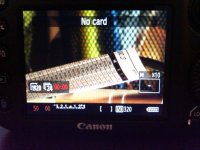
One image is a picture of the camera LCD, in movie mode, zoomed in 10x.
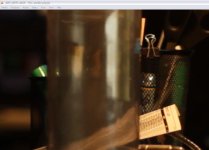
The other is 2x magnification of .mov file in VLC.
Both taken with a 50mm lens from the exact same position, only difference is the glass was moved in one of the pictures.
Way more detail in the in-camera zoommed image. You can make out some of the letters and numbers on the paper. I took the pic of the LCD with my blackberry, it's actually quite sharper in person. Interesting, no?
Attachments
Last edited:


