
Navigation
Install the app
How to install the app on iOS
Follow along with the video below to see how to install our site as a web app on your home screen.
Note: This feature may not be available in some browsers.
More options
You are using an out of date browser. It may not display this or other websites correctly.
You should upgrade or use an alternative browser.
You should upgrade or use an alternative browser.
a bit out of topic but.. MOV to MP4
- Thread starter migu3lp
- Start date
Just for you to see, says:
General
Complete name : E:\matotal\077_1425_01.mov
Format : QuickTime
Format/Info : Original Apple specifications
File size : 37.4 MiB
Duration : 8s 600ms
Overall bit rate : 36.5 Mbps
Movie name/More : 060a2b340101010501010d4313000000a97e1b89165205dc08004602022a004d
Encoded date : UTC 2010-01-20 13:07:23
Tagged date : UTC 2010-01-20 13:07:27
Writing library : Apple QuickTime
Original source medium : Untitled 1
com.sony.bprl.mxf.nrtmetadata : <?xml version="1.0" encoding="UTF-8"?><NonRealTimeMeta xmlns="urn:schemas-professionalDisc:nonRealTimeMeta:ver.1.20" xmlns:lib="urn:schemas-professionalDisc:lib:ver.1.20" xmlns:xsi="http://www.w3.org/2001/XMLSchema-instance" lastUpdate="2010-01-20T12:51:23Z"><TargetMaterial umidRef="060A2B340101010501010D4313000000A97E1B89165205DC08004602022A004D"></TargetMaterial><Duration value="215"></Duration><LtcChangeTable tcFps="25" halfStep="false"><LtcChange frameCount="0" value="04083016" status="increment"></LtcChange><LtcChange frameCount="214" value="18163016" status="end"></LtcChange></LtcChangeTable><CreationDate value="2010-01-20T12:51:13Z"></CreationDate><TypicalUbit value="0000000000000000"></TypicalUbit><BodyUmidBasicChangeTable><BodyUmidBasicChange frameCount="0" value="060A2B340101010501010D4333000000A97E1B89165205DC08004602022A004D" status="start"></BodyUmidBasicChange></BodyUmidBasicChangeTable><BodyUmidWhenChangeTable><BodyUmidWhenChange frameCount="0" value="C4BC690416520580" status="increment"></BodyUmidWhenChange><BodyUmidWhenChange frameCount="214" value="44F2690416520580" status="end"></BodyUmidWhenChange></BodyUmidWhenChangeTable><KlvPacketTable><KlvPacket key="060E2B34010101050301020A02000000" frameCount="0" lengthValue="095F5265635374617274" status="spot"></KlvPacket></KlvPacketTable><VideoFormat><VideoRecPort port="DIRECT"></VideoRecPort><VideoFrame videoCodec="MPEG2HD35_1920_1080_MP@HL" captureFps="50.00i" recFps="50.00" formatFps="50i"></VideoFrame><VideoLayout pixel="1920" numOfVerticalLine="1080" aspectRatio="16:9"></VideoLayout></VideoFormat><AudioFormat numOfChannel="2"><AudioRecPort port="DIRECT" audioCodec="LPCM16" trackDst="CH1"></AudioRecPort><AudioRecPort port="DIRECT" audioCodec="LPCM16" trackDst="CH2"></AudioRecPort></AudioFormat><Device manufacturer="Sony" modelName="PMW-EX1" serialNo="0400077"></Device><Lens modelName="XT14X5.8"></Lens><RecordingMode type="normal" cacheRec="false"></RecordingMode></NonRealTimeMeta>
com.sony.bprl.mxf.umid : 060a2b340101010501010d4313000000a97e1b89165205dc08004602022a004d
org.smpte.mxf.package.material.p : 0x060a2b340101010501010d4313000000a97e1b89165205dc08004602022a004d
com.sony.professionaldisc.nonrea : 2010-01-20 12:51:23 +0000
com.sony.bprl.xdcamtransfer.vers : 2.7.1.398
com.apple.proapps.reel : Untitled 1
com.apple.proapps.clipID : 060A2B340101010501010D4313000000A97E1B89165205DC08004602022A004D
com.apple.proapps.originalFormat : Apple XDCAM EX 1080i50 (35 Mb/s VBR)
Origin : MPEG HD
Video
ID : 1
Format : MPEG Video
Format version : Version 2
Format profile : Main@High
Format settings, BVOP : Yes
Format settings, Matrix : Custom
Format settings, GOP : M=3, N=12
Codec ID : xdvc
Codec ID/Hint : XDCAM
Duration : 8s 600ms
Bit rate mode : Variable
Bit rate : 35.0 Mbps
Width : 1 888 pixels
Original width : 1 920 pixels
Height : 1 062 pixels
Original height : 1 080 pixels
Display aspect ratio : 16:9
Frame rate mode : Constant
Frame rate : 25.000 fps
Standard : Component
Color space : YUV
Chroma subsampling : 4:2:0
Bit depth : 8 bits
Scan type : Interlaced
Scan order : Top Field First
Compression mode : Lossy
Bits/(Pixel*Frame) : 0.698
Stream size : 35.8 MiB (96%)
Language : English
Encoded date : UTC 2010-01-20 13:07:23
Tagged date : UTC 2010-01-20 13:07:26
Audio #1
ID : 2
Format : PCM
Format settings, Endianness : Big
Format settings, Sign : Unsigned
Codec ID : lpcm
Duration : 8s 600ms
Bit rate mode : Constant
Bit rate : 768 Kbps
Channel(s) : 1 channel
Sampling rate : 48.0 KHz
Bit depth : 16 bits
Delay relative to video : 16h 30mn
Stream size : 806 KiB (2%)
Language : English
Encoded date : UTC 2010-01-20 13:07:23
Tagged date : UTC 2010-01-20 13:07:26
Audio #2
ID : 3
Format : PCM
Format settings, Endianness : Big
Format settings, Sign : Unsigned
Codec ID : lpcm
Duration : 8s 600ms
Bit rate mode : Constant
Bit rate : 768 Kbps
Channel(s) : 1 channel
Sampling rate : 48.0 KHz
Bit depth : 16 bits
Delay relative to video : 16h 30mn
Stream size : 806 KiB (2%)
Language : English
Encoded date : UTC 2010-01-20 13:07:23
Tagged date : UTC 2010-01-20 13:07:26
Menu
ID : 4
Language : English
Encoded date : UTC 2010-01-20 13:07:23
Tagged date : UTC 2010-01-20 13:07:26
Bit rate mode : CBR
General
Complete name : E:\matotal\077_1425_01.mov
Format : QuickTime
Format/Info : Original Apple specifications
File size : 37.4 MiB
Duration : 8s 600ms
Overall bit rate : 36.5 Mbps
Movie name/More : 060a2b340101010501010d4313000000a97e1b89165205dc08004602022a004d
Encoded date : UTC 2010-01-20 13:07:23
Tagged date : UTC 2010-01-20 13:07:27
Writing library : Apple QuickTime
Original source medium : Untitled 1
com.sony.bprl.mxf.nrtmetadata : <?xml version="1.0" encoding="UTF-8"?><NonRealTimeMeta xmlns="urn:schemas-professionalDisc:nonRealTimeMeta:ver.1.20" xmlns:lib="urn:schemas-professionalDisc:lib:ver.1.20" xmlns:xsi="http://www.w3.org/2001/XMLSchema-instance" lastUpdate="2010-01-20T12:51:23Z"><TargetMaterial umidRef="060A2B340101010501010D4313000000A97E1B89165205DC08004602022A004D"></TargetMaterial><Duration value="215"></Duration><LtcChangeTable tcFps="25" halfStep="false"><LtcChange frameCount="0" value="04083016" status="increment"></LtcChange><LtcChange frameCount="214" value="18163016" status="end"></LtcChange></LtcChangeTable><CreationDate value="2010-01-20T12:51:13Z"></CreationDate><TypicalUbit value="0000000000000000"></TypicalUbit><BodyUmidBasicChangeTable><BodyUmidBasicChange frameCount="0" value="060A2B340101010501010D4333000000A97E1B89165205DC08004602022A004D" status="start"></BodyUmidBasicChange></BodyUmidBasicChangeTable><BodyUmidWhenChangeTable><BodyUmidWhenChange frameCount="0" value="C4BC690416520580" status="increment"></BodyUmidWhenChange><BodyUmidWhenChange frameCount="214" value="44F2690416520580" status="end"></BodyUmidWhenChange></BodyUmidWhenChangeTable><KlvPacketTable><KlvPacket key="060E2B34010101050301020A02000000" frameCount="0" lengthValue="095F5265635374617274" status="spot"></KlvPacket></KlvPacketTable><VideoFormat><VideoRecPort port="DIRECT"></VideoRecPort><VideoFrame videoCodec="MPEG2HD35_1920_1080_MP@HL" captureFps="50.00i" recFps="50.00" formatFps="50i"></VideoFrame><VideoLayout pixel="1920" numOfVerticalLine="1080" aspectRatio="16:9"></VideoLayout></VideoFormat><AudioFormat numOfChannel="2"><AudioRecPort port="DIRECT" audioCodec="LPCM16" trackDst="CH1"></AudioRecPort><AudioRecPort port="DIRECT" audioCodec="LPCM16" trackDst="CH2"></AudioRecPort></AudioFormat><Device manufacturer="Sony" modelName="PMW-EX1" serialNo="0400077"></Device><Lens modelName="XT14X5.8"></Lens><RecordingMode type="normal" cacheRec="false"></RecordingMode></NonRealTimeMeta>
com.sony.bprl.mxf.umid : 060a2b340101010501010d4313000000a97e1b89165205dc08004602022a004d
org.smpte.mxf.package.material.p : 0x060a2b340101010501010d4313000000a97e1b89165205dc08004602022a004d
com.sony.professionaldisc.nonrea : 2010-01-20 12:51:23 +0000
com.sony.bprl.xdcamtransfer.vers : 2.7.1.398
com.apple.proapps.reel : Untitled 1
com.apple.proapps.clipID : 060A2B340101010501010D4313000000A97E1B89165205DC08004602022A004D
com.apple.proapps.originalFormat : Apple XDCAM EX 1080i50 (35 Mb/s VBR)
Origin : MPEG HD
Video
ID : 1
Format : MPEG Video
Format version : Version 2
Format profile : Main@High
Format settings, BVOP : Yes
Format settings, Matrix : Custom
Format settings, GOP : M=3, N=12
Codec ID : xdvc
Codec ID/Hint : XDCAM
Duration : 8s 600ms
Bit rate mode : Variable
Bit rate : 35.0 Mbps
Width : 1 888 pixels
Original width : 1 920 pixels
Height : 1 062 pixels
Original height : 1 080 pixels
Display aspect ratio : 16:9
Frame rate mode : Constant
Frame rate : 25.000 fps
Standard : Component
Color space : YUV
Chroma subsampling : 4:2:0
Bit depth : 8 bits
Scan type : Interlaced
Scan order : Top Field First
Compression mode : Lossy
Bits/(Pixel*Frame) : 0.698
Stream size : 35.8 MiB (96%)
Language : English
Encoded date : UTC 2010-01-20 13:07:23
Tagged date : UTC 2010-01-20 13:07:26
Audio #1
ID : 2
Format : PCM
Format settings, Endianness : Big
Format settings, Sign : Unsigned
Codec ID : lpcm
Duration : 8s 600ms
Bit rate mode : Constant
Bit rate : 768 Kbps
Channel(s) : 1 channel
Sampling rate : 48.0 KHz
Bit depth : 16 bits
Delay relative to video : 16h 30mn
Stream size : 806 KiB (2%)
Language : English
Encoded date : UTC 2010-01-20 13:07:23
Tagged date : UTC 2010-01-20 13:07:26
Audio #2
ID : 3
Format : PCM
Format settings, Endianness : Big
Format settings, Sign : Unsigned
Codec ID : lpcm
Duration : 8s 600ms
Bit rate mode : Constant
Bit rate : 768 Kbps
Channel(s) : 1 channel
Sampling rate : 48.0 KHz
Bit depth : 16 bits
Delay relative to video : 16h 30mn
Stream size : 806 KiB (2%)
Language : English
Encoded date : UTC 2010-01-20 13:07:23
Tagged date : UTC 2010-01-20 13:07:26
Menu
ID : 4
Language : English
Encoded date : UTC 2010-01-20 13:07:23
Tagged date : UTC 2010-01-20 13:07:26
Bit rate mode : CBR
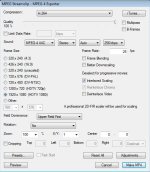
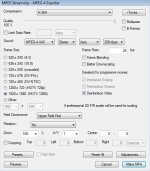
tanks!
I did the first option, is difficult to have done any mistake, I did it many times now, and when I import the MP4 in cs5 and is a black video.
You say "This setting, you can deinterlace in CS5." can you please say how to do it?
In Streamclip, you check "Deinterlace Video".
If you don't check it, you can also deinterlace in CS5 -but you need to consult your help files on how to do that - I don't have CS5.
This is an explanation of deinterlacing:
http://en.wikipedia.org/wiki/Deinterlacing
regarding blackness in the video:
Is there black also in the original video? Maybe try mp4 conversion with a different file.
The original MOV's cant be rad win windows, the system cannot recognise tem, that is why the MPEG_Streamclip makes a black conversion to MP4.
I have QuickTime Pro v7.6.9 installed but I dont think that is the PRO version because it asks me to buy the PRO version.
Any one knows other ways for windows and cs5 read and recognize MOV files?
I have QuickTime Pro v7.6.9 installed but I dont think that is the PRO version because it asks me to buy the PRO version.
Any one knows other ways for windows and cs5 read and recognize MOV files?