Navigation
Install the app
How to install the app on iOS
Follow along with the video below to see how to install our site as a web app on your home screen.
Note: This feature may not be available in some browsers.
More options
You are using an out of date browser. It may not display this or other websites correctly.
You should upgrade or use an alternative browser.
You should upgrade or use an alternative browser.
a bit out of topic but.. MOV to MP4
- Thread starter migu3lp
- Start date
I think "save as" .mp4 in MPEG Streamclip should do it:
http://www.squared5.com/svideo/mpeg-streamclip-win.html
http://www.squared5.com/svideo/mpeg-streamclip-win.html
This is not free but it works great.
You can download a free trial.
http://www.elgato.com/elgato/na/mainmenu/products/Turbo264HD/product1.en.html
You can download a free trial.
http://www.elgato.com/elgato/na/mainmenu/products/Turbo264HD/product1.en.html
Why can't you bring them into CS5? Have you added all the video codecs in CS5?
I have not used a PC for editing since 2006. I just received my CS5.5 upgrade for the MAC
and it will take anything I throw at it. I am still not in love with Premiere CS5 but
use it for simple projects.
I have not used a PC for editing since 2006. I just received my CS5.5 upgrade for the MAC
and it will take anything I throw at it. I am still not in love with Premiere CS5 but
use it for simple projects.
Do you have QuickTime installed?
If you purchase QT Pro for $30 you can convert .MOV's with it.
http://www.apple.com/quicktime/extending/
If you purchase QT Pro for $30 you can convert .MOV's with it.
http://www.apple.com/quicktime/extending/
I misinformed you.Streamclip doesn't read *.MOV, is says unrecognized file...
I don't find possible that windows does't recognize MOV's Zzzz
MPEG Streamclip does import mov and then make mp4, but I told you to use "save as".
You're actually supposed to use the "Export to MPEG-4" in the file menu.
It will give you a bunch of options in a detailed dialogue box after selecting the export mp4.
Try it again.
You can use regular Quicktime/just uninstall Alternative and use regular QT.
They are just saying you can use either or. My mistake.
Just follow this here/sorry for the confusion.
1. Have Quicktime 7 installed
2. Install MPEG Streamclip
3. Import mov file (File>Open files)
4. File>Export to MPEG-4 (tweak settings in dialogue)
They are just saying you can use either or. My mistake.
Just follow this here/sorry for the confusion.
1. Have Quicktime 7 installed
2. Install MPEG Streamclip
3. Import mov file (File>Open files)
4. File>Export to MPEG-4 (tweak settings in dialogue)
Last edited:
ok.
with the regular Quicktime for Windows the MPEG Streamclip works and if I do the File>Export to MPEG-4 (tweak settings in dialogue) it exports, the sound is good but the video is black, any sugestions? tanks
Make sure at the very top Compression: that "no video" isn't selected. Select H.264
What's you source footage interlaced or progressive? Match everything with the original. (You can also save presets for future use.)
For example a 24p 1920x1080 file - I would select:
H.264
Quality 100%
1920x1080
Match frame rate: 24 (or whatever yours is)
Interlaced scaling deselected (Progressive)
If your footage is interlaced ("i", like 60i) it also has a deinterlacer if you select to deinterlace/but maybe your editor can do that.
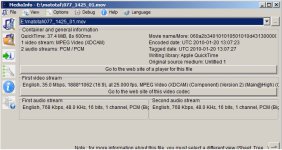
If you're not sure of the specs of your file, download MediaInfo free program:
http://mediainfo.sourceforge.net/en
Last edited: