7Q 2k Raw...WOW +Using selective mask based noise reduction

Well I can only suggest Capture One once again - I think it will give you a good concept of what you are recording and where you can take it.

S
 
Not to take away from all the good info on this thread, but what makes you think the image was so dark?

Hey Paul - as some of us who aren't used to a linear workflow and who have been shooting/editing REC709, if we opened a DNG that looked like that, it'd bring out a little of a panic. Like I said earlier, we're all learning, some of us just need to learn what to expect/what is possible.

I'm soaking in all the information here. I have not even begun to consider shooting RAW on a client job yet as I don't have a solid understanding on it just yet. I'm reading all that's being said, doing some tests, and trying to figure out how I need to approach shooting and working with RAW/linear material. Thanks for all you've explained as it does really help.
 
Well I can only suggest Capture One once again - I think it will give you a good concept of what you are recording and where you can take it.


Did you check that? I tried it and C1 produces also a color cast which is different to Adobe RAW but not usable either

C1_SONYDNG.jpg


Also my experience from still photography and BMD DNG as well is that you need a lot of time because the
Programm is very, very slow and you have another step in your workflow as you cannot export a video file out of
C1


export out of Resolve, straight out of camera, nothing applied, rendered to ProRes LT

straightOOC.jpg


export out of Resolve, only REC 709 LUT appplied, rendered to ProRes LT

REC709appl.jpg


both waveform screen shots captured in Resolve
 
Last edited:
Hey Paul - as some of us who aren't used to a linear workflow and who have been shooting/editing REC709, if we opened a DNG that looked like that, it'd bring out a little of a panic. Like I said earlier, we're all learning, some of us just need to learn what to expect/what is possible.

I'm soaking in all the information here. I have not even begun to consider shooting RAW on a client job yet as I don't have a solid understanding on it just yet. I'm reading all that's being said, doing some tests, and trying to figure out how I need to approach shooting and working with RAW/linear material. Thanks for all you've explained as it does really help.

Hi Alan, I am used to Linear workflows but then cDNG is a container for different approaches, like a black box at times and it's really difficult to know what flavour we're dealing with, so i'm making some (semi!) educated guesses based on what i know. The take home though is that we wanted RAW, we got RAW, we have to remember that RAW needs 'developing' and each application can develop differently. The red eco system has redcine which means they have a reference point and it makes it easier to have baselines. We don't. We currently have resolve which is reading DNG files from a camera it doesn't natively understand and also those DNGs have some different colour information in (hence the Adobe/Capture One issues).

The next firmware will sort out the few niggles we have with the DNGs and then in time the industry will settle down a bit. Adobe needs to support cDNG properly and there's Ginger HDR which is a method for getting full range into Adobe but he's stopping that and i suspect it's because Adobe have some other alternatives coming up.

It's a bit of a wild west situation out there and the sensible approach is as you say, test and be comfortable with what you need. I guess the beauty of RAW is so long as you're captured right in the first place you can always reprocess.

Right now the most sensible approach (IMHO) appears to be to use Resolve to produce 10+ bit log files to grade downstream in whatever. That will retain full range in a container that is more universally accepted. For example PPro is a bit dumb when it comes to high bit range files - whilst internally it is full 32 bit float linear, you can only import 10/12bit depth maximum. But if you make that a log file then it's easy these days to drop a LUT on the timeline and then in Speedgrade you can access the full 10 bit log range to grade with.

cheers
Paul
 
Program is very, very slow and you have another step in your workflow as you cannot export a video file out of C1

Absolutely. Not a tool for using as part of WFlow- only for learning. Indeed I have seen the blue skies which is indeed odd..

I would suggest anyone getting their head round raw does lots of tests before conluding the best exposrue pracitces thats all.

S
 
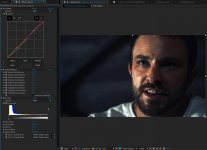
Hi Alex, I used pretty standard tools in Ae to colour grade.

My initial step was a "balance" grade in resolve. Just bringing up the exposure etc. I posted a quick step by step on this earlier.

In Ae, I just used Curves, Color Balance and Levels to grade it the rest of the way after the de-noise step.
Also used a secondary to bring out the colour in the eyes a bit.


TheMoneyGrade.jpg
 
Back
Top