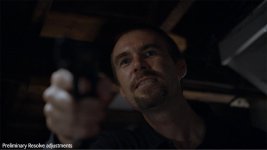
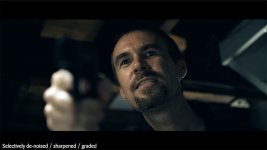
7Q 2k Raw...WOW +Using selective mask based noise reduction

Kyron

Well-known member
I shot my first 7Q narrative short last night...and all I can say is WOW!
It was a very moody, low-lit scene with intense drama. Not only did the actors absolutely bring it, (the whole project from writing to filming was in a 48 hour period and the actors all jumped in with 1 days notice! And holy crap they were good!)


The whole thing was shot at F2.0 on a Canon 24-70 F/2.8 and speedbooster. Close-ups at 70mm.
We lit the entire scene with one R300 LED ring light from camera left slightly behind the actors and one tiny F&V Z96 LED pointing straight down from the ceiling and that's it! Two baby LED's!
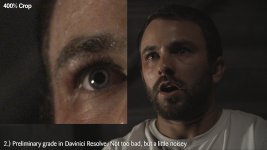
The histogram on the 7Q scared the crap out of me as it was waaaay to the left and the Fs700 was at 3500 ISO the entire shoot. I knew there would be some noise reduction in post, but when i processed through Resolve I was pleasantly surprised to find the noise very very manageable and pleasant compared to the Avchd I'm used to. I wanted to try a selective noise reduction method I read over on Matt Scotts blog and the results more than exceeded my expectations.


7 Second test:
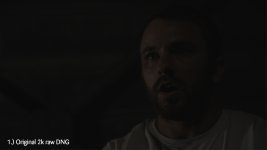
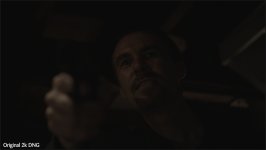
01_Raw_DNG.jpg
02_Exposure_Lift_in_Resolve.jpg
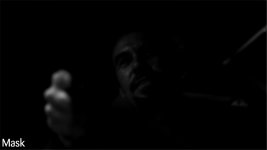
03_Luma_Mask.jpg
04_SelectiveNoise_Reduction.jpg
05_Final_Graded.jpg


Hope this technique helps you guys when the noise is a little high, but you don't want to soften out and muddy up the skin details and well exposed areas of the image.
I was the DOP and camera operator for this short and I learned a lot about minimalist lighting. I would light it stronger next time I think, but with this new found 2k raw freedom I'm beginning to see the possibilities for this amazing fs700 / 7Q combo!
This short will be finished and online by the end of next week. I'll be sure to post a link here when it's done.


Happy shooting!

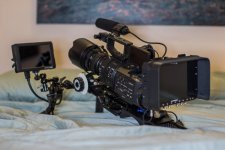
Oh and the rig I pulled together! The Tilta stuff arrived 4 days ago thankfully!
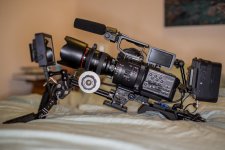
KLG_0819.jpg
KLG_0829.jpg
 
Wow - that's really great. And thanks so much for the tip on that noise reduction trick.

Can't wait to see the finished product.
 
Really nice work Kryon, this is one of the more impressive examples of the 2k raw footage that I've seen yet. There's a lot of obsession over the camera's 4k abilities but that 2k is really quite impressive. God I can't wait to get my hands on a 7Q.
 
Thanks everyone. I agree NMSK, 2k still has a lot of life in it and looks great. This short will be one minute long in the end, and its already taking up 150gb's of space in my project folder because of the DNG files. I think all the 4k Raw hoo hah surrounding the 7Q will get quieter when people get past the glamour of all this extra resolution and then realise how hard it's going to be to work with....to end up delivered in 1080p anyway at the end of the pipe for the vast majority of productions.

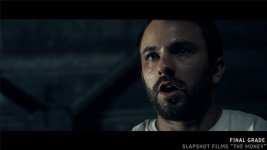
For those interested, I took the "light grade" shown above out of Resolve straight into After Effects via the DnxHD codec and graded the crap out of it in Ae. I was still able to push the image all over the place with zero degradation in the image.

Full clip length from above example is 58 seconds

The difference in size? Roughly a 1:4 compression.

DNG 2k Raw sequence = 4.47gb
DnxHD 1080p file = 1.21gb

I haven't experimented with every codec out there, but I was wondering what you guys do in this situation? (I'm a pc user so pro-res is out of my reach) I've been using DnxHD for about a year in this capacity for high quality edit and pass-through clips between applications. Now that we're in raw land, i think this process is doubly important to be able to discard all the massive raw files once we've squeezed all the colour we need out of them.
I've been fairly happy with the 1:4 trade-off. Is anyone getting a better squeeze out of their footage while retaining as much of the colour space and quality as possible?
 
thanks for sharing that's quite impressive - I have way more noise in my "exposed to the left DNGs" Your posting gives me hope that it's my workflow which can be improved a lot!
 
Holy Moley! That's nice. I, too, have found the low light performance of the O7Q and Sony Slog2 outstanding.
 
Very nice, great info. Is there anywhere online we can learn how you converted the footage to a "soft mask" before applying NR? Thanks, your image looks very cinematic, much appreciated.
 
I use DNx444/880 as an intermediate codec sometimes, but tend to stay away from DNx175x or lower when possiable, sometimes i use PhotoJPEG@ best, runs about 200Mbs, so slightly heavier than either DNX175x or ProRezHQ, but similar resualts

I have been using highlight qualifiers / keyers for NR holdback for years now, I'm not much of a Resolve user, but i it seems to have the ablity to do the same thing as i do in systems like DS, Pablo and Baselight, I prefer to do all NR interactivly in the grade so i can see how much i need / how little i can get away with..
 
Kyron, thanks for showing the clip also. It looks awesome! I really wonder about your preliminary settings in Resolve to push this dark image. I would have expected way more noise!
 
Very nice, great info. Is there anywhere online we can learn how you converted the footage to a "soft mask" before applying NR? Thanks, your image looks very cinematic, much appreciated.

I heard about this technique from mattscottvisuals.com but he's using Edius software I think. The same principles apply in most programs. I applied the same idea to After Effects using the Neat Video noise reduction plugin (which is amazing by the way!)

Its set up like this basically:

1.) Original Footage on bottom layer
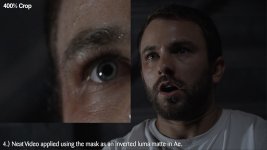
2.) Duplicate of the footage with neat video applied on the next layer above
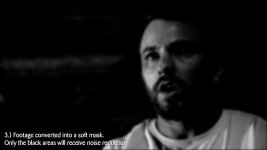
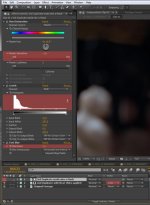
3.) A 3rd duplicate of the footage on the top layer turned into a black and white mask.
- Add a Hue/Saturation and bring the saturation slider down to 0
- Add a Levels and bring in the input black and input white sliders until the image is getting very defined black and white areas in the footage
- Add a fast blur with about a blurriness of 10
4.) Then turn off this mask layer so that it is not visible
5.) Go to the neat video layer (It has to be directly below the mask layer) and change the TrkMat dropdown to "Luma Inverted Matte"

Now the neat video layer is using the mask as a track matte. The black and dark areas of the mask determine how much of the neat video layer becomes visible over the original noisy footage.

If you find well exposed areas to be a little noisy still, then just go back to the levels adjustment and try to make the whites in the mask a little more gray so more of the neat video layer bleeds through. Adjust to taste.
I personally precomp all of this, duplicate the precomp and use it as a high pass filter for selective organic edge sharpening as well to really make the footage and actors eyes pop. Then grade the footage with adjustment layers.

Noise_Reduction_Example.jpg

For example, this next shot I didn't light the actors face strong enough (lesson learned) and his skin was still quite noisy.
The mask for this one was much darker so lots of the denoised layer could come through and clean up the skin:

Brenton_03.jpg
Brenton_01.jpg
Brenton_02.jpg
Brenton_04.jpg
 
Last edited:
Kyron, thanks for showing the clip also. It looks awesome! I really wonder about your preliminary settings in Resolve to push this dark image. I would have expected way more noise!

i was surprised too! After a year of avchd, these DNG's are like stepping off a push bike and into a Ferrari!

Nothing special about the Resolve initial adjustments either.

Footage setup as:
Decode Using: Clip
White Balance: As Shot
Color Space: BMD Film
Gamma: BMD Film
Highlight Recovery Ticked

No LUT's applied
Exposure value set to 2.0
Adjust Gain wheel up and Offset wheel down to add contrast
Slight pull toward blue in the Gain wheel
Saturation to about 65

That's it! Off to Ae via DnxHD!
 
Last edited:
I heard about this technique from mattscottvisuals.com but he's using Edius software I think. The same principles apply in most programs. I applied the same idea to After Effects using the Neat Video noise reduction plugin (which is amazing by the way!)

Its set up like this basically:

1.) Original Footage on bottom layer
2.) Duplicate of the footage with neat video applied on the next layer above
3.) A 3rd duplicate of the footage on the top layer turned into a black and white mask.
- Add a Hue/Saturation and bring the saturation slider down to 0
- Add a Levels and bring in the input black and input white sliders until the image is getting very defined black and white areas in the footage
- Add a fast blur with about a blurriness of 10
4.) Then turn off this mask layer so that it is not visible
5.) Go to the neat video layer (It has to be directly below the mask layer) and change the TrkMat dropdown to "Luma Inverted Matte"

Now the neat video layer is using the mask as a track matte. The black and dark areas of the mask determine how much of the neat video layer becomes visible over the original noisy footage.

If you find well exposed areas to be a little noisy still, then just go back to the levels adjustment and try to make the whites in the mask a little more gray so more of the neat video layer bleeds through. Adjust to taste.
I personally precomp all of this, duplicate the precomp and use it as a high pass filter for selective organic edge sharpening as well to really make the footage and actors eyes pop. Then grade the footage with adjustment layers.

View attachment 82760

For example, this next shot I didn't light the actors face strong enough (lesson learned) and his skin was still quite noisy.
The mask for this one was much darker so lots of the denoised layer could come through and clean up the skin:

View attachment 82761
View attachment 82762
View attachment 82763
View attachment 82764
You're a born teacher, gifted artist, thanks for taking the time to write this post. Much appreciated
 
Thanks Marino!
Countless others have helped me on my journey with film making from all over the world. Always happy to give back!
 
Matt Is very talented and a whiz at color correction. He has given a lot of knowledge to the Edius community. RAW video is such a great tool. The transformations are quite incredible. Thanks for sharing!
 
Nice stuff kyron! Thx for sharing the knowledge

I'm trying to learn fcpx on the side from my regular nle "premiere". Any one know how to manage this technique in fcpx?
 
While I find FCP X's tools great for the on-the-fly color adjustments and the occasional tweak, I think the best solution is to round-trip to Resolve using XML. Unfortunately, though noise reduction is only offered in the paid version of Resolve.

Neat Video does make a plug-in for FCP X and Motion 5, so theoretically it would be possible to build an effect using this method in Motion and then publish all appropriate parameters to FCP X. This way, you'd have a one-effect step in your NLE to make these kinds of adjustments. However, as I don't have the Neat Video plug-in, I can't test this out myself. ... It does have me thinking that it'd be a fun and worthwhile challenge - maybe I'll give it a go in the future when I have the need/funds.
 
Back
Top