Hi all,
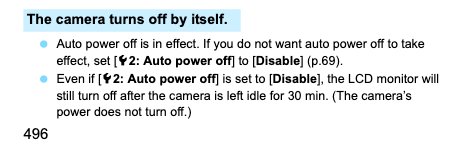
I’m trying to use my 7d mk ii as a webcam. I’ve set auto shutoff to disabled already. I’m using a dummy battery (bought 2, in fact, in case the first one was defective). I’m NOT using Canon’s webcam utility, though. I’m using the HDMI out and running that to an ATEM Mini hdmi switcher.
Is there a different setting I’m missing?
I can force it on by using a remote shutter release and keeping the shutter down, but that doesn’t feel like the right way to do it.
Oh, I also upgraded to the newest firmware.
Thanks!
I’m trying to use my 7d mk ii as a webcam. I’ve set auto shutoff to disabled already. I’m using a dummy battery (bought 2, in fact, in case the first one was defective). I’m NOT using Canon’s webcam utility, though. I’m using the HDMI out and running that to an ATEM Mini hdmi switcher.
Is there a different setting I’m missing?
I can force it on by using a remote shutter release and keeping the shutter down, but that doesn’t feel like the right way to do it.
Oh, I also upgraded to the newest firmware.
Thanks!