7D files not opening

kcn823

Active member
I got a call today from a client who was not able to open a couple files shot on my 7D. I just checked the files on my back up drive and had the same problem. It gives me a message saying
"The movie could not be opened, the file is not a movie file"

Out of a total of about 80 files, 2 of these files give me this message. Is this caused by the battery dying during recording? I believe that happened a few times.

Is there anyway to recover these files?

Any help would be greatly appreciated.

K
 
The MOV files directly from a Canon DSLR can be
problemistic at best. They are large and unless
you have a powerful CPU will not play without
stuttering. I now have a Dell Vostro 1015 laptop,
$329 from Dell, that features an SD slot. I also
changed the delivered OS ( a low grade form of
Ubuntu ) to:

http://puppylinux.org

A lightweight, fast and nimble version of Linux.
So once I've shot whatever vids I want I transfer
those MOV files, via the Vostro SD slot, to a
directory on the laptops drive. Lets call it

/field_files

so now in field_files I have the file

MVI_0001.MOV 57.5MB

Attempting to play this file directly on the lightweight
Vostro 1015 ( Intel Celeron 925 (2.30GHz, 1M L2 Cache, 800Mhz )
will result in stuttering. So I need to convert the
MOV file to something that is easier to handle. I
open a terminal and go to the field_files directory

cd /field_files

and list the files in that directory one of which
is the just shot MVI_0001.MOV

I then run ffmpeg from the command line and convert
that file to VOB format:

ffmpeg -i MVI_0001.MOV MVI_0001.VOB

( http://www.ffmpeg.org/ )

So now I have two MVI_0001 files. They are:

MVI_0001.MOV 57.5MB
MVI_0001.VOB 5.1MB

The VOB file is easily played on my lightweight laptop.
Basically a field rush to see how well I'm doing. If
I want I can directly transfer the VOB file to YouTube
and get it up where anyone can see it. I went through
this process last Sat evening at a shoot for a local
Irish Band. Here's the uploaded rush:

http://www.youtube.com/watch?v=Hpya_u5YmRo "test01"

No editing was needed, or used, on "test01". Just shoot
the vid, copy it into the Laptop, convert it using ffmpeg
then transfer it up to YouTube. The whole process took
maybe 15 minutes.
 
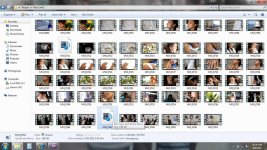
kcn, this is indeed a big problem for many of us. I too have corrupted .mov files and have searched high and low without a solution. Butter and wilcal, thanks for your replys but your posts are on how to transcode uncorrupted files and not how to repair damaged ones, am I right? Damaged files are as shown in 711 and 762!

Any suggestions?
 

Attachments

  • Screenshot.jpg
    Screenshot.jpg
    117.5 KB · Views: 0
Back
Top