
Navigation
Install the app
How to install the app on iOS
Follow along with the video below to see how to install our site as a web app on your home screen.
Note: This feature may not be available in some browsers.
More options
You are using an out of date browser. It may not display this or other websites correctly.
You should upgrade or use an alternative browser.
You should upgrade or use an alternative browser.
GH2 720/60p GH2 Hack >40MBit
- Thread starter adammada
- Start date

adammada
Well-known member
That looks very good, don't you think? Any issues with other video modes? How about ETC (initially I read some of the hacks changed ETC)? Photos OK? Sorry for so many questions, but if you have answers I would appreciate reading your thoughts... Al
Yes - think it looks very good - The other modes all run very well (1080/24pH or MJPeg 1080p . . .) - no Problem with this Setting
and see you here: http://personal-view.com/talks/discussion/421/official-low-gop-topic#Item_163

maranfilms
Veteran
I honestly dont see anything that the stock camera couldn't do with out the hack in these clips. Help me understand what it is the hack is helping with in these shots? thanks

Uwe Lansing
Veteran
The average bitrate is 12mbps according to qt-player and between 6-15mbps according to splash lite...
Edit: I forgot it´s not the original file. But ok, there is no difference to the unhacked 720p60 mode to my eyes too...
Edit: I forgot it´s not the original file. But ok, there is no difference to the unhacked 720p60 mode to my eyes too...
Last edited:
adammada
Well-known member
I honestly dont see anything that the stock camera couldn't do with out the hack in these clips. Help me understand what it is the hack is helping with in these shots? thanks
then let the hack out - it forces you nobody
also applies to @Uwe Lansing
and i cite @Ian_T:
"It’s pretty much what most of us expected (and wanted). Static shots were already sharp. It’s that little bit of mud in motion that we want to get rid of (which apparently is gone). Not only will a higher bitrate help the compression artifacts in 720p but also 1080p when it comes to shadow detail. When it comes to the GH-1 (and basically most CMOS cameras...not only DSLRs) I’ve always hated the murkiness/muddy-look in the shadow areas especially in green colored leaves in trees etc. The fact that the image now looks noisier after this hack on the GH-2 means it is allowing or squeezing all of the detail it can get out of the image. Now...we have control over what we want to do with it and not leaving it up to the camera to decide internally. I remember commenting on the noise and shadow detail from some Ninja footage. If we can do that without having to buy an external HDMI recorder...then it’s gravy from here.
Another benefit I see is...less macro blocking. In Vegas, when it comes to highly compressed images (without looking at the actual image), I can see macro blocking on the scopes. The less compressed these images become the less I see macro blocking on the scopes. It will also help color correcting big time. You will be able to push the colors a little more. I’m not sure yet if 42Mbps is a significant change...but the more the merrier.
EDIT: I'd much rather noise from the sensor than compression artifacts any day."
Last edited:
Hi!
I was also busy experimenting with optimal 720p50 patches. My experience is that 47Mbit B-frame patch with stock GOP is about the best I could get. As I used stock GOP + B-frames (as efficient as AVCHD can be), codec can put more bits into encoding I-frames.
This is output from StreamParser:
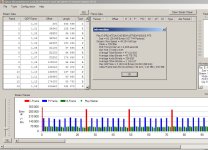
Link to grabbed frame in lossless PNG format:
http://www.luminasweden.com/vlcsnap-2011-07-24-22h44m57s135.png
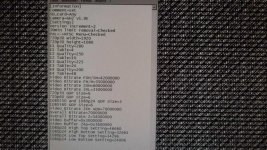
And here are my settings:
[Information]
Comment=720p50 B-frame 47Mbit<br>1080p24 B-frame 40Mbit
SD_Card=Any
Camera=GH2 v1.0E
[Settings]
Version increment=1
30min limit removal=Checked
PAL<->NTSC Menu=Checked
Video Bitrate FSH/SH=46000000
Video Bitrate FH/H=46000000
Video Bitrate 24H=46000000
Video Bitrate 24L=46000000
Overall Bitrate=46000000
Overall Bitrate 2=44000000
Encoder setting 1 720p=3
Video buffer=0x3000000
Video buffer 24p=0x3600000
1080p24 High Top Setting=35715
1080p24 High Bottom Setting=25000
1080p24 Low Top Setting=27143
1080p24 Low Bottom Setting=19000
720p Top Setting=35715
720p Bottom Setting=25000
1080i50 Top Setting=35715
1080i50 Bottom Setting=25000
I specifically shot detailed scene with some dark parts (left tree) in order to test if dark parts would suffer from macro-blocking when graded. So far, so good.
Regards,
I was also busy experimenting with optimal 720p50 patches. My experience is that 47Mbit B-frame patch with stock GOP is about the best I could get. As I used stock GOP + B-frames (as efficient as AVCHD can be), codec can put more bits into encoding I-frames.
This is output from StreamParser:
Link to grabbed frame in lossless PNG format:
http://www.luminasweden.com/vlcsnap-2011-07-24-22h44m57s135.png
And here are my settings:
[Information]
Comment=720p50 B-frame 47Mbit<br>1080p24 B-frame 40Mbit
SD_Card=Any
Camera=GH2 v1.0E
[Settings]
Version increment=1
30min limit removal=Checked
PAL<->NTSC Menu=Checked
Video Bitrate FSH/SH=46000000
Video Bitrate FH/H=46000000
Video Bitrate 24H=46000000
Video Bitrate 24L=46000000
Overall Bitrate=46000000
Overall Bitrate 2=44000000
Encoder setting 1 720p=3
Video buffer=0x3000000
Video buffer 24p=0x3600000
1080p24 High Top Setting=35715
1080p24 High Bottom Setting=25000
1080p24 Low Top Setting=27143
1080p24 Low Bottom Setting=19000
720p Top Setting=35715
720p Bottom Setting=25000
1080i50 Top Setting=35715
1080i50 Bottom Setting=25000
I specifically shot detailed scene with some dark parts (left tree) in order to test if dark parts would suffer from macro-blocking when graded. So far, so good.
Regards,
Uwe Lansing
Veteran
Hi!
I was also busy experimenting with optimal 720p50 patches. My experience is that 47Mbit B-frame patch with stock GOP is about the best I could get. As I used stock GOP + B-frames (as efficient as AVCHD can be), codec can put more bits into encoding I-frames.
Link to grabbed frame in lossless PNG format:
http://www.luminasweden.com/vlcsnap-2011-07-24-22h44m57s135.png
...
The frame looks promising. So, you didn´t notice any mud at very detailed scenes? Did you already give it a try together with the new lpowell mjpeg patch? If so and when it is stable I´m interested in a patch without changing the native 1080p24. Is that possible?
The frame looks promising. So, you didn´t notice any mud at very detailed scenes? Did you already give it a try together with the new lpowell mjpeg patch? If so and when it is stable I´m interested in a patch without changing the native 1080p24. Is that possible?
I don't want to use MJPEG as it's 30fps and nobody is actually sure if it's really 1080p or just 720p upscaled to 1080p and encoded with MJPEG. If it's just upscaled 720p then I dont see any reason for shooting with inefficiennt MJPEG codec in 30fps when high-bitrate B-frame AVCHD gives you glorious 720p50 or 720p60 with double the temporal resolution compared with MJPEG at half a bitrate.
IMHO, bitrate itself isn't the point. The image quality is. And right now, I'm unsure if short GOP really improves IQ. My somewhat non-scientific tests (and common sense, if you know how AVCHD codec works) says no.
Regarding mud, take the frame above and play with it in Photoshop. It's a lossless frame directly from VLC, so it's basically what you see on computer from original .MTS No mud and no macroblocking!
The dark muddiness is good as well. Frankly, I believe that "dark muddiness" is a matter of quantization tables and it seems that GH2 uses value 20 as lowest value regardless of how high we crank up the bitrate. Thus, before Vitaliy delivers PTool where we can alter AVCHD quantization tables, extra bitrate will mostly be allocated for more accurate motion vectors.
Thus I strongly question the value of short GOP, especially together with crippled codec.
Regards,
Uwe Lansing
Veteran
Ok, thx Grunf. Then I´ll wait for some further test footage with the mjpeg-patch of Ipowell. But how can we figure out whether it is just upscaled or not? I suppose you´ve read what lpowell has written about it.
One other thing: did you only change the 720p50 or the 720p60 too?As to whether the MJPEG 1920x1080 frame sizes are literally upscaled from a 1280x720 frame, I have seen no tangible evidence that this is in fact the case. Scaling of that sort should produce telltale irregularities in fine diagonal lines, and I've yet to see a sample image that demonstrates this artifact. The sample frames I included contain numerous fine details that expose the limits of MJPEG 1080p resolution. To my eyes, they appear to be directly captured from the image sensor rather than upscaled.
Last edited:
The benefit of the hack is that it eliminates compression artifacts in the 720p @ 60 FPS mode. This includes the compression artifacts for the ETC mode. The noise in ETC mode tends to skitter about like flies. With the higher bit rate of the hack it tends to look more like film grain.
Some people will prefer the standard noise over the high bit rate noise. It is up to you to decide.
The great part about the hack is that with two simple settings changes you can have 32 mb/sec 720p and 1080p video without any adverse affects. The 42 mb/sec settings produce a distorted preview image and they destroy the 1[SUP]st[/SUP] second of video. It can also cause irrelgular cadences in the compression.
So far I have not seen any comparisons that show the extra 10 mb/sec actually gain anything over the completely stable 32 mb/sec settings. Same goes for the low GOP settings.
Some people will prefer the standard noise over the high bit rate noise. It is up to you to decide.
The great part about the hack is that with two simple settings changes you can have 32 mb/sec 720p and 1080p video without any adverse affects. The 42 mb/sec settings produce a distorted preview image and they destroy the 1[SUP]st[/SUP] second of video. It can also cause irrelgular cadences in the compression.
So far I have not seen any comparisons that show the extra 10 mb/sec actually gain anything over the completely stable 32 mb/sec settings. Same goes for the low GOP settings.
Thanks for re-stating your findings of a week or two ago. You basically feel that all the low GOP iterations going on are not as productive as your simple two bit-rate changes yet. Have you tried combining your simple hack with lpowell's high bit-rate mjpeg settings? I would love to have your hack combined with lpowell's in a .ini file... Al
The benefit of the hack is that it eliminates compression artifacts in the 720p @ 60 FPS mode. This includes the compression artifacts for the ETC mode. The noise in ETC mode tends to skitter about like flies. With the higher bit rate of the hack it tends to look more like film grain.
Some people will prefer the standard noise over the high bit rate noise. It is up to you to decide.
The great part about the hack is that with two simple settings changes you can have 32 mb/sec 720p and 1080p video without any adverse affects. The 42 mb/sec settings produce a distorted preview image and they destroy the 1[SUP]st[/SUP] second of video. It can also cause irrelgular cadences in the compression.
So far I have not seen any comparisons that show the extra 10 mb/sec actually gain anything over the completely stable 32 mb/sec settings. Same goes for the low GOP settings.