GH2 5DtoRGB settings for GH2

Hey so I just returned from Panama City, Panama. Where I shot a short Doc on my GH2. Now Im working on the post production. I have found the settings that work for me but I just wanted to see what settings everyone else is using. I wrote up a blog post on the settings I use and posted them here.

http://www.crossbowfilms.net/blog/

I found very little help online about this subject and wanted to see if anyone agrees or disagrees with the way Im doing it. I will be editing on FCP7.

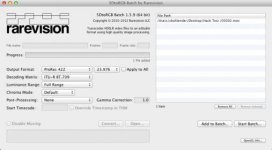
Prorez 422.

Decoding Matrix set to (ITU-R BT.709)

Luminance Range is set at (Full Range).

Chroma mode set at (Default).

Post processing set to (None).

Gamma Correction to (1.0)


Again I found very little online about settings or the GH2 and 5DtoRGB so thats why im posting this.

Thanks!
 

Attachments

  • Screen Shot 2012-04-12 at 10.37.32 PM.jpg
    Screen Shot 2012-04-12 at 10.37.32 PM.jpg
    19.2 KB · Views: 0
Prorez 422.

Decoding Matrix set to (ITU-R BT.709)

Luminance Range is set at (Full Range).

Chroma mode set at (Default).

Post processing set to (None).

Gamma Correction to (1.0)
This all looks good, but I'd use broadcast luminance range instead of full range. The GH2 doesn't write any data below 16/above 235, so you should be fine using broadcast range. Full range will compress the luma/chroma range too much (you can observe this with a waveform or a histogram).
 
Agreed. I know I posted using Full Range a while back was what I did, but broadcast range and no gamma correction at all is a better base to grade from. It's just very contrasty at first sight.

I'll probably go back and correct that on my blog soon.
 
The GH2 doesn't write any data below 16/above 235, so you should be fine using broadcast range. Full range will compress the luma/chroma range too much (you can observe this with a waveform or a histogram).

Is this really true? I transcode my GH2 footage using FCP Log & Transfer, and my blacks are at zero and my brightest whites are at 255. This is without applying any color correction. I observed this on the waveform, histogram, and also the Digital Color Meter utility on my Mac, which reads the pixels you mouse over with the cursor as an 8-bit RGB value. What's the anomaly? Are others getting GH2 footage that only goes from 16 to 235?
 
100% true, the gh2 writes to rec.709 complaint broadcast range h.264. blacks at 16 and whites at 235.

No anomalies, your log and transfer or fcp itself automatically expands these files to full range luma. The color meter utility on your mac is reading the raw RGB pixel data, after your media player has converted the file to 0-255 RGB for monitor output.

Drop a raw MTS in Scopebox or Scratch or something (sorry I don't have more suggestions, I'm not a Mac user), and you'll see pretty clearly it's broadcast range.
 
This all looks good, but I'd use broadcast luminance range instead of full range. The GH2 doesn't write any data below 16/above 235, so you should be fine using broadcast range. Full range will compress the luma/chroma range too much (you can observe this with a waveform or a histogram).

Odd because a lot of people use full range for 5dtorgb for GH2.

Can someone tell me why when I use broadcast range I can't see a difference vs. Log and Transfer, but when I use full range, I get the extra latitude just like the samples on RareVision's site? I'm confused? Just bought the program and don't seem to get anything different when using Broadcast range on a GH2 so far.
 
Can someone explain the difference between the 601 and 709 decoding matrix? The description says 601 is for SD, and 709 is for HD. Using 709 doesn't look as good as 601 because it gives me banding/noise in the shadows. Perhaps by "HD" they mean it's for cameras that also aren't 4:2:0?
 
No, rec.709 is the wider gamut color space that is specified for all HD video. All HD camcorders and dslrs use this colorspace internally when taking the sensors rgb output and encoding it to YUV for recording. rec.601 is the 30 year old, small gamut SD colorspace that was used when broadcasting sd footage over the air forever ago. Taking your gorgeous, wide color gamut rec.709 native mts footage and using this program to comperes that colorspace down to the 30 year old small gamut 601 is a horrible horrible thing to do. As for the banding/shadows, I'd look elsewhere for a solution. Those artifacts are in your original footage, the down conversion to a smaller gamut effects the bit depth among a slew of other things and its process of removing information it's hiding the banding/artifacts

Refer to my post above in this thread Psynema, the gh2 records broadcast range. period. there is no information below 16 or above 235 to recover. I wish somebody would put that in a sticky.
 
No, rec.709 is the wider gamut color space that is specified for all HD video. All HD camcorders and dslrs use this colorspace internally when taking the sensors rgb output and encoding it to YUV for recording. rec.601 is the 30 year old, small gamut SD colorspace that was used when broadcasting sd footage over the air forever ago. Taking your gorgeous, wide color gamut rec.709 native mts footage and using this program to comperes that colorspace down to the 30 year old small gamut 601 is a horrible horrible thing to do. As for the banding/shadows, I'd look elsewhere for a solution. Those artifacts are in your original footage, the down conversion to a smaller gamut effects the bit depth among a slew of other things and its process of removing information it's hiding the banding/artifacts

Refer to my post above in this thread Psynema, the gh2 records broadcast range. period. there is no information below 16 or above 235 to recover. I wish somebody would put that in a sticky.
Then why does selecting broadcast range not make a difference in the footage I'm getting and full range does?
 
because like I've mentioned in literally 9000 other posts, when you select full range, it is taking the original 16-235 luma data and stretching it to fill a 0-255 container.
 
because like I've mentioned in literally 9000 other posts, when you select full range, it is taking the original 16-235 luma data and stretching it to fill a 0-255 container.

Yes EVERYONE understands THAT

But there's no difference in curves using Broadcast Range vs. Log n ' Transfer.
 
Why is this program called 5DtoRGB when it has nothing to do with RGB? Everything about its features implies that it stays in YUV space... doesn't instill confidence.

And the 'range' setting is just confusing terminology, does it refer to the source range or the target range? What matters is if there's a 0>16 transfer, 16>0 or none. Anything else is the software masking what it does with terminology. When encountering a new tool or workflow I just run it twice and pick the result that neither clips nor applies a double range compression.
 
Ok, there must be something retarded I'm doing. On some of my videos, after I process them, I get this motion blur interlacing thing that makes the video look terrible. The MTS file looks fine but after I put it through 5DtoRGB, it looks like this. PLEASE HELP!!! Screen Shot 2012-09-09 at 11.59.50 AM.jpg
 
100% true, the gh2 writes to rec.709 complaint broadcast range h.264. blacks at 16 and whites at 235.
Although the GH2's MTS files do comply with Rec. 709, they contain metadata flags that indicate full-swing 0-255 range, rather than the studio-swing 16-235 broadcast range. This can be confirmed in Adobe After Effects CS5.5, which unlike Premiere or FCP, can be run in ICC color-managed mode. When you set up an AE project to use a color managed profile, it will automatically identify the color space used in each imported video file. If both color spaces match, AE will import the file without remapping the colors. If the color spaces differ, AE will remap the file's color space to the project's color space.

If you set your AE project's color space to HDTV (Rec. 709) 16-235, it will remap imported files that do not use the Rec. 709 studio-swing broadcast color space to limit their range of 8-bit color values to 16-235. Files that were recorded in studio-swing color space will be used as-is without remapping. When you import a GH2 MTS file, AE reports that its color space does not match, and remaps the file to the studio-swing 16-235 color space.

If you set your AE project's color space to HDTV (Rec. 709), it will remap imported files that do not use the Rec. 709 full-swing color space to expand their range of 8-bit color values to 0-255. Files that were recorded in full-swing color space will be used as-is without remapping. When you import a GH2 MTS file, AE reports that its color space does match Rec. 709 full-swing, and the file is imported as-is without remapping.

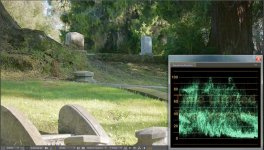
Here's a screen-grab from an AE project set up to use HDTV (Rec. 709) full-swing color space. The overlaid waveform monitor in the lower right corner shows that imported GH2 MTS file contains luma values that range over the entire full-swing color space.
 

Attachments

  • GH2 Waveform Excursion.jpg
    GH2 Waveform Excursion.jpg
    107.5 KB · Views: 0
All I know is it looks better in low lit wild/doc situations using full range, just less shadow noise and MUCH closer to the final grade. Slightly faded is easier to fix than horrendously crushed. Just an easier workflow if you do events.
 
Are many of the posts in this thread referring to a paid version of 5DtoRGB? I see references to "log transfer" and "chroma" settings which are not in the free Windows 64-bit version. Thanks.
 
Last edited:
Back
Top