5DtoRGB beta available for download

Incredible app, also love the dmatrix, Thomas would it be possible to transform a .icc camera profile to a matrix, would love to be able to use the workflow with a proper chart.

I know you probably are ful of request right now but are the any plans to support avids DnxHD format?

Thanks for all the efforts.
 
Currently using the batch processing version. Its in beta format and looks pretty promising.
 
I'm torn between downrezzing to SD to edit in CS4 (I'm on an 08 MBP) or to try out editing the from the files with 5dtoRGB...

I haven't played with it enough to see if it would tax my system too much.
 
It would be nice if it could encode to other formats such as DNxHD via the QT codec rather than just Prores and DPX.

Michael
 
Hi Thomas
will be there any full GH1 support in the future? (with audio)
thanks
I'm investigating this. Hopefully yes!

Thomas would it be possible to transform a .icc camera profile to a matrix, would love to be able to use the workflow with a proper chart.
Not sure on that. I'll look into it.

It would be nice if it could encode to other formats such as DNxHD via the QT codec rather than just Prores and DPX.
This seems to be at the top of everyone's wish list. We'll just have to wait and see ;-)
 
Thomas I have been building a little list for you as well whilst Im using this... Its coming.
 
Strange: I opened file named MVI_1603.MOV for conversion with 5DtoRGB 1.0b5 and it converted file named MVI_1604.MOV. Second time also. As I wanted to convert number 1603 I opened MVI_1602.MOV in the converter and out came 1603 as I wanted.

What is going on?

In other ways I am enthusiastic, waiting for batch feature like everybody else, of course.
 
Regarding batch feature, I've built my own chroma upsampling rig by combining couple of readily available free tools.

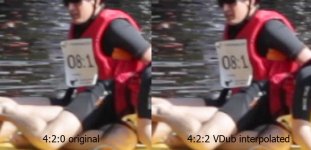
I used Virtual Dub, QT-plugin, AutoYUY2, Lagarith lossless codec and command script to achieve automatic chroma upsampling and conversion to lossless. The picture looks pretty the same with or without chroma upsampling but it comes handy when doing chroma-keying.

How does it work? I simply drop all my .MOV files onto batch file icon and after a while I get a bunch of lossless .AVI files containing upsampled chroma, ready to be used in NLE.

Manually, you can achieve this by opening your .MOV file in Virtual Dub and applying AutoYUY2 filter (use planar 4:2:2 option). I use older QT version which doesn't clip RGB values (so I get full 0-255 RGB)

This is a screenshot before/after the upsampling:
 

Attachments

  • 422inter.jpg
    422inter.jpg
    95.4 KB · Views: 0
Last edited:
Hmmm, I was skeptical about this program when I saw it on the forums. I did a quick test converting to the prores and compared 5DtoRGB to the EOS E1 FCP plugin ... not gigantic, but an improvement was certainly noticeable. Impressed and surprised. Keep up the good work!
 
Back
Top