5D3 Dynamic Range - Raw and H264

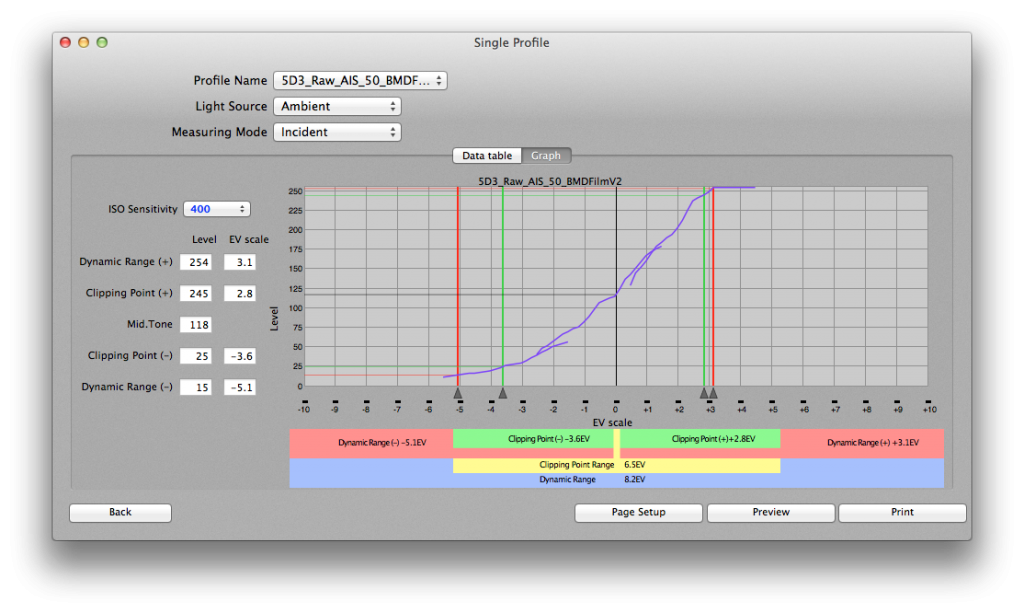
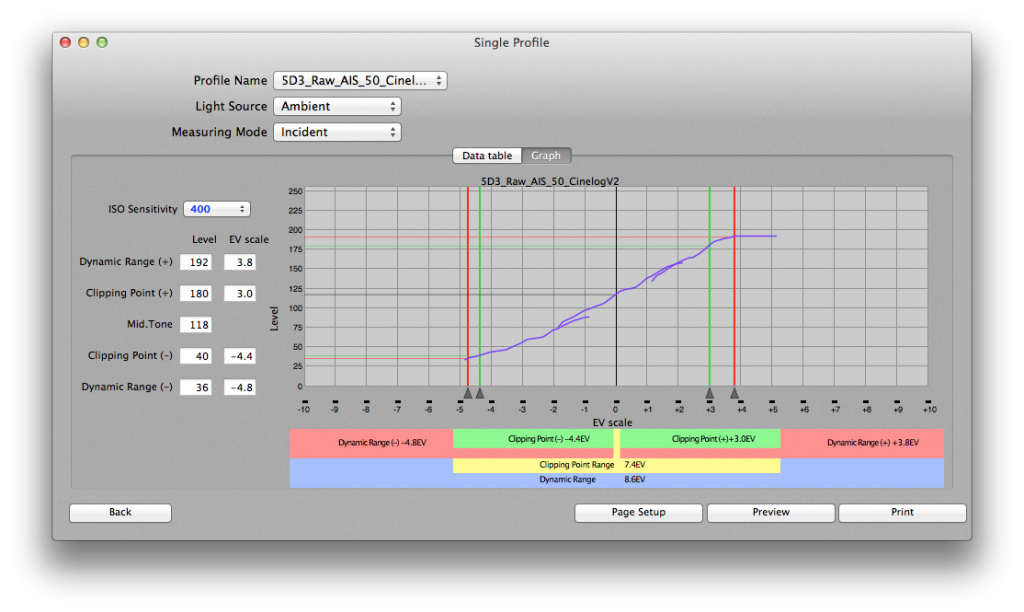
I recently acquired a Sekonic Exposure Target II, and I have been using my L-478D meter and the free Sekonic DTS software to map the dynamic range of my cameras. I followed the Sekonic methodology carefully and got these results.

H264:
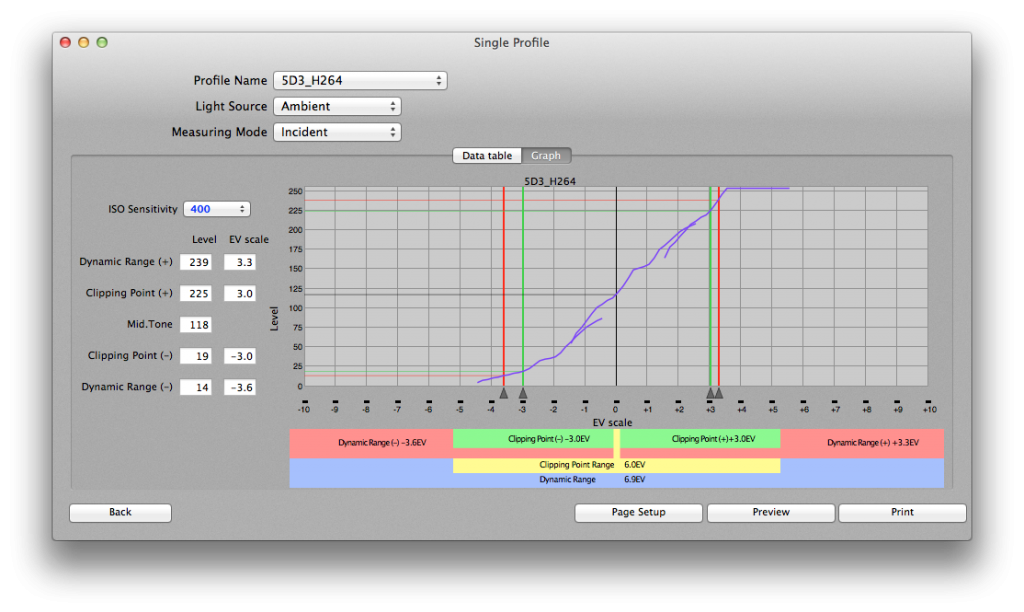
ScreenShot2014-12-05at74510AM_zpsba4c5600.png

BMDFilm (4K):
ScreenShot2014-12-05at74504AM_zps561cd9bf.png

CineLog:
ScreenShot2014-12-05at74157AM_zps210b6efc.png

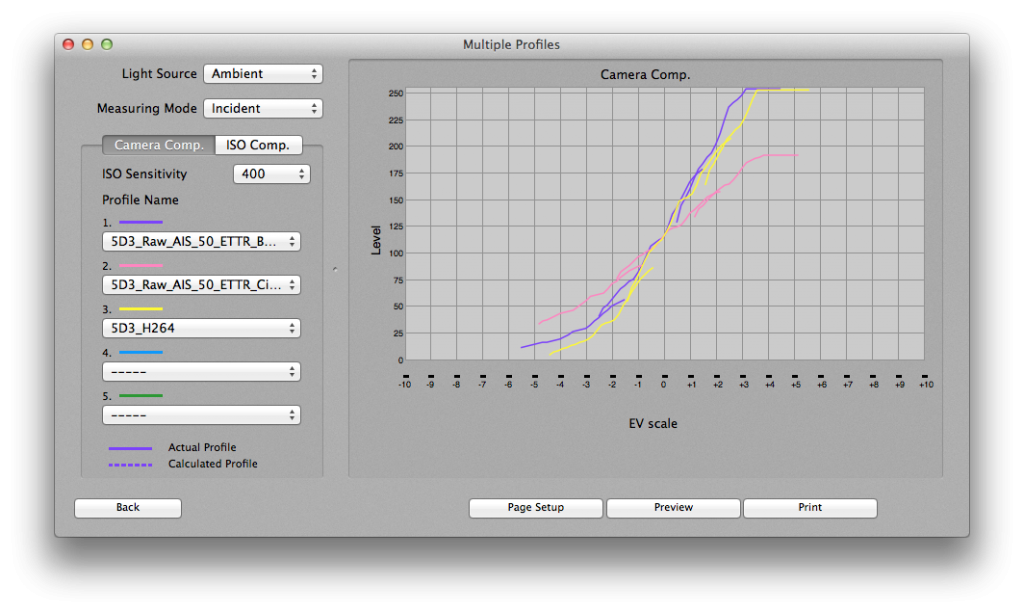
All three stacked:
Sekonic_DTS_5D3_zps02b22ae3.png

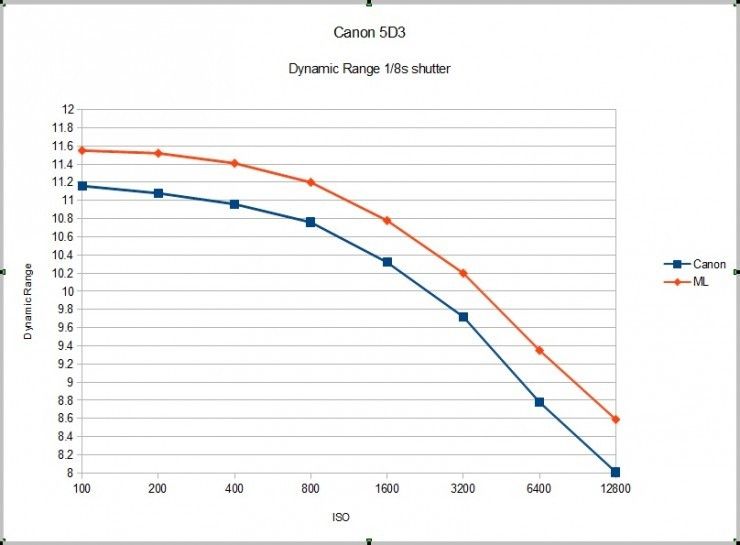
These are of course very different than the results we have all been seeing in other charts (this one appearing on NoFilmSchool):

Magic-Lantern-Canon-DSLR-Dynamic-Range-Improvement.jpg


I'm new to this (i.e. mapping dynamic range). Yet, I don't believe that I am doing anything wrong. I did the tests twice and got the exact same results. I also took the exported TIFs into Photoshop and used the eyedropper/info panel to set the clipping points, and I saw with my own eyes that there are fewer stops available than the common perception.

Anyone care to weigh in?
 
Last edited:
I don't really understand the graphs, but two comments that may help:
* How are you treating the RAW files? It matters A LOT
* I found that the 5D3+RAW has 1.3 stops more DR than the 5D3+H.264, but out of that there's a full stop that is absolutely monochrome: highlights become colorless and display banding one stop before they become clipped. Your target won't show those issues.
 
@Samuel

If you look closely, each line graph above is made up of three smaller lines. One represents the chart exposed according to the default Sekonic meter reading, one represents the same chart at plus three stops, and one is the chart at minus three stops. The software stitches these together using the overlap to map out a camera's total dynamic range. Here's the workflow: http://youtu.be/tdyosItw3Mk

The MLV files are processed in RawMagic 1.2.2, and then the DNGs are brought into Resolve (BMDFilm 4K color space). For the CineLog chart, I applied the CineLog LUT to all clips. Then I exported TIFFs and fed them into the Sekonic DTS software. Lastly, I tweaked my clipping points according to the 0-255 luminance values that I'm seeing in the TIFF files in Photoshop.

I did see your tests earlier and I am confused about why we are getting such radically different results. Since I'm working with a monochromatic chart, I'm not able to make observations about color reproduction at the extremes of the dynamic range like you did. My chart is there to pose the question whether the camera can read a gray at a certain point, or if it just clips to black of white.
 
Last edited:
OK, I think I get it.

I believe both RAW samples have more range in the shadows than the methodology is taking in: they are not actually clipping.
 
i'm using both my 5dm3 and sekonic to match to a 35mm film project as a b cam ...good job on the chart
 
Hello, the issue is your ISO sensitivity.
My understanding is that you have greatest sensitivity at ISO 100 and that it drops off radically after that.
 
It drops, but I wouldn't say "dramatically". My a7s loses half a stop of DR with every stop I increase the ISO.
 
I believe both RAW samples have more range in the shadows than the methodology is taking in: they are not actually clipping.

There is slightly more range in the shadows than is shown here. This was captured with -3 / 0 / +3 exposures but there is also an option in the software to do a test with -8 / -4 / 0 / +4 / +8. But I don't think that I have enough ND filters to do that one.
 
My understanding is that you have greatest sensitivity at ISO 100 and that it drops off radically after that.

You're correct, but as Samuel notes, it's not a major drop. The other chart that I posted suggests that it would be about 0.18EV. I shot it at ISO400 because it has an identical (or possibly lower) amount of noise to ISO100, and it gives you the two-stop bump:

5D_Raw_ISO_zps2b71590c.jpg


I'm finding that shooting raw with the intention of putting into BMDFilm Colorspace (or CineLog) requires a lot of light. I wouldn't call a raw-shooting 5D3 a low-light camera at all.
 
There is slightly more range in the shadows than is shown here. This was captured with -3 / 0 / +3 exposures but there is also an option in the software to do a test with -8 / -4 / 0 / +4 / +8. But I don't think that I have enough ND filters to do that one.
If your lights don't flicker, you can use the shutter speed too.
 
I'm finding that shooting raw with the intention of putting into BMDFilm Colorspace (or CineLog) requires a lot of light. I wouldn't call a raw-shooting 5D3 a low-light camera at all.

I've had considerably good results using 5d RAW in lowlight. It's the next best lowlight cam after A7s. And RAW cleans up really nicely.
 
Back
Top