5D MK IV - settings for Shinobi C-Log shooting and adding Canon LUT's to Shinobi

paddlr

New member
Newbie to video here (long time stills shooter).
Using my 5D IV with the Shinobi. I'm shooting C-Log on the camera, to card as its the Shinobi. I'm not quite sure what the input settings should be on the Shinobi. Log/HDR on? Then camera Canon, Gamma C-Log, then Gamut Rec-709? (I'm shooting for web and social media).
Then in the Monitor setting I assume I'd start with looking at Rec 709, then add LUT's as needed?

Which leads to importing LUT's. Canon has a bunch of LUT's to download, but then it seems like CanonLog_10-to-WideDR_FF_Ver.2.0.cube is the only one of two LUTs that are suggested to use in Premiere, so not sure why Canon included so many in the download?? The Shinobi manual says that the Shinobi only supports 3D LUTs, not the 1D LUT that works in Premiere and that I'm trying to view footage with on with the Shinobi. The manual says I need to convert the 1D LUT to a 3D LUT. Honestly, I'm feeling a bit lost here. In the folder of LUTs I downloaded from Canon, there are 3D LUTs, but I'm not sure what one would match the 1D LUT above.

Any help or links appreciated
 
So there's a lot to unpack here...

Firstly, Canon's LUT folder applies to all of their cameras, but I've gone on the record here saying those LUTs are questionable as I think they aren't optimized as best as they could be for each different camera's LOG (and the version of it, 1/2/3).

When I had the 5D Mark IV a few years back, I applied all 20-30 of them in post (or however many there were back then), and you could see that some worked much better than others. You'll have to experiment (especially if they have quietly updated them over the years).

Secondly - as far as monitoring - if you're going to apply the built-in "View Assist" LUT then you don't need anything on the Atomos because you wouldn't apply a LUT on top of a LUT. However, you won't know how any LUT you plan on using in post later will affect the exposure.

If you don't use "View Assist" then you should have a LOG image on the Atomos and then you can apply any LUTs you'd like to use to preview the image (which could be any of the ones in the Canon folder that you'd import into the Shinobi or other ones from third-parties).
 
I had a feeling that was the case, Canon LUT folder contains LUTs for a whole series of camera's, even though you have to specify which camera you have to navigate to that LUT folder. Strange. From what I can tell, there's really only one LUT in there that is useful for me, CanonLog_10-to-WideDR_FF_Ver.2.0.cube.

Ah, I think you've solved my confusion. I assume you're talking about the "View Assist" IN the camera menu. Got it! So the camera is already outputting the C-Log data to the monitor WITH the Canon LUT applied. Hence, as you say, I wouldn't apply a LUT on top of a LUT. So with "View Assist" ON in camera, on the Shinobi I turn Log/HDR off and I get no options for Camera, Gamma or Gamut, which are at, respectively, Standard, Rec. 709 and Rec. 709. If I want to apply a LUT in the Shinobi, I need to turn "View Assist" OFF in camera to get a C-Log feed into the monitor. Would I then turn Log/HDR on and select Canon, C-Log for Gamma and Rec 709 (or BT 2020??) for Gamut, then in Monitor apply the LUT?

Many thanks! You wouldn't believe how many Google searches I've gone through to get to your answer!
 
I never used the HDR section on the Atomos so I don't have any experience with it, but I don't think you'd benefit much using it with that specific camera.

In general, trust your eyes and experiment.

At the end of the day, anything you do on the device will only affect your monitoring, and you'll know when you're doing things right when what you are viewing during production/testing looks the same in post-production (before or after the LUT depending on your workflow).
 
By the way, IDR if "View Assist" travels with the HDMI...do you see a difference on the Shinobi when you toggle on/off?

If it does then everything I said applies, but if it doesn't then you'd only use VA on Canon's screen and the Shinobi would always require a LUT (unless you just want to see the flat image).
 
When I had the 5D Mark IV a few years back, I applied all 20-30 of them in post (or however many there were back then), and you could see that some worked much better than others. You'll have to experiment (especially if they have quietly updated them over the years).

Did you make an effort to flip through ReadMe_xDLUTxxx.pdf files? From V1.1 to V2.0?

Will post detailed exposition with examples, when I find the time.
 
Did you make an effort to flip through ReadMe_xDLUTxxx.pdf files? From V1.1 to V2.0?

Will post detailed exposition with examples, when I find the time.

Do find the time to post detailed exposition with examples.
 
Do find the time to post detailed exposition with examples.

0K, here we go, everything you wanted to know about Canon LUTs, but were afraid of asking.

Let's cover the basics.

What is color space?

A color space is a specific organization of colors. It may be arbitrary or structured.
Color space identifies a particular combination of the color model and the mapping function.

What is color model?

A color model is an abstract mathematical model describing the way colors can be represented as finite ordered list.
Adding a specific mapping function between a color model and a reference color space establishes a definite area within the reference color space, also called called gamut.

What is gamut?

Gamut, or color gamut is a certain complete subset of colors.
Transforming the image from original to destination color space reqires that colors out of gamut to be converted to approximate values within destination color space gamut. Simply trimming those colors to the closest in the destination color space would result in clipping of that part of the image.

What is gamma?

Gamma, short for gamma correction, is a nonlinear operation used to encode and decode luminance in image systems.
It is used to optimize the bandwidth used to transport the image while maximizing the visual quality of the signal.
Humans are more sensitive to shadow values and can't differentiate the highlights, as defined in Stewens power law for brightness perception.

Gamma characteristic of the display device has no connection with gamma encoding of images.
Most display devices are not capable of displaying the dynamic range that can be captured.
To adjust the reproduced image, gamma correction as artistic choice is used to determinate the reduced form of presented original image.

What is LUT?

Lookup table is used to transform input data into a more desirable output format.
It's an array that replaces runtime computation with a simpler array indexing operation.

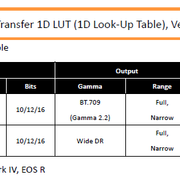
1D LUT is used for gamma transfer.

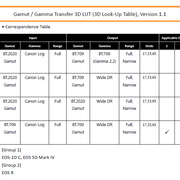
3D LUT is used for both gamut and gamma transfers.

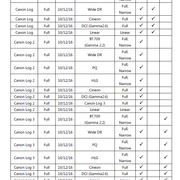
Usage cases for Canon Log, Log 2 Log 3.

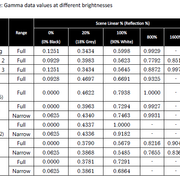
Canon Log covers scene linear up to 800 %, Log2 up to 6400 % and Log 3 up to 1600 %.

Click for full size.


Grid sizes

In Canon LUT package, grid sizes range in steps from 17, through 33 and up to 65.
The higher the grid size is, the transformation is more precise and more computationaly demanding.

Range

For reference, check data values at different brightness in previous table.

There is no option for Input range other then Full.

The Narrow output range version is a curve that compresses the full range of input signal, outputs over 100 % - including superwhites and subdarks, to fit within legal range.
This type of LUTs are used when interpreting raw files, for eg. in Canon Cinema RAW Development, Adobe Premiere Master clip Canon Cinema RAW Light Source Settings etc. They are also used when there was no way to monitor the scene with destination display settings and/or no control over lighting conditions and ratios. Use as starting point for color correction.

Full output range is used to prescribe to legal range, clipping the superwhites and subdarks.
Use when the scene was monitored using destination LUT while having full control over the lighting

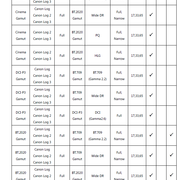
In the latest LUT package dated 201911 there is no Full to Narrow LUTs and no Full to Full CanonLog_XX-to-BT709_FF_Ver.2.0, CanonLog2_XX-to-BT709_FF_Ver.2.0, CanonLog2_XX-to-CanonLog3_FF_Ver.2.0, CanonLog3_XX-to-BT709_FF_Ver.2.0 and [Gamut]_[Gamma]-to-BT709_BT709_XX_FF_Ver.1.X LUTs equivalents.

File naming conventions

Depending on the dimensionality of the LUT, here is the nomenclature:

Gamma Transfer 1D LUT Version 2.0 and 2.1 and the latest dated 201911

[Gamma]_[BitNum]-to-[Gamma]_[Range][Range]_[Version].cube

1. Input gamma
2. Input bit depth
3. Output gamma
4. Input range (N:Narrow, F:Full)
5. Output range (N:Narrow, F:Full, L:Linear)
6. Version

Gamut / Gamma Transfer 3D LUT Version 1.1 and 1.2 and 2.0

[Gamut]_[Gamma]_-to-[Gamut]_[Gamma]_[GridNum]_[Range][Range]_[Version].cube

1. Input gamut
2. Input gamma
3. Output gamut
4. Output gamma
5. Grids
6. Input range (N:Narrow, F:Full)
7. Output range (N:Narrow, F:Full, L:Linear)
8. Version

Here are the correspondence tables, click for full size.


Here are some examples, click for full size with RGB parade.

4kDCI 12 bit CRL 24 fps 180° ISO 200 DL 8000K ND 2 PI on
CN-E 18-80 @ 80mm T4.5 IS off

CRL to Cinema Gamut / Canon Log 2


CRL LUT to BT709 / WideDR FN V1.1


CRL LUT to BT709 / WideDR FF V1.1


CRL LUT to BT709 / WideDR FF V2.0


CRL LUT to BT709 / WideDR FN V1.1 graded


CRL LUT to BT709 / WideDR FN V1.1 video pop


Now, something interesting. If you compare CRL with MXF, there is a difference of 2 stops.

The same settings are used for CRL and MXF.

CRL to BT709 / Canon Log 3


MXF BT709 / Canon Log 3


MXF LUT to BT709 / WideDR FN V1.1


MXF LUT to BT709 / WideDR FF V1.1


MXF LUT to BT709 / WideDR FF V2.0


To conclude, artistic effort will always be needed when captured range of brightness exceeds the capabilities of the display.
 
P.S. I do appreciate your time and formatting all of the above, but it's unnecessary because I didn't ask to know anything about Canon's LUTs (nor did I ask for any of your advice).

I've seen the above information (which Canon has updated over the years), and I have seen other articles in their separate "Knowledge Base", but nothing changes about what I said.

My two main points stand:
(1) Some LUTs worked better than others (and I was not only referring to the ones intended for the IV's LOG but also ones for C-Log2/3 that I ended up using on the IV).
(2) It would take Canon 2 minutes to separate all of them for each camera instead of potentially confusing many people. It's bad management.

When I worked with the LUTs (and hundreds of others) I worked with them in post-production in my software on my own footage, and I don't rely on theoretical suggested applications from a company I already don't trust to be providing the best product(s) with our best interest in mind.
 
I think you don't have a clue.

What's with you and these Canon LUTs? Are you the one who made them? lol

What am I afraid to ask about what?

If I want to know something, you do understand that I am allowed to Google and read Wikipedia too, right? (I was curious about your particular syntax so I researched your introductory information.)

___

There are various copied-and-pasted bits and pieces mixed in with I'm assuming your own thoughts and/or slightly reworded sections.

Let's cover the basics.

What is color space?

Color space identifies a particular combination of the color model and the mapping function.

First sentence of the third paragraph: https://en.wikipedia.org/wiki/Color_space

Color Space_Wikipedia.jpg

Adding a specific mapping function between a color model and a reference color space establishes a definite area within the reference color space, also called called gamut.

More Color Space_Wikipedia.jpg
 
Last edited:
I'll leave it at this...

I'm still not sure what your point is, but I'm assuming it's something more personal from an exchange we had in the past rather than anything else because this one here doesn't make much sense.

Instead of focusing your energy in helping the OP, you're going on about something here on me but I don't know exactly what.

I'm basically sharing that I don't like how some of the LUTs look on the camera, the ones made for it - which many people have said the same in the past - and that I'd also like Canon to separate their LUTs instead of providing one folder for all the cameras, and you're telling me there is nothing magical in the LUTs and providing information from Wikipedia while expressing that I don't have a clue.

This is one of the more confusing and least favorite arguments I have had on here. lol
 
Hey NorBro, I apologize if you think it's personal attack and I'm sorry if I have said something in the past that offended you.

We are just talking here and I appreciate all the input on the subjects we are discussing here on the forum.

I consider you to be quite a contributive member, in matter of fact, an icon of this forum.

I respect your opinion, even if sometimes is different then mine. That doesn't diminish your value in my eyes.

Also, I apologize for my syntax, I'm not a native English speaker nor do I live in English speaking country.

I apologize that I did not cite a bibliography, I was trying to establish definitions of basic building blocks that are foundation of LUT concept.

Of course that you can use Google and Wikipedia, that's the beauty of the times that we are living in.
Not only that, today you can follow lectures on almost any subject in the most prestigious universities around the globe.

I myself was in position to struggle with the output of Canon Log recordings and delivered quite a few flawed projects before I become comfortable around the subject. That was my motivation for writing that post.

To conclude, I appreciate our think tank we have here, where I learned a lot.

At the end, a little sidetrack that is trademark of this forum.

There were a ton of Nicefoto 120 cm softboxes offered on Amazon (EU) and when I wanted to order (this Saturday), they were all gone. So, if someone knows a store in EU that have them, please let me know.

I regret for not purchasing on Black Friday, thinking that they would slash the prices more near the year end.

Now I got project that requires shooting a few rooms in a Castle right after Christmas, but those softboxes are nowhere to be found.
 
Back
Top