
Navigation
Install the app
How to install the app on iOS
Follow along with the video below to see how to install our site as a web app on your home screen.
Note: This feature may not be available in some browsers.
More options
You are using an out of date browser. It may not display this or other websites correctly.
You should upgrade or use an alternative browser.
You should upgrade or use an alternative browser.
50Mbps AVCHD Fast Action 3-Frame GOP Patch
- Thread starter Lpowell
- Start date
Yes, 60p has inherent advantages in capturing rapid movement with twice as many frames as 30p. If the GH1 had a 100Mbps Intra-frame encoder that recorded at 60fps, it would be the preferred choice for fast action videos.
Unfortunately, the 60p AVCHD encoder has technical limitations that can degrade its image quality on rapidly moving objects. In order to handle a 60p video stream with practical efficiency, it records only about two key frames (I-frames) per second. For the rest of the frames it encodes only the pixels that have changed from previous frames (P-frames). When there's a lot of fast motion in a scene, the P-frames can require so much data to encode that there may not be enough bitrate left to encode the I-frames in high quality. In extreme cases, there will be visibly degraded regions where the motion looks muddy.
The direct way to improve image quality is to increase the encoder's available bitrate, but with the GH1, there are reliability issues that impose limitations on this approach. An alternate approach for handling fast motion is to increase the number of I-frames in the video. This restricts the amount of motion that can occur between key frames, which can significantly reduce the bitrate required to encode the P-frames.
What I discovered working on this patch is that if I reduced the AVCHD frame rate from 60p to 30p, I could dramatically shorten the GOP to just three frames, producing ten key frames per second. At such a quick rate, there's very little motion between key frames, and the P-frames can be efficiently encoded at relatively low bitrates. That gives you image quality close to what you'd get with an Intra-frame encoder at twice the bitrate.
The shortest GOP I've been able to make work reliably at 60p is 12 frames, which produces five key frames per second. Check out the link in my signature for more details.
Please could you explain what the purpose of preset bitrate 1 & 2 is? What effect does it have on a G2?
Preset bitrate 1 and 2 are patches that are used to stabilize the initial bitrate of the AVCHD encoder.
Thanks
I've been experimenting with the 50Mbps AVCHD Fast Action 3-Frame GOP Patch . if I raise the GOP to 7 I don't get any problems recording low light for extended periods on g2 or gf1. Is there any point to this/advantage over high reliability settings. Any input much appreciated.
alainmaurel
New member
I have a G2 with the G2___V11 firmware. I have loaded LPowell - Fast Action 3-Frame GOP Standard Patch v2.zip into the latest Ptools using the I button. I have renamed the software G2___V12, put it on the SD card, put that in the G2, switch it on, push the play button and NOTHING happens, as if the camera does not recognize the software. I did not have this problem with the GF1. Any clues?

I have a G2 with the G2___V11 firmware. I have loaded LPowell - Fast Action 3-Frame GOP Standard Patch v2.zip into the latest Ptools using the I button. I have renamed the software G2___V12, put it on the SD card, put that in the G2, switch it on, push the play button and NOTHING happens, as if the camera does not recognize the software. I did not have this problem with the GF1. Any clues?
hi first thx for your work and second I have the same problem with my g2 as alainmaurel. I downloaded the last version of ptool then I downloaded your settings. I used the G2_v11 firmware and then I clicked the I button and saved the firmware. Then I renamed it to G2_V12. Then I deleted my SD card and recharged my battery and then I pressed 5 sec the play button. Does somebody have a solution?
thank you
Thx for your fast answer. I renamed it like G2___V12. I also tried other setting packs. But nothing worked. If I start the camera and push the play button it only says no pictures on the camera. Is it important to write it G2___V12.bin, normally not or? The file is a bin.
Its my first firmware update on my camera I had from the begginning V 1.1 , maybe this helps
Its my first firmware update on my camera I had from the begginning V 1.1 , maybe this helps
sorry that to bother you but I reformat the SD card. My camera is fully recharged and I put this this file in my root folder: G2__V12 (2 underlines). I also opened the tool as an admin and then renamed the G2__V11 to G2__V12. I downloaded the firmware from http://panasonic.jp/support/global/cs/dsc/download/fts/index2.html. If you extract the orginal file there are 3 underlines like this G2___V11. Now I also tried to renamed it to V11 and V10. I made a picture. I already found out that in the tool there is a hint: Available patches for G2 v1.10, maybe thats the reason?
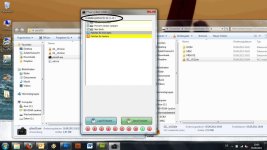
Now I tried it with 3 diffrent SD cards with diffrent classes and also tried it with renamed files like this G2___V12.bin, becauser after unzip the file from panasonic homepage the firmware file is named like G2___V11.bin this and I also tried it with a diffrent increment number 20 instead of 10. I always recharged the battery during the testing.
Now I tried it with 3 diffrent SD cards with diffrent classes and also tried it with renamed files like this G2___V12.bin, becauser after unzip the file from panasonic homepage the firmware file is named like G2___V11.bin this and I also tried it with a diffrent increment number 20 instead of 10. I always recharged the battery during the testing.
Last edited:
thx lpowell I already tried everything and I forgot to tell you that I bought the camera in June 2011. Vitality told me that the new G2 are unhackable. So sorry that I stole your time. If there are new news about development I will try it next timehttp://www.personal-view.com/talks/profile/1/Vitaliy_Kiselev

havasuphoto
Well-known member
No.Is there any way to get 60fps at 1080?
The MJPEG settings in the INI file are completely independent from the AVCHD settings. MJPEG and AVCHD settings do not affect each other.Does these mjpeg settings affect the avchd?
The MJPEG settings in the INI file are completely independent from the AVCHD settings.
Does that go for all your patches? And would this be the best patch for shooting skateboarding in 1080p pal, where you shoot alot of short clips and can't format after each shot?