FS7: 4K Over 3G-SDI from FS7?

It isn't CineAlta, so that's what worries me. The audio could be as bad as the HVR-V1U (unusable for anything but bird calls and female speech) and I'd have to reject it.

Audio could be another reason it's priced much cheaper than the F5.

Exatly - it isn't CineAlta, and it's priced lower, and as you say, the performance may not match that of the F5, but that doesn't mean it's defective and qualified for a return - it means you didn't pay for an F5.

I don't know how this test of yours works. What exactly do you need to do in terms of testing? Do you have a reference audio file you want to record being played out of a good speaker? Is a Mackie HR824 good enough for an output? Is a Rode NTG3 good enough of a microphone? If so, and it's short, I might be able to give it a whirl for you.

Don't buy an $8,000 product because you're too cheap to spend $300 on a test rental and then return it as defective for not performing like a $16,000+ product. That's just wrong.
 
All I ask is that its audio system perform as good as a $10 DAC. ANY digital audio recording device that sports an XLR input connector has no technical or economic excuse to be less than perfectly flat from 20-20,000Hz. It's technically IMPOSSIBLE to deviate from flat without introducing additional circuitry to filter out the low and high frequencies to end up with something like the HVR-V1U's response.

The testing is easy--a child could do it. It's accurate because a software program (freeware) does the testing automatically. All the tester does is provide a decent audio DAC (most production studios have at least something as good as an M-Audio Delta card in one of their Macs), or burn the test signal to a CD audio disc and play it in a CD player, connected to the camera's mic inputs. The only part requiring thought is how to set the levels correctly, but the program, if used with a sound card, can monitor what's coming back in the loopback and tell you if it's clipping, or too low. Oh, and make sure any wind filter or low cut filter is turned off in the camera's audio menu.

There's a freeware version of the testing software here:

http://audio.rightmark.org/download.shtml

One can run it on a PC and output the audio to the camera mic inputs (turn off phantom power first!). Record the test signal, dump the video clip to an NLE, export the audio as a WAV file, and load that file back into RMAA and click 'analyze wav file'. Then simply click on the icon that looks like a notebook to generate a html report that looks like this:

http://sub.basspig.com/basspig/PMW-EX1 New Firmware.htm


It's not that I'm "too cheap" to try a rental. I'm barely keeping my head above water and paying my property taxes! Every dollar I don't spend, is a dollar more that will go to paying the monthly payments on the camera. A $400 rental would pretty much wipe out my chances of buying the FS7 this year and another year would pass before I can come up with the funds again, unless I have some unusual good fortune.
 
Not able to do your test presently, but may find the time closer to the weekend.

It's not that I'm "too cheap" to try a rental. I'm barely keeping my head above water and paying my property taxes! Every dollar I don't spend, is a dollar more that will go to paying the monthly payments on the camera. A $400 rental would pretty much wipe out my chances of buying the FS7 this year and another year would pass before I can come up with the funds again, unless I have some unusual good fortune.


That 's a headscratcher for me. I can't imagine running a business with an annual make or break margin of $400. If it were me, I'd reassess who my clients are and what I'm charging. The move to 4k capability isn't free for us owner operators, and I believe it's perfectly reasonable to charge a premium to clients for that capability for as long as the market will bear to recoup the expense. So I see a 4k camera purchase as an investment in a capability that reaps dividends. If within your business you won't make sufficient profit from upgrading cameras, then I wouldn't.

How is it that you can afford a Shogun but $400 will break you? If I had your business margins I'd be looking for a new line of work. Or a fallout shelter in Wyoming, considering what's apparently happening to the world according to your blog.
 
One of the reasons I'm doing this is for the section 179 deduction. I got nailed real hard on taxes this year because I didn't have any sect 179 deductions last year. So even if the camera takes years to earn back the purchase price, I'd rather have the camera than give the money to an evil empire that is funding activities that run counter to my ethics.

I'm not in LA and I don't know anyone. Plus my competition are all 40+ years younger and far more healthy and energetic. I do better in concert halls and cathedrals, recording classical musicians and organists. There's just not a lot of high paying work here in farm country.

The Shogun was under $2K and I paid for it with the proceeds from my amplifier repair business, which comprises 90% of my income now. I finally broke the $10K gross income barrier last year for the first time since I retired.
 
All I ask is that its audio system perform as good as a $10 DAC. ANY digital audio recording device that sports an XLR input connector has no technical or economic excuse to be less than perfectly flat from 20-20,000Hz. It's technically IMPOSSIBLE to deviate from flat without introducing additional circuitry to filter out the low and high frequencies to end up with something like the HVR-V1U's response.

The testing is easy--a child could do it. It's accurate because a software program (freeware) does the testing automatically. All the tester does is provide a decent audio DAC (most production studios have at least something as good as an M-Audio Delta card in one of their Macs), or burn the test signal to a CD audio disc and play it in a CD player, connected to the camera's mic inputs. The only part requiring thought is how to set the levels correctly, but the program, if used with a sound card, can monitor what's coming back in the loopback and tell you if it's clipping, or too low. Oh, and make sure any wind filter or low cut filter is turned off in the camera's audio menu.

There's a freeware version of the testing software here:

http://audio.rightmark.org/download.shtml

One can run it on a PC and output the audio to the camera mic inputs (turn off phantom power first!). Record the test signal, dump the video clip to an NLE, export the audio as a WAV file, and load that file back into RMAA and click 'analyze wav file'. Then simply click on the icon that looks like a notebook to generate a html report that looks like this:

http://sub.basspig.com/basspig/PMW-EX1 New Firmware.htm


It's not that I'm "too cheap" to try a rental. I'm barely keeping my head above water and paying my property taxes! Every dollar I don't spend, is a dollar more that will go to paying the monthly payments on the camera. A $400 rental would pretty much wipe out my chances of buying the FS7 this year and another year would pass before I can come up with the funds again, unless I have some unusual good fortune.

Hi Basspig,

I'm not really an audio guy, but I could probably run the test for you. However, we're an all Mac shop, so I'd need you to send me an audio file. I'll then run it directly into the camera, and upload the audio from the recording for you to analyze.

I'd be sending it out via a Blackmagic Ultrastudio 4k. My assumption is that is a sufficient DAC for these purposes.

I will note that a frequency response that has problems below 50Hz doesn't really cause me any problems. I am rarely recording any audio other than voices—and our audio guy ends up rolling off the low end of that anyway. We've been using the FS7 for about 6 months and haven't noticed any problems with sound.
 
Mac should not be an obstacle. Just as long as the sound card is at least SoundBlaster quality (most every computer card I've tested is flat from 20-20KHz), which I'm pretty sure the Ultrastudio 4K is, then the test should be accurate enough to determine if the FS7 can be used for wide range music recording.

I've uploaded the calibration and the test file by using RMAA's "Generate wav" command and uploaded them to my Dropbox:

https://www.dropbox.com/sh/2t0uk6d1syhi6gq/AADz6E3I5sjsxK54XM6ZWugEa?dl=0

Use the calibration file to set the record level. Since we're testing the mic inputs, you'll need to turn off phantom power and set the attenuators for as much attenuation as possible. (On the EX1 that makes the mic inputs -11dB) Not sure what FS7 menu allows.

Play the calibration tone and set the output of your Ultrastudio such that the level just approaches 0dB fs on the FS7's meter (assuming there are level meters like the EX1). We must avoid clipping at all costs, as that would invalidate the test and RMAA will produce an error.

Once the levels are set, load up the test signal, start the camera recording and play the test signal (second file). It's only about 10 seconds long. Once recorded, dump the video clip to an NLE, export the WAV and send it to me. I'll run it through RMAA and that will generate the graphs I linked to earlier in this thread.

Don't forget to restore your original camera settings to what they were before testing!

Thank you for your help with this. It is much appreciated.
 
The results look VERY promising, but all the right channel data looks out of whack. Did you test only the left channel?

Also, was this mic input or set to line level?

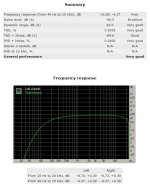
Here's the compiled results from your test signal:

https://www.dropbox.com/s/ru6nkclcqo0rula/PXW-FS7.zip?dl=0


I note that the frequency response is quite good (at least for the left channel... the right channel gets a 'very poor' rating, probably because nothing was sent to it. If that was the test setup, then that explains it. Looking at your test recording in a wav editor, I see there is no signal in the right, so that explains the "poor" scores. Ignore them in the summary at the top of the document.

But from this, it is apparent that (assuming this WAS the mic input) the frequency response is very good. Of particular note is the dynamic range and signal to noise. They are even better than what I measured on the PMW-EX1. This is good news! Are you sure this is the mic preamp and not set to line level? Just want to make sure, because the s/n is better than expected!
 
One of the reasons I'm doing this is for the section 179 deduction. I got nailed real hard on taxes this year because I didn't have any sect 179 deductions last year. So even if the camera takes years to earn back the purchase price, I'd rather have the camera than give the money to an evil empire that is funding activities that run counter to my ethics.

I'm not in LA and I don't know anyone. Plus my competition are all 40+ years younger and far more healthy and energetic. I do better in concert halls and cathedrals, recording classical musicians and organists. There's just not a lot of high paying work here in farm country.

The Shogun was under $2K and I paid for it with the proceeds from my amplifier repair business, which comprises 90% of my income now. I finally broke the $10K gross income barrier last year for the first time since I retired.

Every year in December, I try to take a look at how I did. I'll add up all my invoices, and subtract my expenses (the bonus
to this is I have a really good jump start on my taxes). Then I can have a really good idea of what I am going to owe in
'self employment' taxes and the like. Most times, it is very beneficial for me, as I may find that I need to spend a couple
thousand dollars that I would otherwise end up owing to the government. So, as long as I end up buying before the end of
the year, I can section 179 it. This past year, I had my best year ever, and even after doing a little 'time specific' spending
for business upgrades, I ended up maximizing my IRA contribution (which you can do right up to tax day in April).


Even if you didn't have any section 179 expenses last year, if you only made around 10K it shouldn't seem like
you'd be hit horribly hard though? Do you have a home office? Business vehicle (take milage expenses on your
vehicle when you are driving to any jobs?) Business cell phone (and service)? Web site? Cost of buying physical
media? (DVD's or thumb drives with videos on for the clients)? Any of those things and many others can be 'business costs'
and subtract from your 10 grand 'gross' to give you less of a tax burden. Maybe I am misunderstanding something here?
 
The results look VERY promising, but all the right channel data looks out of whack. Did you test only the left channel?

Also, was this mic input or set to line level?

Here's the compiled results from your test signal:

https://www.dropbox.com/s/ru6nkclcqo0rula/PXW-FS7.zip?dl=0


I note that the frequency response is quite good (at least for the left channel... the right channel gets a 'very poor' rating, probably because nothing was sent to it. If that was the test setup, then that explains it. Looking at your test recording in a wav editor, I see there is no signal in the right, so that explains the "poor" scores. Ignore them in the summary at the top of the document.

But from this, it is apparent that (assuming this WAS the mic input) the frequency response is very good. Of particular note is the dynamic range and signal to noise. They are even better than what I measured on the PMW-EX1. This is good news! Are you sure this is the mic preamp and not set to line level? Just want to make sure, because the s/n is better than expected!

Yep. I had the input set to line instead of mic. I'm doing the test again, and I'll post a new file.
 
I'm very alert to deductions, and I've used every one in the book pretty much. When I had my broadcast engineering business, I was able to deduct vehicle mileage. Nowadays, I don't drive much. Often, when I do go out, my wife does the driving (her reflexes are faster and she has eyesight like a hawk).

But for office deduction, I don't take the home office deduction because it's a major audit flag. I do deduct all the expenses, every postal receipt, every toner cartridge, any new computer gear, etc. In 2009, I did rather well on it, as I had $18K of deductions (I had bought the EX3 and the 8XS lens and a few batteries and SxS media that year). But last year, all I bought was a spectrum analyzer for my amp repair business. And we got hit hard this April on taxes. :(

But it looks like if I can arrange the financing with multiple credit accounts, I will buy the FS7, and pursue making demo material for my friend's home theater design business, Kipnis Studio Standard. They like lots of the kind of shooting I do, of towns and nature and wildlife, which makes great 4K demo and sells a lot of $100K+ projectors from Sony to Christie Digital. And imagine what I can do with 14 f-stops...
 
Yep. I had the input set to line instead of mic. I'm doing the test again, and I'll post a new file.


Can you test both channels this time? That would improve the score and give a better picture of how consistent between channels and also give a crosstalk number that is meaningful. Thanks!
 
I'm very alert to deductions, and I've used every one in the book pretty much. When I had my broadcast engineering business, I was able to deduct vehicle mileage. Nowadays, I don't drive much. Often, when I do go out, my wife does the driving (her reflexes are faster and she has eyesight like a hawk).

But for office deduction, I don't take the home office deduction because it's a major audit flag.
All I'll say is that it's a totally legit deduction (assuming you have an actual home office)
so I could care less if it's a major audit flag. It's legal and I'm taking it.....and breaking no
rules by taking it. If they audit me, they can come see that I really have a 180 square foot
office in my home, where I have an edit bay, gear storage, shelves of royalty free music
and graphics, green screen, DVD printer, fax, scanner, and the like, with a separate door
for clients from the main house door. Not sure how they could claim it was anything but
a home office for my business. Now if you don't have a home office, I totally understand,
but if you do, you shouldn't be scared off of taking a perfectly legal deduction. Especially
if you are grossing 10K. Trust me, the IRS isn't going to be looking to go after businesses
that make 10k, when they look to do their audits.
 
Alright, here's a new file. I've done both channels this time. Camera is now on the mic input.


https://www.dropbox.com/s/vx2o0comvxa3p88/Audio_Test_2.wav?dl=1


https://www.dropbox.com/s/y0ithvd1hueommj/PXW-FS7 Mic In.zip?dl=0


Here's the result, but I think it's invalid. It appears that the waveform is SEVERELY clipped. The level is low, so probably there was insufficient attenuator in line with the mic channel (on EX1 you can set the mic attenuator to as large a signal as -11dB, which is close to line level), so the front end preamp was clipping hard, while the downstream gain was set to -6dB or thereabouts.

I'm guessing the mic preamp was at -41dB gain and your line level signal overdrove it into clipping.

Another important thing to do is make sure the AUTO LEVEL is OFF.

I'm looking at page 40 of the manual and can't find anything about an attenuator.. which raises the question, what if you have to record something very loud like pyrotechnics or a rock band?

At any rate, we need to get the test signal amplitude down to mic level, or find a way to reduce the sensitivity of the front end mic preamp through setting attenuators. On the EX1/3 this is on the Audio menu, but a quick glance at the FS7 manual doesn't turn up this feature.
 
These are the audio menu options along with my settings in bold.

CH1 Input Select
INPUT1 / Internal MIC / Shoe 1


CH2 Input Select
INPUT1 / INPUT2 / Internal MIC / Shoe 2


INPUT1 Reference
–60dB / –50dB / –40dB
INPUT2 Reference
–60dB / –50dB / –40dB


Audio Input Level 0 to 99 (60)


CH1 Wind Filter On / Off
CH2 Wind Filter On / Off


Limiter Mode
Off / –6dB / –9dB / –12dB / –15dB / –17dB


AGC Mode
Mono / Stereo


AGC Spec
–6dB / –9dB / –12dB / –15dB / –17dB


1kHz Tone on Color Bars On / Off


CH1 Level
Audio Input Level / Side / Lvl+Side


CH2 Level
Audio Input Level / Side / Lvl+Side
 
https://www.dropbox.com/s/y0ithvd1hueommj/PXW-FS7 Mic In.zip?dl=0


Here's the result, but I think it's invalid. It appears that the waveform is SEVERELY clipped. The level is low, so probably there was insufficient attenuator in line with the mic channel (on EX1 you can set the mic attenuator to as large a signal as -11dB, which is close to line level), so the front end preamp was clipping hard, while the downstream gain was set to -6dB or thereabouts.

I'm guessing the mic preamp was at -41dB gain and your line level signal overdrove it into clipping.

Another important thing to do is make sure the AUTO LEVEL is OFF.

I'm looking at page 40 of the manual and can't find anything about an attenuator.. which raises the question, what if you have to record something very loud like pyrotechnics or a rock band?

At any rate, we need to get the test signal amplitude down to mic level, or find a way to reduce the sensitivity of the front end mic preamp through setting attenuators. On the EX1/3 this is on the Audio menu, but a quick glance at the FS7 manual doesn't turn up this feature.

Let's try again. I made some adjustments and I looked at it on a waveform this time. it no longer appears to be clipping.

https://www.dropbox.com/s/sd1zqlnq5eje3g3/Audio_Test_4.wav?dl=1
 
Let's try again. I made some adjustments and I looked at it on a waveform this time. it no longer appears to be clipping.

https://www.dropbox.com/s/sd1zqlnq5eje3g3/Audio_Test_4.wav?dl=1


This looks MUCH better!

https://www.dropbox.com/s/1qzhhdi7n8v4oie/PXW-FS7 Mic In test 4.zip?dl=0


The THD+Noise probably did poorly because of a ground loop. There's a considerable 60Hz component in one of the graphs, which suggests unbalanced audio or a ground loop of some sort. I doubt the camera is producing it, so it's probably an anomaly of the test setup and not a camera fault most likely.

Overall, it looks like on s/n ratio and bandwidth, it even beats the EX1 quite handily.

My only concern is the input reference:

INPUT1 Reference
–60dB / –50dB / –40dB
INPUT2 Reference
–60dB / –50dB / –40dB


I run my mics typically at -29dB when I'm recording marching band (Memorial Day for example) from the sidelines. At -40dB, my Rode NT4 would be too 'hot' with the percussion section passing in front of the mic. For chamber orchestra and church organs, I use -35dB for my attenuator. The above "reference" settings... it would be interesting to find out how these relate to attenuation. They seem way too sensitive, if I understand,
correctly, how they work .

Page 16 of the FS7 manual doesn't show what the values for Input Reference can be set to. I would hope they have levels down to -11dB, because I've encountered some hot signals while filming civil war reenactments with live cannons.

But overall, it looks like the audio system doesn't have to play second banana to anything. It looks good and you did a great job putting in the time and effort to get this test done right. Thank you for your help!
 
My FS7 arrived today, so I anxiously tested it, both in the lab and with RMAA. Sadly, my results differed greatly from those that ChristopherA posted. I'm down more than 7dB at 20Hz and the rolloff starts well up into the female vocal range.

I double checked to make sure the Wind Filters were turned off, AGC was off and all levels were manual. My test signal level was -8dBm and the camera's reference level was set at 40dB.

ChristopherA, can you relate your audio settings in addition to the reference levels? I can't seem to replicate your results. My results are below.


RMAA FS7 Test.JPG

In the lab, I found that the input headroom is very good though. a -3.95dBm level signal at 1KHz was the limit. And the side volume controls were set at "3.1" (just a smidge above 3) to get below clipping.

I had to keep lowering the headphone volume, as the headphone amp kept clipping. Finally dialed that down to '5' to get the maximum level into the mic inputs without clipping being visible on the oscilloscope. In the lab, a square wave test signal was tilted, indicating a poor low frequency response, so I assumed it was the headphone amplifier that was at fault. My next stop was to the editing suite, where I ran RMAA and recorded the test signal. Used the MPEG 422 50 mode so I could open the file in Premiere CS6 and save the audio wav file to import into RMAA. The graph above was the result.

I don't know how you managed to get a flat response in the mic mode of the inputs. I'd like to know what the rest of your settings were to achieve the flat bass response in your graphs. I hope this is not a difference in serial numbers and manufacture quality! My camera has firmware 2.0. What is yours running?

I'm going to go back and test the Line level input mode, just to see how it compares. But I need to get that mic input response flat, like on your test result and I'd like to know how you accomplished that. I'm still under 2 hours on the clock, so I can return it for refund if necessary, but I'm hoping I can salvage the situation--that I'm doing something wrong here causing the rolloff.
 
Back
Top