GH4 4K crop format of the GH4

JohnB

New member
I was surprised to find that when I shoot 4K 16:9 format on my GH4 the image area is only 1/2 (or very close to that) of the width of the still image format. And when I read this forum a bit I see someone mentioning a 2.3X crop. So why the major cropping? Does this result in noticeable loss of sharpness? This cam is only using less than half of the (small to begin with) sensor area AND lens circle area!

How do you serious cinema users of this cam find the image sharpness?

I don’t have a 4K TV to test the GH4 cinema image quality. If sharpness remains excellent after this severe cropping it brings up an interesting advantage for extreme telephoto use. Mount the Lumix 100-400mm and it gives an equivalent of 800mm+ angle of view (comparing to full frame 35mm) when used for stills. But when used for 4K 16:9 cinema the focal length will be increased further, to 1600mm+.

Maybe some or even many 16mm format lenses would cover the crop format. Is there a post or thread here with specific lenses that cover?

On the other hand finding a good ultra-wide for cinema use could be a problem. What are any of you using to go as wide as possible? Even the 7-14mm Panasonic lens, at 7mm ought to be about 28mm angle of view equivalent in 4K 16:9 due to the crop factor.

Some of these issues make me wonder if I might be better off with another camera with 4K ability, but I think all of the few 4K DSLR’s crop the video image to one degree or another.
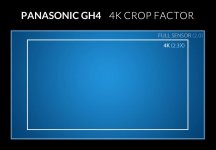
 
Here is the GH4 sensor crop for 4K UHD video...

Panasonic_GH4_4K_Crop.jpg

Which is really not that big of a deal as long as you've got the right lenses for this format, or own a Speedbooster to use APS-C or Full Frame 35mm lenses.
 
A 7-14mm Micro 4/3 zoom lens ( like the Panasonic or Olympus zooms ) has the same Field of View as a Full Frame 14-28mm zoom when shooting Micro 4/3 photos, and the same as a Full Frame 16-32mm zoom lens when shooting 4K UHD video.
 
I was surprised to find that when I shoot 4K 16:9 format on my GH4 the image area is only 1/2 (or very close to that) of the width of the still image format. And when I read this forum a bit I see someone mentioning a 2.3X crop. So why the major cropping? Does this result in noticeable loss of sharpness? This cam is only using less than half of the (small to begin with) sensor area AND lens circle area!

How do you serious cinema users of this cam find the image sharpness?
It's using way more than half. It's using the sensor this way as it can extract a pure 4k image with a 1:1 pixel ratio and not have to do any additional processing that also introduces artifacts like aliasing. 1 pixel on the sensor equals 1 pixel of resolution captured. If it took the whole sensor, it would be more than 4k resolution and then they'd have to crunch it down to size. 1080 on this camera uses the whole sensor and has aliasing. There is also a 1080 ETC mode, which extracts 1080 from a sensor crop and is much cleaner, but this is an extreme lens crop. It's useful if you want to get more range out of your zoom lens.
 
It's using way more than half. It's using the sensor this way as it can extract a pure 4k image with a 1:1 pixel ratio and not have to do any additional processing that also introduces artifacts like aliasing. 1 pixel on the sensor equals 1 pixel of resolution captured. If it took the whole sensor, it would be more than 4k resolution and then they'd have to crunch it down to size...
Aliasing is usually the result of line skipping/binning. An oversampled 4K usually results in bad rolling shutter and (as in A6300 and A7RII) overheating with the current generation of processors.

Off rumors, GH5 will read the full width of the sensor for an oversampled 4K. The negative effects of that, if any, are currently unknown.
 
1 pixel on the sensor equals 1 pixel of resolution captured.
Please forgive the pedantry here. Yes, sampling a 4K patch at 1:1 results in clean images, but it's not really accurate to say that 1 sensor pixel = 1 captured pixel of resolution, no, because the Bayer filter prevents direct sampling from resulting in direct resolution. You'd be spot-on if you were talking about a black & white sensor. With a color sensor, the sampled pixels do not result in direct picture resolution, instead they undergo an intermediate de-mosaic process which pretty much results in them synthesizing pixels out of individual color samples, and it results in about a 70% retention of resolution.

The only way to get 4K of resolution out of a bayer-pattern sensor, it to start with a 5K or preferably 6K (or more) resolution source.

1080 on this camera uses the whole sensor and has aliasing.
I'm not privileged to know exactly the process used, but the presence of aliasing suggests that the camera is using "some" pixels from all the sensor, but not all of the pixels. It is very likely skipping lines and/or rows. The bonus is that it preserves the wide angle of view, the downside is the aliasing.

There is also a 1080 ETC mode, which extracts 1080 from a sensor crop and is much cleaner, but this is an extreme lens crop. It's useful if you want to get more range out of your zoom lens.
Yes, ETC works off the sensor's center, in a pixel-for-pixel readout situation, similarly to how 4K works. The crop-in to ETC is pretty much the same process as the crop-in to 4K, but obviously the crop-in to ETC is much more extreme than the 4K crop.
 
The actual crop of the GH4 is 2.08x a full frame 35mm stills image in 1080 HD modes. It is 2.49x in 4K UHD.

Cheers,
Pete
 
I was surprised to find that when I shoot 4K 16:9 format on my GH4 the image area is only 1/2 (or very close to that) of the width of the still image format. And when I read this forum a bit I see someone mentioning a 2.3X crop. So why the major cropping? Does this result in noticeable loss of sharpness? This cam is only using less than half of the (small to begin with) sensor area AND lens circle area!

How do you serious cinema users of this cam find the image sharpness?

I don’t have a 4K TV to test the GH4 cinema image quality. If sharpness remains excellent after this severe cropping it brings up an interesting advantage for extreme telephoto use. Mount the Lumix 100-400mm and it gives an equivalent of 800mm+ angle of view (comparing to full frame 35mm) when used for stills. But when used for 4K 16:9 cinema the focal length will be increased further, to 1600mm+.

Maybe some or even many 16mm format lenses would cover the crop format. Is there a post or thread here with specific lenses that cover?

On the other hand finding a good ultra-wide for cinema use could be a problem. What are any of you using to go as wide as possible? Even the 7-14mm Panasonic lens, at 7mm ought to be about 28mm angle of view equivalent in 4K 16:9 due to the crop factor.

Some of these issues make me wonder if I might be better off with another camera with 4K ability, but I think all of the few 4K DSLR’s crop the video image to one degree or another.

It's damn sharp on my 4K Sony television. Truly no complaints with good glass. Ladies as subjects will complain it's too sharp, unless they're less than 25 years old or blessed with great genes.
 
The GH4 is widely considered to be one of the most detailed 4k cameras out there. In fact by some it is considered to be too detailed and video looking compared to more organic looking cinema 4k cameras. Most video cameras and cinema cameras also only take a 1:1 readout from their sensors to create an image. They just happen to only pack in the amount of needed pixels on those sensors. The Arri Alexa is known to be one of the best cinema cameras out there and really it is only a 2.8k or 3.2k camera and takes 1:1 pixels from the sensor. The 2.8k crop is a crop mode on the Alexa exactly the same as the 4k crop on the GH4. It's a common practice with cinema cameras that do it right. Even Nikon and Canon are starting to realize this and using a 1:1 crop for 4k video. It not only works but really is one of the best solutions.

Honestly don't worry about crop factor. It only matters if you absolutely must match a full frame look for some sort of match moving visual effects shot. Why is FF even a benchmark for video? It shouldn't be and the only reason it is is because Canon put video on a FF DSLR. Super35mm is the benchmark we should be striving towards but even then it really doesn't matter. Who cares if you match the 28mm super35mm lens Spielberg loves to use? Use what you want to use for your style. If lens A is too tight on the GH4 find something else to use. This is why it is good to start with a zoom lens on a camera system. It allows you to discover what zoom ranges work for you and then you can buy primes to cover those areas you like to use on the zoom lens.
 
Please forgive the pedantry here. Yes, sampling a 4K patch at 1:1 results in clean images, but it's not really accurate to say that 1 sensor pixel = 1 captured pixel of resolution, no, because the Bayer filter prevents direct sampling from resulting in direct resolution. You'd be spot-on if you were talking about a black & white sensor. With a color sensor, the sampled pixels do not result in direct picture resolution, instead they undergo an intermediate de-mosaic process which pretty much results in them synthesizing pixels out of individual color samples, and it results in about a 70% retention of resolution.

The only way to get 4K of resolution out of a bayer-pattern sensor, it to start with a 5K or preferably 6K (or more) resolution source.


I'm not privileged to know exactly the process used, but the presence of aliasing suggests that the camera is using "some" pixels from all the sensor, but not all of the pixels. It is very likely skipping lines and/or rows. The bonus is that it preserves the wide angle of view, the downside is the aliasing.


Yes, ETC works off the sensor's center, in a pixel-for-pixel readout situation, similarly to how 4K works. The crop-in to ETC is pretty much the same process as the crop-in to 4K, but obviously the crop-in to ETC is much more extreme than the 4K crop.

Very interesting, and very much in line with Adam Wilts' resolution testing of the GH4's various video modes a couple of years ago: standard 1080p, about 700 Lines/Picture Height; ETC 1080p about 800; 4k about 1600; 4K downsampled to 1080p - the full 1080 L/PH, for an over 25% gain.
And to address the OP's concerns, it's blazingly sharp seen on my 55" UHD TV - even from just several feet away.

http://www.dvinfo.net/article/acquisition/micro-43/review-panasonic-dmc-gh4-camera.html/2


Peter
 
IIRC, from Barry's own chart tests, DVX-200 - which oversamples 4K from 13 (?) MPX - delivered ~ 2160.

I presume that high end cameras with an "exact" 8.8 MPX sensor don't necessarily lose those 20%-30% of resolution due to the Debayering since they have far more powerful processors and can deploy their own de-mosaic processes.
 
That is a very interesting visual of the crop factor for 4K use. Is it really almost "full frame" of the stills image area? Please advise. When I tested on an easy to analyze object across the room, I saw in the VF a 50% reduction in frame width in the 4K 16:9 mode compared to the still shooting image size. In other words 1/2 the width of the still image format. 4K 16:9 is the only format I have tried to test thus far (as that is what I'd prefer to work in). Does that make sense? Perhaps I am doing something wrong !!!
 
Thanks for all the great input on this subject. It seems I am doing something wrong to get an image that is only half as wide on 4K as for stills. I need to look into this further!
 
Thanks for all the great input on this subject. It seems I am doing something wrong to get an image that is only half as wide on 4K as for stills. I need to look into this further!

The only thing that could possibly do that in 4k is the digital zoom feature. It's on the 4th shooting menu page. Make sure it's off. Also, you might be judging based on the height. That graphic showing the crop actually is a little misleading. The full crop shown there is for 16x9. For stills, you can use the full 3/4 sensor which has additional space on the top and bottom. Toggling between 4/3 stills and the Cinema 4k ratio, the crop seems more extreme as the tops and bottom are getting chopped off quite a bit, but if you focus on the sides, you'll see it's not cropping all that much width wise.
 
Last edited:
I've got to get the camera out and try to figure this out. I was judging based solely on width, not height. It could not be the MPEG-4 format, could it? That is what I decided to save to. I'll check the digital zoom to be sure its off. I would never want that on anyway.
 
I've got to get the camera out and try to figure this out. I was judging based solely on width, not height. It could not be the MPEG-4 format, could it? That is what I decided to save to. I'll check the digital zoom to be sure its off. I would never want that on anyway.

If you are using 4K (UHD) 3840x2160, it should be a 16:9 aspect ratio. If you use C4K 4096x2160, it's a little wider. Do you have the Anamorphic function on? if so, turn it off unless you are shooting with anamorphic lenses.
 
Last edited:
It WAS the digital zoom, what is called "Ext. Tele Converter". It was ON. I got the cam used so don't know if the previous owner had it set up that way or if I somehow turned it on while I was setting up for 4K use. Anyway, I'm getting a wide and beautiful image now! Thanks so much for the great advice everyone and especially Batutta!
 
Back
Top