FS7: 3D Stream from two FS7s?

basspig

Veteran
We recently installed a Sony VPL VW675ES DCI 4K projector in our screening room. Although not the reason we purchased it, it has 3D capability. For kicks, we screened a 3D movie on it and used some pairs of Xpand glasses to view. I was amazed at how real it looked.

Prior to that experience, I had zero interest in producing 3D content. Now my curiosity is piqued.

How does one take streams from two FS7s that are mounted side by side, and multiplex it into a file that can play on a 3D player like the Oppo UDP-203? I have found next to nothing about making 3D masters. Only discussions about anaglyph 3D, which goes back to the 1940s.

Has anyone experimented in making 3D video with a pair of FS7s?
 
3-D was all the rage at NAB a few years back. I think the topic is a lot bigger than you want to try to get into simply in a forum.
But...
Obviously the two cameras need to be set up to record the same colorimetry and optics.
If you want the same inter-ocular distance that you have with your two eyes, the cameras are too big to get that close to each other - and you'd need to use a half surface mirror rig.
Several of the editing software programs will combine individual Left and Right streams into a stereo mix. They may also allow you to adjust your convergence point, etc. (Obviously, you'll need to edit using a 3-d capable screen & viewing system.)
And don't forget to not just match time codes, but also genlock the two cameras.
Plus having a unified remote start/stop so they both start recording on the same frame.

So... Have fun with it!
 
The big challenge is finding a way to fuse the two streams together to create a 3D-compatible file that 3D BD players will work with. The mechanical stuff is not so much an issue and is easily solved. The software is where it gets tricky.
 
I used to shoot a lot of 3D.
First of all There are 3D post NLE systems out there that make combining the images fairly easy and give you tools for alignment. I don't remember the names and don't know what's still avail;able since its been a few years. There may even still be a 3-D forum on DVX User or another space.
Secondly though getting decent 3D is not as simple as putting 2 cameras side by side since the ideal distance apart for the 2 eyelines is usually less than an inch . The closer your subject the closer your 2 eyes ( interocular distance) needs to be. That's why nearly all 3D rigs use a system of 2 cameras aligned at 90 degree angles going through a mirrored beamsplitter to get the alignment distance and other parameters correct. That's a big can of worms but those rigs are out there and there are books and web tutorials and all kinds of info on the web to teach you about the rules of 3D. I shot a terrific looking doc in 3D using 2 EX-1's on a beamsplitter rig but it was a royal PITA to shoot with the rig on a dolly almost all the time. That was dirt cheap system. Alistair Chapman made a nice fairly inexpensive right.
You might have better luck shooting landscapes with 2 side side FS7's as the distance form the subject os much greater. I shot a lot of timnelapse clouds etc with 2 Canon 5D's side by side.
 
Actually the easy way to play around with 3D would be to pick up one of the 3 Panasonic one piece cameras that record both streams onto 1 camera thus solving 3/4 of y9our headaches right off the bat. My favorite was the cheapest the Z1000 ( forgot the letters ) because it got the IA down close enough so you could actually shoot things within 4 or 5' . You can get them for $2000 or less now.
 
I wouldn't want to take 8 steps backward to the horrid quality of HDV cameras. I'm not so concerned about near-field right now. I'm just experimenting with getting the editing workflow figured out.

I did find a tool called FRIM that is open source and it comes with plug-ins and a template for Premiere CS6 which is perfect for me.
The process of setting it up takes a bit of editing of the XML Premiere project files for each camera, and then importing them into their template. Then you can supposedly render out a 3D file.

Both of my FS7s have XDCA Extension units, so I need to only figure out the process for genlocking and synching timecode, but then I should be able to do a side by side shot test and then import the Prores files into Premiere and follow the lengthy and complicated steps in the instructions provided with FRIM to make a file. All that remains is to figure out how to play it on the Oppo UDP-203. Some are talking about burning to Blu-ray disc and then playing it. If I can do that, it would be tremendous.
 
You may laugh, but...
I'd take a look at Vegas Pro
I know that a couple of releases ago (Vegas13) they had a pretty complete Stereoscopic 3D workflow, and Vegas came with DvD Architect - which I believe also allowed you to burn projects to Blu-Ray.
Of course since then VegasPro was sold by Sony and bought by Magix... but it might be worth checking whether the features are all still there. It was all pretty seamless and didn't require outside plug-ins.
 
On a smoke or flame you can set the HDMI or SDI output to playback multi-track files in 3D using the interlaced method, which works great with passive 3D monitors. There are also boxes from blackmagic, etc. that combine two SDI streams into all of the popular HDMI 3D formats. I believe that in addition to interlaced, there are Side by Side, sequential, and Top/bottom. There are HDMI flags to tell the projector or monitor which 3D method is being used.
 
Thanks for the hardware information. Good to keep in mind as I delve into this. 3D right off the timeline would be pretty slick.
 
I know from this forum that you are pretty thorough , but just want to emphasize the importance of researching how to shoot 3D effectively or you will come up with a lot of footage that will give people headaches. You want to learn how and why to properly set convergence and IO (inter-ocular distance) as well common rules about how long you lenses should be (not long) as well as questions about difficult foreground elements and various tricks used to hide common problems. Right off the bat , immediately stop reading anything that tells you the proper distance to set your cameras is the same as the distance between your eyes - it's nonsense. Those black magic boxes mentioned by SamEd sound very useful.

As I mentioned earlier , without a mirrored rig you will have to shoot things that are pretty far away to get good results . Interiors will be difficult and forget about closeups of people. I understand why you scoffed at the idea of an HDV camera , but if good 3D is your goal rather than achieving some kind of technical specs you'll soon find that side by side cameras are very limiting and those old Panasonics are the only cheap easy way to do it. They did make a more expensive camera the size of a typical broadcast camera with 2 2/3" chips that would probably give you quite nice quality if you don't mind spending the money, but of course all those one piece cameras are only good for closer objects and not for landscapes. You could have fun with a side by side rig outside on landscapes but its best if you can mount the cameras on some kind of bar that allows you to slide the cameras apart at measured distances , and allows you to vary how much they are tilted in for convergence. Have a good time . I miss 3D. Last times I shot it was 2 RED's for a music video with Snoop Dog and using the little Panny one piece for a doc about Little League that never got off the ground. I loved the little guy.
 
Sony also had a one-piece shoulder mount ENG 3D camera with a fixed dual lens set-up. It was essentially an XDCAM EX ENG body with a fixed dual lens and recorded to two SxS cards(L & R) when shooting 3D. It was a dual 3-chip camera(1/2" chips). I shot on what was either a "production prototype" or one of the very first copies. It was 3D BTS of a 3D sports production for a network client for Sony, who provided the 3D production equipment and support for them.

The original B&H listing
https://www.bhphotovideo.com/c/product/827099-REG/Sony_PMW_TD300_PMW_TD300_XDCAM_EX_Shoulder_Mount.html

Here's a used one on eBay
https://www.ebay.com/p/Sony-PMW-TD300-Camcorder-Black/102359857?iid=332475313847&chn=ps
 
Last edited:
Fascinating. Though I tend to suspect that 3D shot at anything other than the interocular distance of the human eyes would look odd or produce uncomfortable viewing sensations.

I've noticed in 3D movies, that some objects in the foreground are unnatural. Partly the out of focus aspect and partly something about the way the images are separated.

I've recently gotten into drone flying and think that would be an ideal platform for 3D, since flying low through forests and other structures would be rich in 3D visual data. It also brings a benefit for FPV piloting, because it adds natural depth perception, making it easier to judge distance to obstacles. Sadly, DJI has no plans to implement. Perhaps I could get a Matrice 600 and rig a couple of FS7s on it.

That PMW-TD30 looks like a pretty slick piece of gear. But if it records to separate media for L & R, then we still need to figure out how to edit it. If it produced a multiplexed stream, it might be playable direct on our 3D projection system.
 
Fascinating. Though I tend to suspect that 3D shot at anything other than the interocular distance of the human eyes would look odd or produce uncomfortable viewing sensations.

Quite Simply this is entirely incorrect.

I've noticed in 3D movies, that some objects in the foreground are unnatural. Partly the out of focus aspect and partly something about the way the images are separated.

This is correct.

In a previous thread I suggested that you do some research in the correct rules for shooting 3D. It sounds like you haven't done that yet. Ifs you don't bother you're just wasting your time. I just looked on the web and it was actually much harder to find information than it was when 3D was popular a few years ago .
Below are a couple of good introductory resources.

A decent book was "3D movie making " by Mendiburu though as with all 3D advice some of his was dubious.

Especially important is the 1/30 rule ( though most people follow a 1/60 rule instead ) and the basic advice to avoid telephoto lenses, don't shoot through out of focus foreground elements, and in fact be extremely careful with all foreground elements.

http://www.dvinfo.net/article/acqui...inners-guide-to-shooting-stereoscopic-3d.html
same article but the graphics loaded better for me:
https://www.hpc.jcu.edu.au/vislab/courses/dashwood-beginners-guide-to-shooting-stereoscopic-3d.pdf

http://www.dvinfo.net/article/acqui...ro-handheld-camcorders-comparison-review.html

http://www.the3drevolution.com/3dscreen.html

There used to be good apps on the web and for the iPhone but at least the iPhone app haven't been updated to new IOS.
I have more info somewhere on my computer if you want more.

These guys made a half decent cheap 2 camera rig
http://www.3dfilmfactory.com

better was Alister Chapman's who you can google.

lenny
 
Incidently there are all kinds of other issues to avoid various misalignment problems and it is best to use some kind of software while shooting that allows you to see the alignment. I don't what's around now. Best was to get a monitor with the software built in.
 
Actually the easy way to play around with 3D would be to pick up one of the 3 Panasonic one piece cameras that record both streams onto 1 camera thus solving 3/4 of y9our headaches right off the bat. My favorite was the cheapest the Z1000 ( forgot the letters ) because it got the IA down close enough so you could actually shoot things within 4 or 5' . You can get them for $2000 or less now.

The Samsung NX mirrorless series are orphans now, but are a cheap way to get into 3D filmming as well.
 
Both of my FS7s have XDCA Extension units, so I need to only figure out the process for genlocking and synching timecode, but then I should be able to do a side by side shot test and then import the Prores files into Premiere and follow the lengthy and complicated steps in the instructions provided with FRIM to make a file. All that remains is to figure out how to play it on the Oppo UDP-203. Some are talking about burning to Blu-ray disc and then playing it. If I can do that, it would be tremendous.

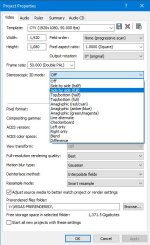
We experimented with 3D some years back with a couple of EX1s. The first and biggest problem was getting close to the human IO of 62mm which is considered the average "Interocular" distance between the center axes of the two lens. We ended up borrowing a 'beam splitter' rig for numerous tests but the alignment issues we encountered every time we changed subject to focal plane distance was a problem too far for us to solve quickly on a job. In the end we gave the 3D idea away from an economic point of view as I could see no future in it for us. What videos we did produce were in fact created in Vegas as it was the best NLE for 3D straight off the timeline. I haven't touched the Vegas 3d capability for years now but it is still there in all its glory in V15. With the Vegas production suite you could indeed make 3D BD discs. A real primer to the complexities of 3D video is well covered in an interview / demo from James Cameron. View here:

https://www.youtube.com/watch?v=142gTbBDzWM

Vegas 3D options:

Vegas 3D.jpg

Chris Young
 
Back
Top