zixin
New member
Hi, I'm hoping someone on here can please help me out. I am using Final Cut v. 7.0. I recorded footage on mini-DV tapes using my Panasonic DVX100b camera, with the settings: 24p (normal, not Advanced), letterboxed (16:9, but NOT anamorphic), and standard def.
At first I tried capturing the footage with the normal settings (DV NTSC 48kHz 29.97), but the footage looks stretched and "squished" (like what happens when you capture anamorphic footage, but I don't have an anamorphic lens, nor did I set the camera to record with "Squeeze").
Then I went online to find out other possible FCP settings, given the above info. I found this site: http://www.rippletraining.com/engine/index.php?action=docs&doc=408, but it only addresses the 24pA feature. After using all of their suggested capture and sequence settings, the footage that I capture still appears stretched and squished in both the viewer and the canvas windows.
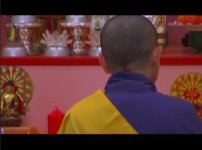
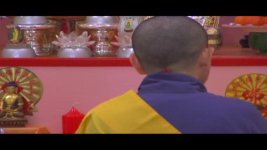
I've attached two images to this email to show you what I mean: The first is what the footage is supposed to look like; the second is what I end up capturing, given my current settings...
If you have any advice, please let me know!
At first I tried capturing the footage with the normal settings (DV NTSC 48kHz 29.97), but the footage looks stretched and "squished" (like what happens when you capture anamorphic footage, but I don't have an anamorphic lens, nor did I set the camera to record with "Squeeze").
Then I went online to find out other possible FCP settings, given the above info. I found this site: http://www.rippletraining.com/engine/index.php?action=docs&doc=408, but it only addresses the 24pA feature. After using all of their suggested capture and sequence settings, the footage that I capture still appears stretched and squished in both the viewer and the canvas windows.
I've attached two images to this email to show you what I mean: The first is what the footage is supposed to look like; the second is what I end up capturing, given my current settings...
If you have any advice, please let me know!