GH4 10bit 1080p 4:2:2 from HDMI or C4k to 1080p 444 downres?

Mike Krumlauf

Award Winning Filmmaker
I currently do not have the computing power to effectively cut the GH4's C4K files, so, i am taking gear I was using for my Varicam like the AJA KiProMini and using the GH4 for now as a 10bit 1080p camera. The question I have is which option would yeld me better results for a 1080p finish.. using my kipro with the 10bit 4:2:2 downconvert from C4k option, or, shooting internal C4k files and spending the time converting those properly to 10bit 4:4:4? Is all that extra time converting really worth it? Is that process even giving true 4:4:4, i'm a bit skeptical. Below I listed my computer specs incase someone has a miracle where i could cut C4k files on my machine and just need to alter what power is going where. I edit on Adobe Premiere CC btw. Thanks.
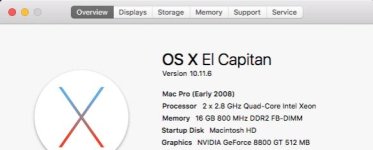
Screen Shot 2017-12-23 at 12.15.26 PM.jpg
 
Is that process even giving true 4:4:4, i'm a bit skeptical.

From my experience a proper down-rez (I used the Cineform CODEC for the down-rez) from 4K to 1080p does give you true 4:4:4 chroma, but as far as I can tell it's still 8-bit luma. If it's worth it to you or not, that's something you will have to decide. I would run a few tests to confirm the results before committing to the whole process.
 
From my experience a proper down-rez (I used the Cineform CODEC for the down-rez) from 4K to 1080p does give you true 4:4:4 chroma, but as far as I can tell it's still 8-bit luma. If it's worth it to you or not, that's something you will have to decide. I would run a few tests to confirm the results before committing to the whole process.


Not to derail the thread, but maybe you can point me to a post about your Cineform down rez workflow? I'm thinking of doing the same thing with my GH4, not sure I like the downsample to my Ninja 2.
 
I was under the impression that you could get 10bit 4:4:4 1080p from downresing a C4K file. If its 8bit then i've lost all interest. Although what i'm interested in is the data rates between the two ideas.. i have to believe the HDMI is sending more Mbps than the down res? i dont think downresing a 100mbps file to 1080p will up the data?
 
I was under the impression that you could get 10bit 4:4:4 1080p from downresing a C4K file. If its 8bit then i've lost all interest.
The luminance should be 10 bit because there are four original 8 bit 4k samples for each 2k pixel, however unless your 4k source is 4:4:4 the two chroma channels will not be 10 bit.
 
The luminance should be 10 bit because there are four original 8 bit 4k samples for each 2k pixel, however unless your 4k source is 4:4:4 the two chroma channels will not be 10 bit.

As far as down-rezzing with Cineform, the logic is built-into the Cineform CODEC, you simply have to render your 4K footage down to the Cineform 1080p format.

Back when the GH4 camera first came out and news broke about downsampling 4K 4:2:0 to 1080p 4:4:4 chroma, there was a post on the EOSHD forums by David Newman (one of the three creators of the Cineform CODEC) where he stated that you could downsample 4K 4:2:0 chroma data to create 1080p 4:4:4 video. He confirmed that the end result of the down-sampling would be 1080p 4:4:4 color.

Link to EOSHD and David Newman's Post
 
So would I not be able to preform the downres using Apple Compressor? Do I need a specific piece of software?
 
So would I not be able to preform the downres using Apple Compressor? Do I need a specific piece of software?

It all depends on how the CODEC does the down-convert. Very likely there are other CODECs that can do the same. As far as I know Cineform is supported on the Mac platform ( I exchange Cineform production files with a Final-Cut X editor all the time ), but you might have to install the free GoPro studio software to access the Cineform CODEC at the system level. ( same for Windows, where installing the free GoPro studio software enables Cineform access in many Windows NLE apps )
 
So Converting the files to Apple ProRes 444 wouldnt do the trick? Does anyone know a current and working workflow for this on mac?
 
8bit vs 10bit doesn't really work like that. Yes there are 4k the samples because of 4k but thats not why we shoot 10bit. We shoot 10bit to have enough samples to cover a subtle color gradient. If the damage is already done in 8bit no amount of magic can get that back by just down converting. Take any posterized image in Photoshop and down convert and the posterization doesn't magically go away. The color depth benefits from down scaling 8bit 4k to 10bit HD are very minimal and only benefit samples that were already pretty close together to the point where they didn't cause much visible posterization.

The 4:4:4 benefit is 100% real however because 4k down to HD takes every 2x2 pixels and turns them into 1 pixel. 4:2:0, 4:2:2 and 4:4:4 are nothing more than ratios of luma to color. 4:2:0 means every 2x2 block of pixels shares a single color value. Think of down scaling 4k 4:2:0 to HD not as gaining color but really as merging the 2x2 luma values down to a single luma value similar to the 4:2:0 color values. You end up with the same overall ratio and accuracy of luma to color because you tossed out the extra luma detail. There is a very tiny amount of rounding error but for the most part 4:2:0 4k down to a 4:4:4 HD format is 100% 4:4:4.

As to which one is more important that really depends. 4:4:4 is not as much of a benefit as you would think it is and visually will make little to no difference at all. Even if you do heavy grading you would benefit a lot more from just capturing HDMI 4:2:2 10bit. Especially if you shoot V-log like I do. I use an Atomos Ninja Blade with my GH4 to capture V-log HD 10bit files and they have vastly superior color in every possible way compared to V-log 4k internal down converted to HD in post. There is no comparison at all. Even if you don't use V-log this tells you that the whole 8bit to 10bit thing isn't really a reality through down conversion.

The best GH4 solution is to capture externally 4k 10bit 4:2:2 and then down convert to 2k 4:4:4. Expensive route but thats the best way to get 2k 4:4:4 out of the GH4. Next to that doing the HDMI HD down conversion from a 4k shooting mode is the next best solution for color and compression quality accuracy.
 
Thank you thomas for all of that :). I was actually thinking of buying a ninja star for the GH4, given the kipro i use for my varicam is a bit bulky for a run and gun gh4 setup and its battery setup is a nightmare for the gh4.
 
Prores HQ to an external recorder Shogun, Blade or Inferno will edit with your current Mac if you spring for FCPX at 299...no idea of your budget but the GH4 looks fantastic recorded on a Shogun in Prores HQ and then the whole system is designed to work together...a 2 or 3 Terrabyte Lacie hard drive ( I like the ones designed by Porche as they are small and powered by the computer) then takes care of the storage when you're working in Prores....the other expense to also factor in is SSD media for the external recorder but it's fast, robust and very affordable. Your current computer would be just fine with this setup
 
Back
Top