AC90: 1080p60 combination port composite signal appearing as interlaced on DVD

bluesgeek

Well-known member
I am recording 1080p60 to an SD card on an AC90, and recording the composite signal through the combination port to a stand-alone DVD recorder.

I would expect that when the resulting DVD disk is played in a computer's software DVD player and displayed on its monitor, the video would appear interlaced for 1080i60 and 480i, and to appear without interlacing for 1080p24, 1080p30, and 1080p60 recording formats. However, the 1080p60 signal through the combo port is recording to DVD in such a way that my computers display it with pretty nasty interlacing.

I know that SD DVD doesn't support 60FPS, so the DVD file (when converted and read as an mpeg4 file) is reported in QuickTime player as 30FPS.

Is there something about 1080p60 in AVCHD that would appear as interlaced in standard def DVD? Is it the nature of the signal through the AC90 combo port?

Is there anything I can do (inline hardware) that would eliminate the problem?
 
The composite output is neither 1080 nor 60p. Composite is standard def and that means 480/60i. There is no such thing as composite 60p.
 
Thank you, Barry.

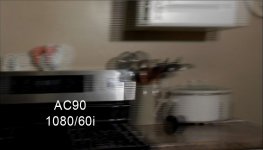
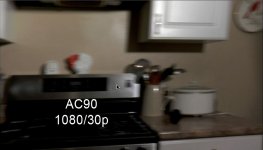
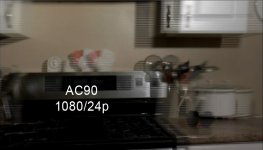
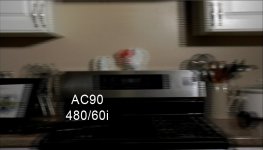
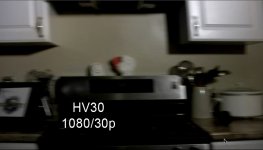
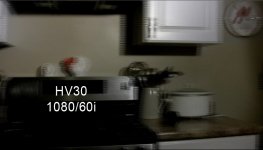
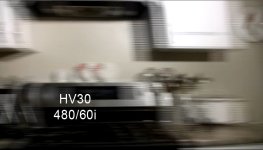
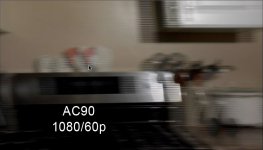
I understand the basics of the signal, and that DVD is an interlaced standard, but I'm referring to the unique and pleasing way in which I see 30p handled by DVD players (stand-alone and software), and my assumption that 60p would enjoy the same. Perhaps these screen shots from Apple DVD Player can give an example.

I've included screenshots of quick panning using the following cameras and standards:

AC90 -
1080/60p
DVD screenshot - AC90 1080p60.jpg

1080/60i
DVD screenshot - AC90 1080i60.jpg

1080/30p
DVD screenshot - AC90 1080p30.jpg

1080/24p
DVD screenshot - AC90 1080p24.jpg

480/60i
DVD screenshot - AC90 480i60.jpg

HV30 -
1080/30p
DVD screenshot - HV30 1080p30.jpg

1080/60i
DVD screenshot - HV30 1080i60.jpg

480/60i
DVD screenshot - HV30 480i60.jpg


Anyone who wants to play with this can download the DVD's TS folder (119MB) on this link:
http://www.mediafire.com/?2395050nb2q50mg

You may notice that even though the 30p shots from both cameras are interlaced in the DVD file, they appear as deinterlaced in Apple DVD Player. (30p "plays nice with others):laugh:

I'm hoping to learn the reason that 30p appears as deinterlaced (even with Apple DVD Player's deinterlacer turned off), and the reason that 60p (and 24p), being progressive standards, don't also appear as deinterlaced.

I have a strong interest in this because my company is shooting scholastic sports, and a major component of my service is to provide the client with a DVD immediately at the close of the event. I also webcast a stream from the same composite signal source. (This is a low-rent operation, and I run the composite signal directly from the camera into a DA, and out to the DVD and streaming encoder.)

My concern is that, while 30p seems to give a deinterlaced appearance across a wide range of hardware and software players and displays, 60p does not seem to enjoy the same "free ride." I know that it is possible to find DVD players that will do a good job of deinterlacing (and VLC bobs the 60p just fine), but I can't control how efficient the deinterlacing of my end users players will be. My upgrade to 60p may be resulting in a downgraded experience for many of them. One of my webcasting clients has expressed concern over this potential problem.

Shooting 60p is important because I use the HD footage recorded into the camera to produce other products for the client. It would be a shame to not use the superior 60p standard, which this camera implements so well, for my action sports clients.

[I could mention that shutter speed is 1/120th for AC90 footage and 1/100th for HV30 footage.]
 
Last edited:
30p shows as progressive because it "fits" in a 60i signal. It is still being recorded as interlaced, but because both fields are from the same moment in time, there is no temporal difference in the fields so it "looks" de-interlaced.

24p doesn't "fit" in 60i so it has to split frames Across fields. Look through your footage and you should see two "progressive" frames and three "split" frames in every 5-frame group.

Dvd can never show 60p. DVD is inherently a 60i format, like composite video. It has no choice but to convert each frame into a field, because that is all it can record: fields.

If you need a disc media that can show 60p, DVD is not what you want. Blu ray can show 720/60p so you might try that.
 
Thank you, Barry. That is totally logical, and I suppose I should have known it </hand slapping forehead>

I can see now, that 1080p60 is an incredible acquisition format requiring a lot of conversions to edit, display, broadcast, webcast, or simply record to a DVD. This can be challenging when trying to quickly prepare a 2-hour sports event recording for distribution. (In a heavy week I may cover 10-20 games.)

It would seem possible to convert 60p to a 30p-look DVD recording, but depending on how it's done, I think that could result in screwing with the motion by disposing of half of the discrete frames, which would then be recorded as interlaced using the 30 discrete frames that remain, reducing resolution. (I've noticed at least one of my DVD recordings I made using direct conversion of 60p in MPEG Streamclip stutters terribly.)

Perhaps some software workflow outputting a 60p timeline to 30i and then converting that to DVD would at least keep the motion intact, but I don't see how that could be done using a hardware deinterlacing solution.

This leads to another question. Would the output from a hardware deinterlacer have a similar look when recorded to DVD as 30p does? If so, are there any suggestions for a low-cost inline hardware device that could be put before the DVD recorder, to deinterlace the HDMI 60p or the composite 480i?
 
What are they viewing it on? A 60i DVD would retain the motion characteristics of the 60p source. Any time you de-interlace, through any means, you will be losing motion smoothness.

If this is for computer viewing, you may value the progressive frame over the smooth motion. But if it is for tv viewing, keep the motion intact and just directly render 60p to 60i.
 
It would seem possible to convert 60p to a 30p-look DVD recording, but depending on how it's done, I think that could result in screwing with the motion by disposing of half of the discrete frames, which would then be recorded as interlaced using the 30 discrete frames that remain, reducing resolution. (I've noticed at least one of my DVD recordings I made using direct conversion of 60p in MPEG Streamclip stutters terribly.)

If you shot your footage in 60p and want to go to a dvd, you need to do a few different conversions to make it look good. The key to remember is DVD has limits, so you need to follow the rules. If you do it will look good, if not it will look really bad. I can give you a link if you like when I get to my Mac that wil tell you how to make this happen if you like. FYI, you will need a good machine to do this in a fair amount of time (like a 8 or 12 core system with allot of RAM). Also if you are shooting for DVD, why not just shot in 480 and be done with it, it will look good without extra work.
 
Here watch these videos and it will help you do what you are wanting, you will have to find the different methods they are here.
 
It must look like I dropped off the face of the earth. (In fact, I came close. I don't think it was officially the flu, but it wasn't pretty, nonetheless.)

I want to thank you both for taking the time to help out with my issue. rzr219, that's a great tut for Premiere.

If I make take a moment to shine a light here on one of the things that makes DVXUSER such a great resource, folks taking the time to share from their experience, and going the extra mile to research and provide links to other sources. Invaluable. I know that I run into professionals who don't keep up with this forum, and they are often behind the curve on new technologies and workflows, which can translate into failing to compete in the marketplace. :)
 
I know what you are going through (not being sick I mean) I have had to learn over years what it take to make my videos look correct for different media types. I still am constantly learning and trying new techniques to improve with the help of others. I love it when some that just starts doing video walks up to me and asks how to resolve a issue they are having, and when I start asking questions I get that blank look and response of well the software should do it (I want to lose my mind and say then why did you ask me if you think software out of the box on a underpowered system should work). They don't want help, they want you to do it for them with a few simple clicks (thats how it done on TV isn't it? lol) Sometimes I feel like I ask the dumbest questions that I should know, however as I get older I know there are no dumb questions just bad answers to my dumb question :-) . Anyone can shoot video, not everyone can make it look good.
 
Back
Top