100Mbps Max Latitude Native 24/25p Patch

Is 25p more stable than 24p ? In 24p I always got those card speed errors on static high detailed image. I tried this patch just with unchecking Native 24p/25p and I didnt have this problem anymore. I should have read the note from ptool :shocked: there is a warning on this problem with native 24p... So now I understand that this problem is really not related to the card speed.

I'm wondering if I should give up with native 24p or just avoid foliage...
 
Aside from that, the major difference between the two patches is the lack of 720p50/60 mode in the Max Latitude Patch.

Maybe not a bad thing if we are concerned by the image quality... but after some tests i think that 720p mode should be only used if we absolutely need 50/60fps, however 720p give a bit better quality in 25/30fps.

Right now I'm using 100Mbps Max Latitude Native 24/25p Patch but with 24/25p unchecked, which is stable. I will propably switch back to 75Mbps GH1 Peak Reliability Patch which should give me more or less the same result (I will test that to be sure).
 
I use 100Mbps Max Latitude Native 24/25p Patch on my GH1 and the results have encouraged me to approach more filmic look. However, I noticed the most potential for "filmic" look appear to be in the M-JPEG settings. The camera records M-JPEG reliably on Class-10 card but there is still some M-JPEG noise visible at 60 mbit/s. Would it be possible to raise M-JPEG data rate slightly to, say, 85 mbit/s and how would I best determine required settings?

Aki Hartikainen
 
Dear Lpowell,

The max latitude patch is on my GH1 and it's been taking good looking videos but I haven't been able to play them back in the camera. I get a memory card error message. It doesn't freeze or anything like that. The camera just says it can't play the video because there is an error in the card. In short, I don't get video playback at all. I get picture playback though. Is this normal or is there something I should do to fix it? Thanks for your help.
 
I'm testing this patch lately and I have the "error due to writing speed limit...".

I got this error with 3 different cards. I've done a quick bench of this 3 cards on my laptop sd card reader.

Kingston 8GB class 6 = 10 200 kb/sec
Transcend 16GB class 10 = 17 200 kb/sec
SanDisk Extreme HD Video 16GB class 10 = 17 700 kb/sec

So we can see a huge difference between the class 6 and the class 10 (by the way don't waste your money on this particular SanDisk sd card since its not really better than cheap Transcend).

After that I filmed the same scene with the 3 cards using this patch and 1080@24p setting. I was shooting at my backyard including grass and trees... producing kinda high bitrates.

With the 3 cards I had writing speed error. So I'm wondering if it's really concerning the sd cards or something else since I don't really have more errors with the class 6 card.

Is it due to the 24p native patch ? I didn't have time to test with another patch.

I had a simialr problem with my cards after I ran some software to test the write speeds of the card and then used the computer to reformat the cards. I discovered that using either the camera to format the cards of the SD Formatting software from Panasonic eliminated the errors I was getting. Hope this might fix your problem.
 
I'm in PAL land, have a GH2 and would prefer 25fps in Cinemamode rather than 24fps (why did Panasonic give us 24fps anyway?). I understand that Panasonic have been monitoring these hacks and, after vigorous testing, are going to produce a firmware update to allow PAL users to do this. Does anyone know if this is going to happen sooner rather than later?
 
I'm in PAL land, have a GH2 and would prefer 25fps in Cinemamode rather than 24fps (why did Panasonic give us 24fps anyway?). I understand that Panasonic have been monitoring these hacks and, after vigorous testing, are going to produce a firmware update to allow PAL users to do this. Does anyone know if this is going to happen sooner rather than later?

Where did you hear that David?
 
I came across a site, EOSHD.com and it was mentioned there. I've copied a portion here:In an interview with EPhotozine Panasonic talk X lenses (as first exclusively revealed by EOSHD last week) and the GH2.
Mr Uetmasu product developer:
A firmware update may be coming for the GH2 to add support for 25p, and additional improvements in video abilities. If there are features you want adding, contact Panasonic and let them know. They are aware of the work the “hackers” are doing and are impressed with their work, but that they (Panasonic) need to test everything / confirm there are no problems before rolling out updates. The GH3 is not due imminently, as the GH2 is still extremely popular, but that there is a high end GF series camera in the works.
Will be interesting to see what the ‘other’ video improvements are! Hopefully AF tracking and 60p.
Uetmasu also says Panasonic’s share of the DSLR market has increased to 30% in Japan whilst the G3 has been a great success in the UK with 65% of the overall mirrorless market, although it will almost certainly drop when the new Sony NEXs come out.
Future X premium lenses will include a fast 12-35mm zoom and a 35-100mm rumoured to have a constant aperture around the F2 mark.
 
Never Give up on this Camera!

Never Give up on this Camera!

Thanks man. Will try this out with my trusty 13. I have been a bit slow to try other hacks since the original peak performance patch but it looks like it's time to move on. Got some great shots with the old one tho.

I shoot exclusively in PAL so this is a godsend. Thanks again. Never give up on this camera. it is a true pioneering tool and has a magical feel about it not found in the Canons. I switched from Canon to Panny because of this camera. No regrets.

Gonna buy a GF-1 to go with it and hack it too...I think to the GOP 3 hack. Gonna wait for the hack project on the GH2 to mature further before diving in there.

Quick question : I noticed that you always state it is possible to return to original firmware. I never want to go back, but is it recommended to reinstate 1.32 in-between hacks?...or can I just move straight on to this great looking PAL speciality?
 
Last edited:
Final Confirmation

Final Confirmation

I'm about to reload the new firmware. Just checking a couple of things. I noticed you left the overall bitrate blank in the patches for testers section. Just double checking that is right before I proceed.

Also I noticed you didn't include any audio improvements. I don't have my Zoom H4n yet and was wondering if upping the bitrate to 48khz is okay or will that destabilise the patch?

Finally a really stupid question. Version Increment set to 10. Does that mean I have to rename the firmware with a digit 10 onwards from 1.32 (i.e. 1.42) or can I just bump it a couple of numbers (like 1.35) or does version increment mean something totally different. I can only apologise if this is obvious but forgive me for not having done this for a fair few months.

Just making sure I make zero errors.

Thanks
 
I'm about to reload the new firmware. Just checking a couple of things. I noticed you left the overall bitrate blank in the patches for testers section.
Correct, some patches are intentionally left blank, i.e. unused.

I ...was wondering if upping the bitrate to 48khz is okay or will that destabilise the patch?
In AVCHD video modes, audio is always recorded at 48khz and cannot be changed. I don't recommend altering the audio bitrate as it is more than adequate for the GH2's stereo tracks. Some users have reported playback problems after altering audio bitrate.

Version Increment set to 10. Does that mean I have to rename the firmware with a digit 10 onwards from 1.32 (i.e. 1.42) or can I just bump it a couple of numbers (like 1.35) or does version increment mean something totally different.
Keep the PTool Version Increment patch set to 10. The 3-digit number in the firmware filename is meaningless and can be set to any number you like.
 
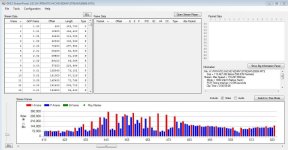
Was messing around with low GOP settings and rig's GOP1 would crash constantly on my Transcend 16gb Class 10. I loaded This patch and changed Gop to 6 and it worked much better, didn't crash once in similar shots. Set it to GOP4 and....so far so good.

All I did was change 1080/25p to GOP5, 24p to GOP4, and under AVCHD Research I dropped the audio buffer to 4....no idea why...and upped the video buffer to max, 84. Works so far, but only done very basic shots. But it recorded super over exposed and in pure darkness it recorded 3 times as long as the GOP1 patch.

Capture6.jpgCaptureGOP4.jpg

EDIT: Just did a quick test to see how long it would record a all black scene and it went around 7-10 seconds when you start the scene, all black. It also did 7-10 recording a bright all white scene. However, when I started with a standard lit scene then moved to all black it went over 20 seconds before I got cold feet and moved the camera around.
 
Was messing around with low GOP settings and rig's GOP1 would crash constantly on my Transcend 16gb Class 10. I loaded This patch and changed Gop to 6 and it worked much better, didn't crash once in similar shots. Set it to GOP4 and....so far so good.

All I did was change 1080/25p to GOP5, 24p to GOP4, and under AVCHD Research I dropped the audio buffer to 4....no idea why...and upped the video buffer to max, 84. Works so far, but only done very basic shots. But it recorded super over exposed and in pure darkness it recorded 3 times as long as the GOP1 patch.

View attachment 42208View attachment 42209

EDIT: Just did a quick test to see how long it would record a all black scene and it went around 7-10 seconds when you start the scene, all black. It also did 7-10 recording a bright all white scene. However, when I started with a standard lit scene then moved to all black it went over 20 seconds before I got cold feet and moved the camera around.

Try GOPs divisible by 3 - that's what the main testers say! So, GOP1 (intra), 3, 6, 9 and the original 12 are the most stable, apparently.
 
Back
Top