GH13 100 Mbps GH1 takes on GH2 in both 24H and HBR modes!

Lpowell

Veteran
I recently invested some time into matching the GH1's video color balance to the GH2. Afterwards, I took both cameras out for a quick field test. On the GH1, I shot in Native 24p mode using the 100Mbps Max Latitude Patch. On the GH2, I used the 100Mbps Flow Motion v2 Patch in both 24H and HBR modes.

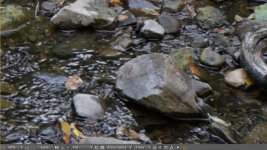
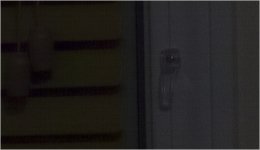
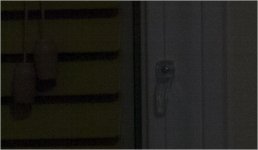
Here are unedited, 200% magnified crops of the three video modes. Props if you can correctly identify them!
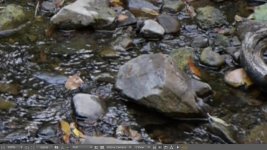
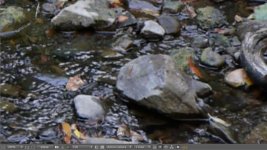
Untitled-0.jpg

Untitled-1.jpg

Untitled-2.jpg
 
Wow, I'm impressed. I can't see any difference, but then again I am not too good at tiny details. The GH1 with your hacks seems to still be very capable... Al
 
I'm guessing from top down:
GH2-24H
GH2-HBR
GH1

Based more or less on an educated guess, the colors and contrast seem similar on the top 2, and there's slightly more blocking in the middle sample. Durned close, though.
 
Yep, very close. I've always been pleased with my GH1 in well lit situations, but had to buy a GH2 to go along with it for low light because my GH1 FPN is downright disgraceful. I think I got one of the worst offenders.

I have to go with this as well.

GH2-24H
GH2-HBR
GH1
 
I recently invested some time into matching the GH1's video color balance to the GH2. Afterwards, I took both cameras out for a quick field test. On the GH1, I shot in Native 24p mode using the 100Mbps Max Latitude Patch. On the GH2, I used the 100Mbps Flow Motion v2 Patch in both 24H and HBR modes.

I loaded up your ( GH1 100Mbps Max Latitude Patch ) on a GH1 recently.... It's the best!


Pappas
http://PAPPASARTS.WORDPRESS.COM
http://TWITTER.COM/PAPPASARTS

[size=+1]BlackMagic Digital Camera Info:[/size] http://www.bmcuser.com/showthread.p...mera-Technology-Announcements-amp-Latest-Info
 
Sorry, but no one spotted the center frame grab (Untitled-1.jpg) as the GH1. The bottom shot (Untitled-2.jpg) was shot in 24H mode by the GH2, leaving the top shot in HBR. To my eyes, the best in image quality is the GH2 24H, followed by GH1 FHD, and GH2 HBR. It's a very close competition, however, and all three look much better than an unhacked GH2.

Here are links to the original, downloadable video files:

GH2 HBR - Flow Motion v2

GH1 FHD - Max Latitude v2

GH2 24H - Flow Motion v2
 
Last edited:
I was going through some footage yesterday, shot a couple of weeks ago. The GH2 was running the Flowmotion patch and the GH1 was using the 75Mbps patch. I couldn't really tell which was which. All daylight exterior footage.
 
I recently invested some time into matching the GH1's video color balance to the GH2. Afterwards, I took both cameras out for a quick field test. On the GH1, I shot in Native 24p mode using the 100Mbps Max Latitude Patch. On the GH2, I used the 100Mbps Flow Motion v2 Patch in both 24H and HBR modes.

....

So what were your GH1 and GH2 settings which gave you a matching video? I'm having problems matching my cameras so if i can get a match between the GH1 and GH2, then i think i will have a breakthrough with the HMC151 and AC130. I have now forced myself to buy two extra similar monitors to do the job.
 
All I can tell is that I can't tell the difference. I would use any of those especially if the video is only playing at 100% and 24 or 30 FPS. Can you do the test with the 720p mode. I would love to see how it stands up to that scene.

Are you interested in the 1080p @ 60 FPS mode of the G5 and probably the GH3? That is definitely going to tax the codec.
 
Here are the Film Mode and White Balance settings I used in the GH1 and GH2 tests. These are daylight settings designed to remove the greenish cast of both the GH1 and GH2 in AVCHD video modes. They're also intended to closely match the AF100 Scene File I developed for multi-cam use:

Matching AF100 footage to the GH2

GH2 Daylight Settings
Film Mode Smooth
Contrast -2
Sharpness -2
Saturation -1
Noise Reduce -2
WB Sunlight
A-3
M-2

GH1 Daylight Settings
ISO -1/3rd stop slower than GH2
Film Mode Smooth
Contrast -2
Sharpness -2
Saturation -1
Noise Reduce -2
WB Sunlight
A-2
M-5
 
Hello lpowell. Thanks for all your work in support of the GH1 and GH2 over the years. I only have the GH1, but always use your 75 Mhz Peak Perfomance Patch v1. In you post I noticed that you have Noise Reduce Set to -2 for the GH1. I am surprised by that. I'n not sure where I read it, but aren't The NR settings 'counter-intuitive for the GH1? As in +2 results in the MINIMUM IN CAMERA NOISE REDUCTION being applied, while -2 results in the MAXIMUM IN CAMERA NR being applied? I'm pretty sure this is the case? I have all of my film modes set to NR=+2 bevause I prefer to have the finest grain noise possible. I'd rather have the fine grain noise over the blotchy "processed" noise. But, I haven't looked at this in a *long* time, but, one night I did convince myself that using NR=+2 in my GH1 resulted in the most finely grained "most" Noise, while NR=-2 resulted in some pretty ugly looking, smeared, "pre-processed looking" noise.

Am I way off base? Now I'm wondering if I should look at this again?
 
OK: I just took two quick shots with the same film mode settings except for NR=-2 in the first and NR=+2 in the 2nd.

NR=-2: This looks like 'pre-processed' Noise to me:

NR_minus2.jpg

NR=+2 This looks like a finer grain 'noisier' image to me? I prefer NR = +2? Yes, it is overall noisier, but, though it isn't apparent in this example, with NR=-2, you can sometimes get some ugly blotch artifacts. I prefer the more 'uniform' 'unprocessed' noise straight from the imager. It is easier dealing with that than the 'pre-processed' raw image that already has some in camera NR applied. It really does look like NR=+2 is the setting that applies the LEAST amount of NR in the GH1? Alas, the JPGs I've pasted in this post don't really retain the detail. You need to try this yourself and look at the RAW images (I only shoot stills in RAW format and convert to Adobe DNG when I import into LR). These examples don't really show what I'm talking about. You should try this yourself and be sure to shoot RAW.

NR_plus2.jpg

Thoughts?

Cheers,

John
 
According to the GH1 tests done by dpreview, overall noise is suppressed as the Noise Reduction setting is increased from -2 up to +2:

http://www.dpreview.com/reviews/panasonicdmcgh1/15

Most of dpreview's noise samples are shot at ISO 800 and higher, which in my view is an unacceptably noisy ISO range for video shooting. At ISO 100 - 400, the GH1's NR setting has a much subtler effect, and I've seen no perceptible improvement in raising NR above -2.

The NR setting should be applied only to video files and JPEG still shots. If the GH1 is in fact applying noise reduction to RAW images, I'd find that disturbing and set NR to -2 to minimize its effects. I'm not really a connoisseur of the subtleties of noise quality and prefer to avoid both noise and noise reduction. To my eyes, the upper image your last post appears less noisy than the lower. However, at the gamma they're displayed at, I wouldn't consider either of them to be acceptably free of noise.

Glad to hear you've had good results with the original Peak Performance Patch on the GH1. I'd recommend updating to the Peak Reliability Patch v2, which takes advantage of advanced settings available in the current version of PTool. Here's a link to the patch's download page:

GH1 75Mbps GH1 Peak Reliability Patch
 
Last edited:
Thanks for the reply, lpowell. I will have to try the newer patch (though, I have been extremely satisfiled with the 75 Mbps Peak Per Patch V1, it has only failed to write to the card maybe a dozen times in 1.5 years.

Thanks also for the link to the thorough DPreview article on the GH1. I could never find the GH1 in their choice of cameras for their "Comparometer", just the GH2. I figured the GH1 was 'too old'. That link clearly shows lower noise with +2 than -2. But, that output all deals with JPGs. I never shoot JPGs, and cna only speak about what I see in RAW. I understand that 'theoretically' there should be *zero* noise reduction applied to RAW, so that the -2 vs. +2 setting for RAW output should make no difference. But, in my (admittedly limited) testing, I see finer grain, less blotchy noise with NR set to +2, and more blotchy 'processed looking' noise at -2. I'll try to find some time to do some tests this weekend (but...my father-in-law is visiting from Kiev, and we have a busy weekend planned).

I'll try the better patch this weekend too. I'm sure it will be great, just like the 75 Mbs PP Patch V1.

Thanks again for the reply. The DPReview certainly shows that for JPGs NR= -2 is the setting for "least aggressive in camera NR, and +2 is the setting for most aggressive in camera NR, but...the difference is pretty small. I wonder if somehow the settings are applied differently to the RAW images (where again...probably they should have no effect...but. to my eyes they do, with NR=+2 giving, to my eyes, a finer grain, less blotchy RAW noise pattern?

More later. PLus...if there are any other RAW GH1 still shooters out there...how about your opinions too? But...maybe everyone who shoots stills has moved on the the Oly OMD-EM5? :-) I'm tempted by that nice cam with the Sony sensor....but...like everyone else am waiting to hear what the GH3 has to offer.
Off to the track with my daughter for her training to pass her Karate Physical in several weeks...
 
Hi lpowell and any other GH1 RAW shooters.

I found the info that led me to experiment with using +2 for NR in my GH1 when shooting raw.

You might find this forum discussion interesting?

http://forums.dpreview.com/forums/read.asp?forum=1041&message=33116726

http://forums.dpreview.com/forums/read.asp?forum=1041&message=33437588

I'm not sure there was ever any definitive conclusions from all the forum arguments, but, speaking only for myself: I definitely see 'better looking finer grain' noise in my RAW Stills when I use NR=+2. If I use NR=-2, (or any other NR value) I see very ugly, blotchy, patchy and almost impossible to correct noise. With +2 in RAW, the noise is fine grained and well behaved, so can be dealt with by most noise reduction algorithms. If you have a long exposure you do get the horizontal or vertical stripes which are hard to handle in LR, but Topaz Denoise or Nik Dfine can remove such banding pretty easily.
 
@GH1_newguy - Thanks for the links to forum discussions documenting GH1 RAW still frame corruption at ISO 800 and higher. From the linked chart of GH1 tests, it appears that setting NR to +1 or +2 is the safest way to avoid this problem at all ISO settings. However, my experience with the GH1 is that ISO 800 and higher is unacceptably noisy, regardless of the other camera settings. If you always keep GH1 ISO below 800, none of these problems will occur.

For still photography, there's another problem with the GH1. Unlike the GH2, which has a CONTINUOUS PREVIEW option, the GH1 does not display your actual exposure in the viewfinder when framing a shot in PASM still modes. The best workaround I've found for this flaw is to frame your shot in Creative Movie Mode (Manual mode), which does display the correct exposure. Then turn the mode dial a single click to the M still frame mode without changing any settings. Although the display may appear to change, the camera will retain your Creative Movie Mode exposure when snapping a shot in M still frame mode.
 
Fascinating.
Here are my personal results:

Link to PNG - https://picasaweb.google.com/117075345188561713127/ImageTests#5772909593416512802
GH1_NoiseTests_01.jpg

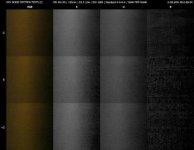
This confirms that -2 is significantly different from 0 or +2 in ISO 1600 RAW.
While turning up the noise reduction achieves a more "grain"-like noise pattern, it is essentially false detail. -2 is definitely finer and cleaner to my eye.
0 and +2 show noticeable green blotches on the right, and the blue channel data becomes noticeably degraded.

Of course this isn't a completely fair test as it doesn't include different details, and not all colour channels are represented with equal intensity - but it is a fairly clear one for what it is.

I recommend -2 NR for ISO 1600, at any rate. Not that I shoot over 400 much at all..!
 
Last edited:
Wow. Thanks for the detailed look at noise in RAW images on the GH1. I just did a couple more quick tests, and, even though others may disagree, I am going to keep shooting RAW still with NR set to +2. I don't have a lot of science behind my choice, just a few experiments that make me believe it is possible to get better final 'pictures' from RAW Images captured using NR=+2.

I'll post one example below. It's not even a very convincing example, but, it matches what I've seen in the past, so..

Method: Put the GH1 on a Tripod and use a cable release. Set up a scene. Make 3 exposures using NR=-2. Then make 3 exposures using NR=+2. Bring into LR and stare at the images at 100%. My conclusion: it may be 'false detail' to some, but, I see fine grained noise that is pretty uniform with NR=+2, but, I see some NR artifacts with NR=-2. Then, since we all agree that shooting at ISO 1600 is not a good idea with the GH1, I ran one of the images through NIK Dfine2 to remove the noise. I did not let Dfine 2 choose the sample locations, but, chose the same samples locations to use for Dfine's algorithm, and then I let it 'remove the noise'. I then looked at the TIF images for both. Again, to my eyes the image that began with NR=+2 had more remaining detail. It's true that the difference is not huge, but...I'm going to keep using NR=+2 for my GH1 stills.

I'll put the samples images up on Picasa soon end edit this post. In the meantime, here a couple annotated 100% crops:

NR= -2: Crop from the RAW DNG

NR-2_Crop_DNG.jpg

NR= +2 Crop from the RAW DNG

NR+2_Crop_DNG.jpg

Below are the results after applying the same NR techniques in NIK Software's Dfine 2 (after manually defining the same area as the sample to be used to compute the NR)

In Camera NR Setting = -2 Crop From TIFF File created by NIK Software Dfine 2 shown below

NR_minus2_Crop_TIFF_After_Dfine.jpg

In Camera NR Setting = +2 Crop From TIFF File created by NIK Software Dfine 2 shown below

NR_Plus2_Crop_TIFF_After_Dfine.jpg


Again, this isn't the best example, since the differences are really small anyway. But, my point is I prefer to do any Noise Reduction Myself. I do not want the camera to apply any NR automatically. This is why I shoot raw. With LR's adjustment brush now including "noise" as one of its adjustments, and, with The "Control Points" in NIK Software, if I *have* to shoot at ISO 1600 in the GH1 (because I can't afford 'really good glass', so I have only one "fast" lens, the Lumix 20 mm), I want to be in control of any noise reduction, not an algorithm in the camera.

But...this is about stills and this is a video forum, so, I'll shut up now. BTW: Did you notice from my file naming convention that I have 284 photos from 2012_08_04 Filename=120804_0292.dng). I took a lot of stills and many video clips 2day...so..."she who must be obeyed" will surely not be happy that I've been messing about with 'test images' and not processing all the "keepers" from our outing today!

I will try to get the RAW DNG images and TIFFs from NIK Dfine into a Picasa album in a few minutes.

Cheers,

John

Yikes...I just previewed the examples above...and there's virtually no difference. So, I dialed the exposure down, and did another test. I'll eventually place all the files into Picasa.

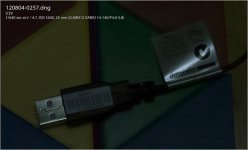
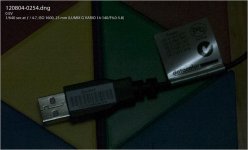
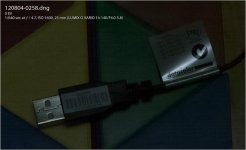
Below I'll show 2 100% crops of the same scenes just shot with NR=-2 or NR=+2. Again, these were using a tripod and cable release, I took 3 shots of each mode. I'll show two of each below. Notice that you can clearly read the patent numbers in the shots taken with NR=+2, while it is very hard to make out the patent numbers with the shots taken with NR=-2.

Sample 1 with GH1 Camera NR = -2.

Yikes again...I just previewed these, and the difference is not so obvious because once I JPG these to place them in the post, they lose some quality. But...the differences seen in RAW are much more clear...

NR-2_Crop__257_DNG.jpg

Sample 1 with GH1 Camera NR = +2

NR+2_Crop__254_DNG.jpg


Sample 2 with GH1 Camera NR = -2:

NR-2_Crop__258_DNG.jpg


Sample 2 with GH1 Camera NR = +2:

NR+2_Crop__255_DNG.jpg

So, again. If I'm FORCED to shoot STILLS in low light with high ISO with my GH1, I will always set the Camera NR=+2. Yes...it will have tons of ugly noise, but...I'm not losing POTENTIAL detail that might be pulled out by having the camera apply some noise reduction before it sends me my "RAW" file.

Cheers,

John

Hmmm...I've onl saved JPGs to Picasa. Hopefully, Picasa will accept Adobe DNG Files? Hmmmm
 
OK, I put the last set of 6 images as TIFFS into a Picasa Album. These were simply 3 shots taken with GH1 in Camera NR set to +2, and then three shots taken with GH in Camera NR set to -2. Since Noise is a random effect, the VERY NOISY patterns can shift around a bit. But, be sure to use the magnifying glass tool in Picasa and zoom in to 100%. Focus on the Patent Number text at the top right of the image. The 3 samples with NR = +2 all have much more detail and are much more readnable than the "smudged" text obtained with NR = -2.

Here's the link to Picasa Album. I p[ut some text in the caption and left the EXIF data exposed.

https://picasaweb.google.com/100366723276929828396/2012_08_ForDVX?authkey=Gv1sRgCPm01dfJje2XwgE

If for some reason you *can't* get to the album, let me know and I'll look into it.

John

Who now has to get to work on real images/video clips and stop 'pixel peeping'. :-) I also have to get the new better lpowell patch in my aging GH1.
 
I think this is so hilarious that I liked the middle frame the best (and the top one the least). I have been told a thousand times that "anyone" could tell the "huge" difference between the two cams. I guess I for one can't tell the difference, owing in part to the fabulous hacks, of course.
Awaiting now the refined quantization tables for GH1 that will reveal the true Red beater :)
What would be really funny is if we had a hundred people vote on the best cam, the GH1 "won" and then ppl would have to decide whether to sell the GH2 for a GH1.
After all, in this mini test, the GH1 is looking pretty good.

PS lpowell, what setting would you recommend to neutralize the green cast on the GH2 in Tungsten? I have a tough time getting rid of it in post even using a WB card.
 
Back
Top