
groveChuck
U-matic Member
I just stumbled across these tutorials from Canon, don't know if they've been posted previously...
They're actually C300 tutorials, but I chose C100 prefix in the title because I just got one (coming from the AF100) and the functions are nearly the same (other than under/overcrank and the joystick, I guess).
http://learn.usa.canon.com/galleries/galleries/tutorials/eos_c300_tutorials_gallery.shtml
The Ten Tutorial Topics (TTT) include
- Exposure
- Gamma
- Custom Picture Menu
- Creating a Custom Picture
- Assign Button Feature
- Best Practices for Recording
- Multi Camera Setup
- Wireless Shooting
- Transferring Custom Pictures
- Audio Features
The Exposure tutorial gives a good explanation of the WFM if you're not familiar with it.
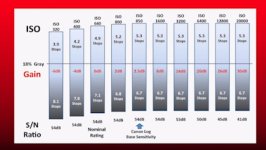
It also explains C-Log and the 850 Base ISO, and shows the shift in DR above and below ISO 850.
(I wish I knew how ISOs affect DR in Wide DR):
I'd been reading the C100 forum here before I got the camera, and (if I remember correctly) I think I remember a post about not being able to assign Delete Last Clip to a button?
I was disappointed because I love using that to keep my SD card lean and mean...
Well, turns out you can assign a Delete Last Clip button- it's just not offered as a selection.
As the Assign Button Feature tutorial shows, you can assign any function from any menu.
At 7:30, it shows how to scroll down to User Setting, which gets you into the entire menu, where you can choose anything in the menu, including Delete Last Clip.
Forgive me if I'm pointing out the obvious to those who've had the C100 for 8 months (or the C300 for 2 years(?)), but I didn't know this was possible until I saw the tute, and hopefully the Ten Tutes will help some others...
I ended up assigning:
1- Bars and Tone
2- ABB
3- Delete Last Clip
4-Time Code (so I can easily reset TC or go between Record Run and Free Run)
5- Shutter (to switch from 180 degrees to 1/125 or 1/250 if shooting 60i for slo mo)
6- Record Review
I may change 4 to Initialize Media or see if I can assign 60i for quick slo mo access.
And since I have Magnify and Peaking on 7, maybe assign something new to 8 and/or 9?
I'd be curious to hear how others have assigned functions to buttons? :thumbsup:
Gotta go, I have another 5 tutes to watch... :happy:
They're actually C300 tutorials, but I chose C100 prefix in the title because I just got one (coming from the AF100) and the functions are nearly the same (other than under/overcrank and the joystick, I guess).
http://learn.usa.canon.com/galleries/galleries/tutorials/eos_c300_tutorials_gallery.shtml
The Ten Tutorial Topics (TTT) include
- Exposure
- Gamma
- Custom Picture Menu
- Creating a Custom Picture
- Assign Button Feature
- Best Practices for Recording
- Multi Camera Setup
- Wireless Shooting
- Transferring Custom Pictures
- Audio Features
The Exposure tutorial gives a good explanation of the WFM if you're not familiar with it.
It also explains C-Log and the 850 Base ISO, and shows the shift in DR above and below ISO 850.
(I wish I knew how ISOs affect DR in Wide DR):
I'd been reading the C100 forum here before I got the camera, and (if I remember correctly) I think I remember a post about not being able to assign Delete Last Clip to a button?
I was disappointed because I love using that to keep my SD card lean and mean...
Well, turns out you can assign a Delete Last Clip button- it's just not offered as a selection.
As the Assign Button Feature tutorial shows, you can assign any function from any menu.
At 7:30, it shows how to scroll down to User Setting, which gets you into the entire menu, where you can choose anything in the menu, including Delete Last Clip.
Forgive me if I'm pointing out the obvious to those who've had the C100 for 8 months (or the C300 for 2 years(?)), but I didn't know this was possible until I saw the tute, and hopefully the Ten Tutes will help some others...
I ended up assigning:
1- Bars and Tone
2- ABB
3- Delete Last Clip
4-Time Code (so I can easily reset TC or go between Record Run and Free Run)
5- Shutter (to switch from 180 degrees to 1/125 or 1/250 if shooting 60i for slo mo)
6- Record Review
I may change 4 to Initialize Media or see if I can assign 60i for quick slo mo access.
And since I have Magnify and Peaking on 7, maybe assign something new to 8 and/or 9?
I'd be curious to hear how others have assigned functions to buttons? :thumbsup:
Gotta go, I have another 5 tutes to watch... :happy: