C100: 10 bit via dnxHD 220x ???

LeoGrey

Well-known member
While perusing the web I came across this article:

http://ntown.at/blog/2014/02/05/canon-c100-ninja2-10-bit-workflow/

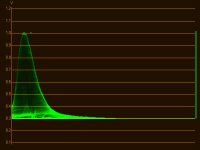
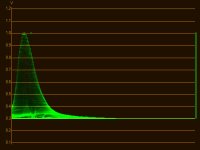
I do realize that ATOMOS claims to only be recording the uncompressed 8 bit and storing it in a 10 bit container, but the results from the tests performed in that article tell a different story. To summarize it gently, the gentleman claims the c100 is outputting between 9 and 10 bits of information and that there is a clear difference between recording prores vs the 220x dnxHD option.

DNXHD(no banding from the extreme grade)
PrWF1.jpg


Prores(clearly shows banding from the SAME extreme grade)
PrWF2.jpg

Anyone ever come across this article or something else with more in-depth testing? Has this already been debunked?
 
I believe this is due to the implementation of ProRes support on Windows platform. DNxHD can be dithered into a 32bit floating point environment, while ProRes has some limitations.

On a Mac machine, the results are the same between ProRes HQ and DNxHD 10bit.

In a nutshell, personally I would suggest always use DNxHD format with Atomos recorders (and other brands), as it has very good cross-platform compatibility and also has superior encoding algorithm.
 
So can someone tell me what the pro vs cons on DNxHD vs ProRes?

It all depends on the platform.

On Windows, DNxHD offers best compatibility, decoding/encoding convenience and efficiency, on Mac, you need to install plugins for FCP X to import it.

ProRes obviously is the best on Mac OS as it's Apple's native codec.
 

Do you have any sources on that? I have personally always preferred dnxHD to prores but I believe the limitations(pro res on pc) were lifted with a recent update to premiere cc so the playing field should technically be the same. His logic and results seems sound as even with the DnxHD 220(non x) version of the pro res he incurred banding. He has the source files available for download, someone working on a mac should download and perform the same tests.

Just to summarize his results for new readers. The aforementioned article tested externally recorded footage from a c100. For testing purposes he applied an extreme grade to a gradient which resulted in the following:

Pro Res HQ = banding
DnxHD 220 = banding
DnxHD 220x = no banding

This is either a weird bug, or a very interesting find. I do find it hard to believe that a bug would result in a quality increase of this magnitude. Anyone on a mac willing to give it a try?
 
Last edited:
Do you have any sources on that? I have personally always preferred dnxHD to prores but I believe the limitations(pro res on pc) were lifted with a recent update to premiere cc so the playing field should technically be the same. His logic and results seems sound as even with the DnxHD 220(non x) version of the pro res he incurred banding. He has the source files available for download, someone working on a mac should download and perform the same tests.

Just to summarize his results for new readers. The aforementioned article tested externally recorded footage from a c100. For testing purposes he applied an extreme grade to a gradient which resulted in the following:

Pro Res HQ = banding
DnxHD 220 = banding
DnxHD 220x = no banding

This is either a weird bug, or a very interesting find. I do find it hard to believe that a bug would result in a quality increase of this magnitude. Anyone on a mac willing to give it a try?

keep-calm-and-use-dnxhd.png
 

Please don't clog up this thread with junk, it takes up space for no reason and only makes it more difficult for other readers. Besides, my question has nothing to do with which codec is better or should be used(I have always preferred DNxHD over pro res).

I am genuinely curious about the results from that test that clearly indicate a large difference in color resolution between DNxHD 200, DnxHD 220x and Pro Res HQ from the c100.
 
The non-x DNxHD is an 8-bit container, that's why it's banding.

Still, to me that seems to indicate that we are getting something more than 8-bit out of the HDMI, though at the same time I cannot comprehend how.
 
I drew the same conclusion, assuming that filling the 10 bit container with 8 bit information somehow either interpolated values or the camera really did output a little more than 8 bit.
 
Back
Top