Joshua Milligan
Well-known member
I'm wanting to start using my ColorCheckers more in my work (I have a CC Video, CC Passport Video and CC Passport Photo), but am running into an issue in Resolve where the results are, well, crap.
I've watched videos online that demonstrate how great a ColorChecker workflow can be in Resolve and even in Premiere (Premiere uses the MBR Color Corrector 3 plugin) and since I always carry ColorCheckers with me for white balancing, I thought that I'd like to try that workflow out. But, for whatever reason the colors I get are terrible.
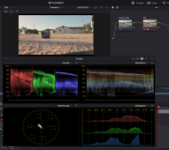
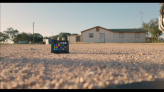
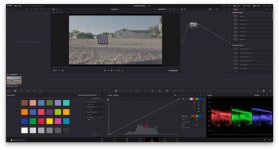
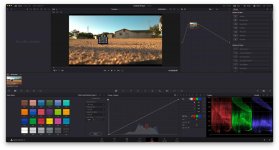
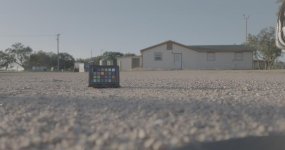
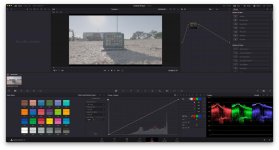
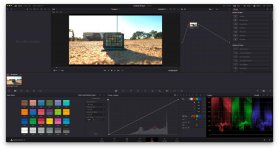
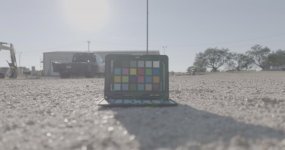
Take this example below. This is from my Mavic 3 Cine using my CC Passport Photo. I didn't have my larger CC Video with me at the time and this is as close as I could get my M3C to focus on the CC. This example was from an all aerial shoot where I ran through four batteries on my Mavic 3 Cine over the course of a few hours and right before every launch I placed my CC Passport Photo in the frame and recorded a quick shot of it for use in Resolve. All of these shots were in log.
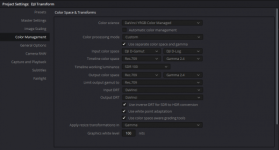
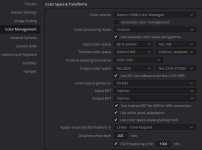
As you can see, when I lay the CC graph over the Passport and apply the DJI D-log to Rec.709 match, the results are not good. I do know that I have selected in the settings "X-Rite ColorChecker Classic" which is not the Passport version I'm using, but a quick search shows that the CC Passport and CC Classic are very similar in the color layout and should result in similar images since the main difference is just the size. CC Passport isn't an option in Resolve, but since it's basically a smaller version of the Classic, I don't feel like it should matter all that much, or at least not enough to create this kind of mess.
Can someone help me understand what I'm doing wrong here? I know I could just go in and grade everything by hand which is what I normally do, but I really wanted to successfully try the ColorChecker workflow out and so far I can't seem to get it right. I'd love some help on this and have attached a couple .tif screengrabs below of the original log shots in case someone wants to try it out in Resolve on their end. Thanks in advance for any help!
By the way, DVXuser won't let me upload the full-size images, so here's a Dropbox link to the full size versions including the .tif files: https://www.dropbox.com/sh/shp3cc04q...vuPThvmXa?dl=0
I've watched videos online that demonstrate how great a ColorChecker workflow can be in Resolve and even in Premiere (Premiere uses the MBR Color Corrector 3 plugin) and since I always carry ColorCheckers with me for white balancing, I thought that I'd like to try that workflow out. But, for whatever reason the colors I get are terrible.
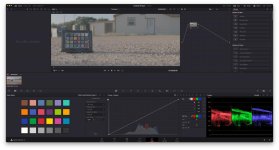
Take this example below. This is from my Mavic 3 Cine using my CC Passport Photo. I didn't have my larger CC Video with me at the time and this is as close as I could get my M3C to focus on the CC. This example was from an all aerial shoot where I ran through four batteries on my Mavic 3 Cine over the course of a few hours and right before every launch I placed my CC Passport Photo in the frame and recorded a quick shot of it for use in Resolve. All of these shots were in log.
As you can see, when I lay the CC graph over the Passport and apply the DJI D-log to Rec.709 match, the results are not good. I do know that I have selected in the settings "X-Rite ColorChecker Classic" which is not the Passport version I'm using, but a quick search shows that the CC Passport and CC Classic are very similar in the color layout and should result in similar images since the main difference is just the size. CC Passport isn't an option in Resolve, but since it's basically a smaller version of the Classic, I don't feel like it should matter all that much, or at least not enough to create this kind of mess.
Can someone help me understand what I'm doing wrong here? I know I could just go in and grade everything by hand which is what I normally do, but I really wanted to successfully try the ColorChecker workflow out and so far I can't seem to get it right. I'd love some help on this and have attached a couple .tif screengrabs below of the original log shots in case someone wants to try it out in Resolve on their end. Thanks in advance for any help!
By the way, DVXuser won't let me upload the full-size images, so here's a Dropbox link to the full size versions including the .tif files: https://www.dropbox.com/sh/shp3cc04q...vuPThvmXa?dl=0
Last edited: