Hi Guys,
I thought I would share this with you guys. Totally by accident I found an affordable alternative for archiving and working on lager projects. Like most I figure in the cost of external drives for my projects. Its a bit of a pain hooking up power supplies etc.
So I then looked at Robo drives and other similar HDD solutions... alll around 800.00 by the time your done. Which is O.K. depending on your needs. I like the thought of hot-swapping drives as needed but Robo dosent offer this.
Enter Blac - X, an eSATA docking station for 3.5 SATA drives up to 1.5 T. I have a G5 PPC Quad. All I did was plug the Blac-X in the ESATA slot in the back of the computer and install an extra drive in the docking station, and whaLah!! Instant archival and scratch disc for projects.
The drives I use are 32 meg buffer / 7200. Plenty fast for DVDPROHD, PRORES, and some uncompressed HD stuff (2K limit on my stuff) .
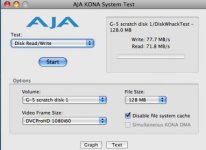
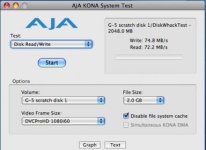
Heres the part you have been waiting for.... your cost, $56.00 ! yup thats it! In the last few hours I have done limited testing with zero problems and find the speeds plenty fast. Attached are two screen shots of my Kona system test:
Also let it be known that this system does not support a raid of any kind. But for the money who cares. I now have hot swap-able storage for projects and content on the fly!
Heres the link:
HERE
I thought I would share this with you guys. Totally by accident I found an affordable alternative for archiving and working on lager projects. Like most I figure in the cost of external drives for my projects. Its a bit of a pain hooking up power supplies etc.
So I then looked at Robo drives and other similar HDD solutions... alll around 800.00 by the time your done. Which is O.K. depending on your needs. I like the thought of hot-swapping drives as needed but Robo dosent offer this.
Enter Blac - X, an eSATA docking station for 3.5 SATA drives up to 1.5 T. I have a G5 PPC Quad. All I did was plug the Blac-X in the ESATA slot in the back of the computer and install an extra drive in the docking station, and whaLah!! Instant archival and scratch disc for projects.
The drives I use are 32 meg buffer / 7200. Plenty fast for DVDPROHD, PRORES, and some uncompressed HD stuff (2K limit on my stuff) .
Heres the part you have been waiting for.... your cost, $56.00 ! yup thats it! In the last few hours I have done limited testing with zero problems and find the speeds plenty fast. Attached are two screen shots of my Kona system test:
Also let it be known that this system does not support a raid of any kind. But for the money who cares. I now have hot swap-able storage for projects and content on the fly!
Heres the link:
HERE