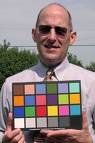
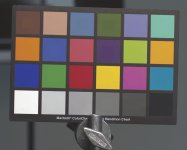
Back In Business (new image from sensor)

Jim, you got yourself a good team. Graeme has been doing excellent work with his various plugins, which I own and love. But most importantly, he has always been about helping people out and giving great support to his products. He's always just an email away. The fact that he is on the Red team is very encouraging.

Steve
 
drool.gif

(Drooling)
 
perfect 18% gray and skin tone

perfect 18% gray and skin tone

I don't know much but I am guessing the most important things are the 18% grey and the skin tone, and they look perfect to me. (I am looking at them on my 23" Cinedisplay, which might not be a perfect screen, but I think it is good enough.)

You guys are going to take it out into natural sunlight too, right?
I want to see the required shots of Mannequin eyelashes when it comes time to test the zoom lens. :)
 

Attachments

  • dress.jpg
    dress.jpg
    3.9 KB · Views: 0
  • face.jpg
    face.jpg
    3.5 KB · Views: 0
It would be nice to have a natural looking scene shot with the same settings to test.
 

Attachments

  • chart1b.jpg
    chart1b.jpg
    148.7 KB · Views: 0
1st point:
It says the picture has been colour corrected.

Colour correcting a Macbeth chart can't be that difficult. So what's all the fuss about?

2nd point:
Cor Blimey Guv'nor. That's a beauty and no mistake!

My mother's a londoner so that's how I recognized your accent.
 
Colour correcting a shot macbeth to look like it's supposed to look is actually quite tricky. There's a lot of math in there, and a lot of art. We're trying math+art to get it to look good, and be accurate.

Graeme
 
Perhaps part of the RedCine toolset should be a software app which lets you load up a Macbeth tiff and a shot from on set, and then just draw square A draw Square B (A shot, B Tiff) Then let it get you close, and from there offer some refinement tools. It seems like the math would be a relatively simple plot interpretation app.

I actually don't know if this would be useful at all, I'm not very well versed on LUTs.
 
It's not a LUT thing, it's a colour matrix thing, which is based upon the colorimetry of the sensor dyes on the colour filter array, and the target RGB space you're aiming for. This will be calibrated in two ways:

1) each sensor is calibrated in the factory to match a standard sensor spec
2) the standard spec is calibrated to the target RGB space.

Once this is done, all you need to adjust is white balance. We do all the hard work, so you don't have to.

Graeme
 
Well, from a technical perspective, the use of a MB chart shouldn't actually be necessary from shoot to shoot. Lets assume that a given sensor in a given camera has been tested and locked down with a particular custom color profile to read the MB chart accurately in a controlled situation.

At that point, you have a camera that will output what it sees properly. Reds won't be too red, greens won't be too green, etc. Then all one should have to do from shoot to shoot is read a basic 18% grey card. Technically, if you have grey locked off at grey in your particular environment and the sensor is locked off to read colors correctly according to its particular color profile, you should be set.

This could happen in camera, I suppose. I'd love to be able to put my 18% grey card up on set, point the camera at it in my selected neutral color temperature and click the "this should read 18% grey" button. The camera adjusts itself to that grey in that situation [keeping in mind its own color profile] and I'm ready to rock and roll.

Ok, basically I'm talking about white balance but with a grey card. Ah, habits from telecine.

[edit: Ok, I wrote this while Graeme was writing his reply... and he already answered the question I was asking myself]
 
Brook Willard said:
I'd love to be able to put my 18% grey card up on set, point the camera at it in my selected neutral color temperature and click the "this should read 18% grey" button. The camera adjusts itself to that grey in that situation [keeping in mind its own color profile] and I'm ready to rock and roll.

Ok, basically I'm talking about white balance but with a grey card. Ah, habits from telecine.

[edit: Ok, I wrote this while Graeme was writing his reply... and he already answered the question I was asking myself]

this is actually a good idea brook.. because it can also tell you if your exposure is correct as well, not only your color balance.
 
That would work in *some* cases, but not all. Here's my example:

Lets say I've lit my scene for tungsten. I've used four different gel colors from four different directions, the set looks ridiculous. I put my grey card up and what am I going to see? Four colors on one card [and it *won't* be tungsten]. What I do in a situation like this is kill the gelled lights and hit my grey card with a tungsten 1K [slate light].

Since I've lit the scene with tungsten as neutral, the grey card will read as neutral with a single neutral light. I'll expose the card properly to keep it in the middle of the dynamic range. Then I pull the slate light, turn my lights back on and enjoy the [non-neutral/tungsten] colors that they bring to the scene. The final exposure will almost certainly be different.

So in *that* situation, it won't work for exposure. It'll work for color, but that's just for the telecine operator. The whole setup will only work because I'm lighting the scene with knowledge of what will read as white/neutral and what will read as a varying temperature.

Lets say that I don't use a slate light [in a situation with a more neutral color scheme]. Lets say it's a day exterior without any lighting of any kind. The grey card will work for both exposure and color but *only* if the card is held in the same place as the subjects. On a wider lens, I'll have to have the card close to the lens to fill the whole frame [it only really works if the frame is full on the card]. If the card has to be in a different plane than the subject, the exposure may be different.

Anyway, this post has gone on too long. It could work sometimes, but it certainly won't work in all cases.

It'll always work for color if you do it properly.
 
Last edited:
yes of course.. if you test with different level/color of lights your not going to get the correct exposure with that test... but your really not going to get an accurate color balance either using that method... as if you light your card with a different light than your set, your not taking into consideration color bounce, stray shifts or lamp inacuracies. A much easier way would just to use a color tempurature preset... set it to 3200K (or whatever your source is) and shoot.

As for the last comment about needing to hold the grey card close to the subjects, you do that anyways in the "traditional" method of exposing with a light meter. for wider lenses, you would need to employ a focused reading, much like using a spot meter.

I get what your doing, but it just seems like a hellofalot of work to do something that should be rather simple using color temperature presets.If you wanted to be more accurate, you could use a color meter to depict the correct kelvin of your source.
 
I should note that my post was referring to a film shoot. No grey card/color chart = bad juju. I completely agree that using presets should do the trick most of the time for digital.

I was also referring to a rather complicated lighting setup in the first instance.
 
ah there you go.. of course shooting film would make that more appropriate, i will completely agree with that.

but then again... you could use a specific temperature balanced stock. :)
 
I always use temperature-balanced stock. Regardless, there's no excuse not to shoot a grey card at the head of each roll. Potential variances in the celluloid, chemical makeup, development, etc.

If I was on a big show and used the same colorist the whole time, I'd trust them to match it roll to roll. Unfortunately, most shows I work on are small, potentially use multiple colorists and - unfortunately - sometimes I don't get to supervise telecine. The card saves me from all potential color disasters.

But for some reason I'm talking about film in the RED forum.:)
 
Graeme_Nattress said:
It's not a LUT thing, it's a colour matrix thing, which is based upon the colorimetry of the sensor dyes on the colour filter array, and the target RGB space you're aiming for. This will be calibrated in two ways:

1) each sensor is calibrated in the factory to match a standard sensor spec
2) the standard spec is calibrated to the target RGB space.

Once this is done, all you need to adjust is white balance. We do all the hard work, so you don't have to.

Graeme

Sorry I wasn't very clear in where I was going with the question.

My question mostly relates to matching cameras. With film or a locked white balance in video it's easy. You shoot one way, then you can grade all the color from each of the cameras pretty much the same since you're starting from the same color settings.

If you white balance two cameras differently, trying to reverse engineer something as simple as one having white balanced to a cooler lit card can be a nightmare.

Would it be possible to export say an ASCII definition of the WhiteBalance and an inverse color function to calibrate two seperate cameras.

Let's say Camera A applys a rudimentary color equation to the Raw sensor data: R^2 but Camera B is using 2R. If a program was fed both pieces of footage and told to match B to A it would know what the difference between the two equations was and properly match the footage via a new LUT.

Once the footage gets into a grading application, often the gray card alone isn't enough information to mathematically match the two balances, since a camera's white balance isn't a linear RGB scaler. (warmer/cooler)

I guess what I'm asking for is the ability to white balance in post. Would this be possible or am I just way the hell off base. (Easily possible.)

All of this is mostly "outdated" since the 10bit color space of RAW will allow me to simply shoot a default setting such as 5600k and then grade somewhat universally later without too much color loss. But it'd still be nice if I need to shoot in a heavier compressed 8bit format where I want to get as close as humanely possible in camera before it gets burned to ones and zeros, but isn't possible to perfectly synchronize on white balance.
 
Last edited:
You'd just put the same white balance number into both cameras - say 5600k. Then they'd be practically identical, or, you shoot raw, and type the "right" number into both clips in the REDCINE.

Graeme
 
Graeme_Nattress said:
You'd just put the same white balance number into both cameras - say 5600k. Then they'd be practically identical, or, you shoot raw, and type the "right" number into both clips in the REDCINE.
Graeme,

Does this mean that we will be able to input whatever white balance temperature we want, numerically, as opposed to being limited to selecting from presets or having to "set" the white balance optically? If so, that's awesome. What kind of range will the camera have in terms of minimum and maximum white balance values?

I know part of the point of shooting RAW is the ability to adjust white balance in post - while I still don't completely understand the concept yet, are you able to shift it as much as you like in any direction without any kind of image degredation at all? Will the REDCINE software allow us to carry out these functions? Thanks in advance.
 
Hopefully we'll at least have something like a fast 3200k/5600k/Custom setting, and a variable kelvin/tint for the custom setting.

This setting is used as the live viewing setting and as the starting point in REDCINE.

If you have never tried RAW processing, have some fun with Adobe Lightroom. It's a free download, and the 120 MB download includes a few RAW images to play with. http://www.adobe.com/cfusion/entitlement/index.cfm?e=labs%5Flightroom
Note that Lightroom has been in active development over a few years and not <8 months. Exactly what controls we'll have available inside REDCINE is not known, but I don't expect it to be as extensive as this....
 
Back
Top