Zhiyun Crane

Hm will be interested to hear about the V2, the shorter handle makes it tempting to switch to. Would fit in my bag for travel more easily. Also has anyone used the Zhyuin Crane V1 and the Letus Helix JR.? How would you compare them in sizes as I just upgraded to the fs700 and spec wise they are somewhat similar in size but how is traveling with them? The Zhyuin works well with the A7R II but theres no way im getting a FS700 and odyssey on there for bigger projects, and depending on the size of the handle for the v2 crane I may just switch to the helix.
 
I own the Crane V1 and the Letus Helix Jr. Magnesium w the encoded motors. You are talking apples and oranges, two completely different type solutions. The Letus is much more difficult to setup and balance but you can fly a C100 on it which makes good looking images. It is also steadier and smoother, owing to it's weight and size. The Crane is reasonably smooth but more challenging to get really smooth, slow movement than with the Helix Jr. The Crane is $600.00, I paid close to $3,000.00 for the Helix Jr., different ballpark. The Helix Jr. will never support a FS700 and Odyssey. Or probably even an FS700. The C100 is about the max for the Jr. You would need the Helix, not the Jr.
 
Last edited:
Remember that you should store your ZC with batteries off, otherwise if it turns itself on somehow it can die. This makes the shorter handle much less interesting for me.
 
I jumped in and ordered the Crane from B&H this week...I can confirm, even though the website makes no mention of it, they are shipping V2. Like it so far, not as smooth as I was expecting but can't complain for a lightweight DSLR rig.

For anyone wondering, a GH4/Speedbooster/Sigma 18-35 will not work. Way too front heavy, there's not enough room to move the camera back far enough to balance. I'm using my GH4 w/Lumix 12-35 now, and the OIS is a must. Way too many little shakes without it on.

Is the Zhiyun Assistant app still available? I can't find it in the app store. One of the videos posted showed some suggestions for optimal settings using the app and I'd like to tweak them.

ETA: Found it, it's called Zhiyun Play now. Had me confused because it looks totally different then the app shown in online vids. It's a little hard to find the right settings, but they're there, and I'm seeing much better results now that I tinkered with them a bit. It also requires you to allow it to use your phone's camera and microphone, which is annoying. The app is compatible with their iPhone gimbal too, I guess that's why.
 
Last edited:
Check the app store again. The Zhiyun Assistant app wasn't on there for awhile but it's up again and much better than the ZY Play app. Don't have to worry about your phone's camera or any of that crap. More gimbal focused and you can use two thumbs to control the gimbal instead of one.
 
How are you all transporting the crane? Long term it's fine breaking it down and putting it in its case, but I kinda want it ready to go in some situations. The problem is that it feels so fragile and awkward when it's left fully assembled and with all of the adjustments as you last used them with your camera balanced. Even laying it gently on the back seat feels a bit risky somehow.
 
I stick mine with the camera and lens on it into a backpack with the soft camera case in the bottom of it. Works well for me.
 
I think I don't treat it with that much love XDDD
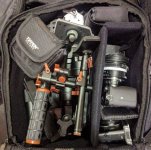
I use a padded backpack. Both cameras (a6000 and RX100 IV go on the right, with their lenses. Everything else goes to the big common space. In this pic you can see a magicrig, micro-tripod, ND filter sets for both cameras (one uses 67mm and the other 49mm), and, at the bottom of all, the ZC, with handle unscrewed (it's not easy to figure what's what, but the motors are ZC).
(important: ZC batteries go in little plastic boxes, you don't want to have them short and create a fire inside your bag)


received_10210496088250988_.jpg
 
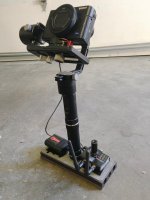
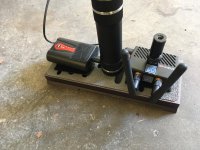
I bought the Crane M for use with my little RX100IV which we are going to use as for some action shots on my current series. After playing with it for a while, I felt that the design made it top heavy (even with this camera which is less than the capacity of the system), making it awkward to handhold. Plus, putting it down inbetween takes or to balance was an issue and the enclosed desktop stand is to me a little silly. I attached a plate I had left over from my Steadicam days at the bottom, which shifted the CG down to make it feel more comfortable in the hand, and added a little lateral stability. That's not critical for the actual stabilizing functionality, but again it does improve the feel in the hand which will ultimately translate into a better operating experience. It also gave me a platform to mount the Connex mini transmitter and Camera Motion Research battery which allows the rest of the company to view the images from the camera. We haven't had opportunity to use it on the show yet but my operator has had some fun getting familiar with it, as have I.

IMG_4422.jpgIMG_4423.jpg
 
Last edited:
I *LOVE* seeing you play with these little toys for your big (at least for my standards) productions.
 
Thanks for all of the suggestions guys! Yeah, I added weight at the bottom as well, like Charles.

However, it all feels rather delicate when packing it if the motor section is all loose and jangly.
 
Gonna try this setup today.

GH5
Nikon 28mm Ais (lightweight dumb adapter - no aperture control on adapter)
Beholder 2 grip handle
Neewer fishbone arca quick release
arca plate with a bit of lateral adjustability (useful if you don't have truly bidirectional plate like Bern's RRS)
701 lite monitor
hdmi cable that is WAY too thick. I'm not used to needing a full size hdmi on both ends. Good problem to finally have

The whole setup, despite all of the add-ons, is still so much more forgiving on the arms than a ronin M or similar. Of course, the weight capacity is also way more limited.

So far, I love:

How easy it is to get eye level shots because the Crane's arm is so long.
I can get really low shots simply by tilting forward since it's light enough to do so when using both hands.
I can set it down easily, although as you can see, it's a fairly top heavy setup with a somewhat narrow base. Still....
It makes balancing the thing or making any other adjustments much easier
The entire setup has a quick release plate, so switching to single handle is very fast.

Will try to follow up with a bit of test footage.


View attachment 122713

How was it? I'm tempted to pull the plug on the beholder handles so I can mount my monitor easier too. looks like a lovely setup for travel when I can't take my Movi M5 with me.
 
I just keep a small Manfrotto QR plate on the bottom and mount it on a Benro tripod so it's ready to use as needed on shoots.
And we keep a Rokinon 12mm on a stripped down BMPCC on it for everything.
 
This is my last short, I uploaded it two days ago. The shot at 0:24 is a fake crane shot that I could only pull off because of the Zhiyun Crane: I put the ZC on a cheap monopod, extended it all the way, and lifted it by hand. It is definitely not as smooth as an actual crane shot, but we dressed the room, lit it, smoked it, got five or six takes of this shot, then cleared everything, all of it in half an hour. With a crew of "me and the two girls". Just setting up a small crane would take me almost that long.

Also, I chose the shot with the best acting, and it turned out to be one of the least smoothed ones. The plan was to stabilize it in post but it didn't work well enough, so what you see is the original motion. If I had to shoot this again, I'd set a couple of coins to the right of her: the blanket motion killed the warp stabilizer (at least I couldn't make it work), and the wrinkles in the sheets were too soft to do two-point tracking for at least half of the shot; two coins for doing two-point tracking, then removing them in post, would have been a good idea.

Using a better monopod would also have helped a lot: my cheap one bent and wobbled when fully extended with the ZC and camera looking down like this.

https://youtu.be/GdjorEd0hKU?t=24
 
Back
Top