Zhiyun Crane

So I estimate my rig weight will hover around 1600 Grams (A7S + 35mm Contax Zeiss lens + fotodiox adapter + Rhino mount rod + Redrock Motor + QR plate assembly + motor cable). It appears that the Crane update goes to 1800gr, but I have the impression that people give mixed reviews on it. I need to clarify before buying. With the weight upgrade of the Crane, is it performing properly or not ? Is it sluggish, less responsive or will it burn out the motors as people have suggested in the past ?

I just got the crane so I don't know if this is a new feature, but in the notes on the latest firmware upgrade it says: "v1.52- With this firmware, gimbal motors’ power can be set by APP, in order to adapt different weight of camera."

In the app under 'settings', you can select the motor intensity as "weak, middle, or strong".
 
Ok, so I understand if you set the motors too high for too light a payload, the gimbal won't function properly - is this correct?

Anyone know roughly what the aprox weight range to use for each setting would correspond to (IE weak for 600-900g, mid for 900-1200g, strong for 1200-1500g)?
 
I purchased a Batis 18 and got it yesterday. It performed just as good as my Sony 16-35 but with the benefit of a lighter and smaller lens on the Crane. I measured my A7SII, Batis 18/2.8, hood attached, UV-filter and a small Velbone quick release to 1050 grams.
 
Ok, so I understand if you set the motors too high for too light a payload, the gimbal won't function properly - is this correct?

Anyone know roughly what the aprox weight range to use for each setting would correspond to (IE weak for 600-900g, mid for 900-1200g, strong for 1200-1500g)?

I suspect it is >1200, 1200-1500, 1500-1800
 
Hi dudes, happy new year.
Someone could give us efficent settings of the zhiyun phone app to get the best smooth movments of the gimbal ?
Meanning to get slow pan-tilt-roll-acceleration-dead zone ?
Thanks a lot.
 
Had the Crane in a camera backpack during a two day road trip & neglected to take the batteries out. The Crane got inadvertently turned on at some point, & when I went to use it again the 'blue' status light began flashing quickly, & the gimbal would not work. Assumed I fried the device & put another on hold at B&H which I planned to pickup when I arrived in NYC today.

I had recharged the batteries just prior to this problem, but when I checked in the App it reported they were below 60%, & dropping quickly. Swapped batteries & the issue disappeared, so it seems I only toasted the batteries.
 
Had the Crane in a camera backpack during a two day road trip & neglected to take the batteries out. The Crane got inadvertently turned on at some point, & when I went to use it again the 'blue' status light began flashing quickly, & the gimbal would not work. Assumed I fried the device & put another on hold at B&H which I planned to pickup when I arrived in NYC today.

I had recharged the batteries just prior to this problem, but when I checked in the App it reported they were below 60%, & dropping quickly. Swapped batteries & the issue disappeared, so it seems I only toasted the batteries.

Good shout. Just packing now, so that's a very timely tip!
 
To clarify, I had the Crane fully built, & just waiting for a camera to be attached.

On another note: seems the latest firmware can not be upgraded wirelessly via a iPhone (6s+), & needs to be attached to a computer.
 
Has anyone discovered a fix for the panning drift that occurs sometimes when you're trying to hold a stationary shot?

I have the latest firmware. I tried initializing. Didn't work. Haven't tried calibration--seems like a last resort.

Lock mode works but sometimes I don't want that.
 
That should never happen with a encoder based system. Contact Zhiyun and log it as a bug. Either that of one of your encoders is not working correctly.
 
I e-mailed Zhiyun and they recommend calibration. They say it's normal after severe temperature changes. No time today. I'll post results here. P.I.T.A.
 
Well, I calibrated the Crane with the App. But the problem is still there. Not sure if it's really a "problem" though. What happens is when I'm moving the Crane around in Follow or Full mode and stop on something, the Crane will pan very slowly for 3-5 seconds until it settles to a full stop.

It doesn't do it every time and sometimes the correction is shorter or longer.

It's so slow it's hardly noticeable so it doesn't really ruin the shot and it doesn't do it in Lock mode.

I did some more testing. I suspect I may have the handle very slightly turned left or right when I stop on something and the Crane is adjusting to that (???).
 
Zhiyun Assistant App

Zhiyun Assistant App

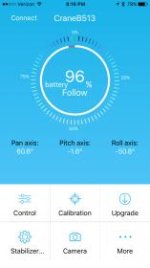
Does anyone else have an app that looks like the attached? (iPhone 6s, iOS 10.2) Mine seems to be missing some features seen in this video. I don't have an option to adjust the motor strength (as was mentioned earlier in this thread) or check which firmware my Crane is running. It otherwise operates correctly.
IMG_3309.jpg
 
Here's a video of the panning drift I was talking about. I did this video with the Crane in "Full" mode. The Crane was mounted on a tripod. I picked the tripod up, moved it, then set it down. All Crane settings are default.

The effect is exaggerated with the medium focal length, strong vertical framing lines, and the sudden stop on the tripod. It's harder to see it with wide angle handheld stuff.

Full screen: https://www.youtube.com/watch?v=fU80l84uSsc


Back
Top