
Navigation
Install the app
How to install the app on iOS
Follow along with the video below to see how to install our site as a web app on your home screen.
Note: This feature may not be available in some browsers.
More options
You are using an out of date browser. It may not display this or other websites correctly.
You should upgrade or use an alternative browser.
You should upgrade or use an alternative browser.
XDCAM EX to 4:3 SD?
- Thread starter xt777
- Start date

Drop it in a 4:3 timeline in FCP. Render and you're good to go.
I should have mentioned that I tried that first (before compressor). The resultant video looks worse than if I had just shot it in SD 4:3 in the first place. FCP/Compressor down-converted EX1/3 footage < DVX100 DV footage! Thoughts?
777
Suggestion: Never, ever, shoot interlaced again. Interlaced footage does not scale well. Shoot progressive and you can do pretty much anything you want with it and the results will be great, if you use quality tools and understand the settings.
Noted. Any suggestions for my current situation?
777
MitchLewis
Well-known member
What steps and presets did you use to convert with Compressor? Did you make sure you had it set to interlaced? Did you have the correct field dominance settings? Did you turn on the Frame Controls?
The Compressor presets are located in Apple>Other Workflows>Advanced Format Conversions>Standard Definition.
The Compressor presets are located in Apple>Other Workflows>Advanced Format Conversions>Standard Definition.
MitchLewis
Well-known member
Okay, i just did a test with some 1080 60i footage I shot a while back.
1) I launched Compressor
2) I dragged my XDCAM EX 1080 60i file into Compressor
3) I navigated to the preset Apple>Other Workflows>Advanced Formate Conversions>Standard Definition>DV NTSC Anamorphic
4) I then changed the settings in the Frame Controls tab in the following way:
- Turned on Frame Controls (clip on the little gear, when turn it on)
- Resize Filter: Better (Linear filter)
- Output fields: Bottom first
- Deinterlace: Better (motion adaptive)
- Adaptive Details: checked
- (leave everything else the same)
5) Submit
This converts to a anamorphic DV file. Here's how mine came out: (62 mb file)
http://www.ssscc.org/ftp/Surgery-DV-NTSC-Anamorphic-2.mov
NOTE: Quicktime Player defaults to displaying video at low quality. I've already checked the High Quality box and saved this file, but if you're doing your own testing I would be carfeul to always make this change. I use a free program to do this automatically. It's called HiQual. You can download it for free at www.versiontracker.com. Just put the program in your dock, and then simply drag your QT movies onto the HiQual icon and it will automatically flip on the High Quality switch. Slick!
1) I launched Compressor
2) I dragged my XDCAM EX 1080 60i file into Compressor
3) I navigated to the preset Apple>Other Workflows>Advanced Formate Conversions>Standard Definition>DV NTSC Anamorphic
4) I then changed the settings in the Frame Controls tab in the following way:
- Turned on Frame Controls (clip on the little gear, when turn it on)
- Resize Filter: Better (Linear filter)
- Output fields: Bottom first
- Deinterlace: Better (motion adaptive)
- Adaptive Details: checked
- (leave everything else the same)
5) Submit
This converts to a anamorphic DV file. Here's how mine came out: (62 mb file)
http://www.ssscc.org/ftp/Surgery-DV-NTSC-Anamorphic-2.mov
NOTE: Quicktime Player defaults to displaying video at low quality. I've already checked the High Quality box and saved this file, but if you're doing your own testing I would be carfeul to always make this change. I use a free program to do this automatically. It's called HiQual. You can download it for free at www.versiontracker.com. Just put the program in your dock, and then simply drag your QT movies onto the HiQual icon and it will automatically flip on the High Quality switch. Slick!
Okay, i just did a test with some 1080 60i footage I shot a while back.
1) I launched Compressor
2) I dragged my XDCAM EX 1080 60i file into Compressor
3) I navigated to the preset Apple>Other Workflows>Advanced Formate Conversions>Standard Definition>DV NTSC Anamorphic
4) I then changed the settings in the Frame Controls tab in the following way:
- Turned on Frame Controls (clip on the little gear, when turn it on)
- Resize Filter: Better (Linear filter)
- Output fields: Bottom first
- Deinterlace: Better (motion adaptive)
- Adaptive Details: checked
- (leave everything else the same)
5) Submit
This converts to a anamorphic DV file. Here's how mine came out: (62 mb file)
http://www.ssscc.org/ftp/Surgery-DV-NTSC-Anamorphic-2.mov
NOTE: Quicktime Player defaults to displaying video at low quality. I've already checked the High Quality box and saved this file, but if you're doing your own testing I would be carfeul to always make this change. I use a free program to do this automatically. It's called HiQual. You can download it for free at www.versiontracker.com. Just put the program in your dock, and then simply drag your QT movies onto the HiQual icon and it will automatically flip on the High Quality switch. Slick!
Mitch, Thank you for the very thorough response. That was very kind of you. I am trying to "center-cut" the footage though. I want to (at least I think I want to) 1) make my 1920 x 1080 (1.7778) footage into 1.333 footage by cropping the right/left edges and 2) downsize to 720 x 480. Recommendations for this?
MitchLewis
Well-known member
You can do this as well using Compressor. But I'm now in the middle of a project, so give me an hour or so and I'll do another test.
MitchLewis
Well-known member
Sorry, got busy. Maybe this evening.....

basspig
Veteran
Noted. Any suggestions for my current situation?
777
If you have AfterEffects, this might yield the best results:
http://www.videocopilot.net/tutorials/deinterlace_in_ae/
MitchLewis
Well-known member
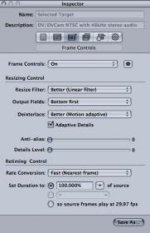
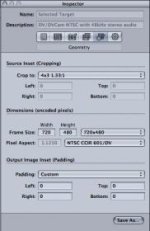
Okay, it worked. Here's the steps I took for center-cut SD:
1) I launched Compressor
2) I dragged my XDCAM EX 1080 60i file into Compressor
3) I navigated to the preset Apple>Other Workflows>Advanced Formate Conversions>Standard Definition>DV NTSC (not anamorphic)
4) I changed the settings in two windows. Frame Controls and Geometry (see attachments)
Here's the finished file Quicktime MOV: (57 mb)
http://www.ssscc.org/ftp/Surgery-DV-NTSC-center-cut.mov
1) I launched Compressor
2) I dragged my XDCAM EX 1080 60i file into Compressor
3) I navigated to the preset Apple>Other Workflows>Advanced Formate Conversions>Standard Definition>DV NTSC (not anamorphic)
4) I changed the settings in two windows. Frame Controls and Geometry (see attachments)
Here's the finished file Quicktime MOV: (57 mb)
http://www.ssscc.org/ftp/Surgery-DV-NTSC-center-cut.mov
Attachments
Okay, it worked. Here's the steps I took for center-cut SD:
1) I launched Compressor
2) I dragged my XDCAM EX 1080 60i file into Compressor
3) I navigated to the preset Apple>Other Workflows>Advanced Formate Conversions>Standard Definition>DV NTSC (not anamorphic)
4) I changed the settings in two windows. Frame Controls and Geometry (see attachments)
Here's the finished file Quicktime MOV: (57 mb)
http://www.ssscc.org/ftp/Surgery-DV-NTSC-center-cut.mov
I followed this procedure exactly (I had actually done something very similar earlier but used the "best" resize filter). The resultant image (in both cases) looks much too soft. I expected to lose resolution compared to the HD source footage, but the video looks softer (to me) than if the footage was shot on a DV camera at the outset.
Basspig, thanks for the link to the AE tutorial. I have not been too concerned with interlacing since it is my desire to go from an interlaced source to an interlaced product. I can't imagine that the crop would have any effect on the interlacing/image. Is the resizing screwing with this somehow?
basspig
Veteran
Any time you resize interlaced footage, what's happening is that instead of a direct integer multiple of scanlines being transformed to the new resolution, a scan line is dropped, say, every 2nd, and every 3rd scanline, alternately, and the ouput is being averaged by the rendering process' attempts to deinterlace the footage. Once the vertical dimension of interlaced footage changes, you lose the proper interlace for television. It HAS to be deinterlaced at that point, and this averaging that goes on has a rather pronounced softening effect on the footage.
I recommend, that if you're shooting for broadcast analog TV purposes, shoot either 1080P/30 or 720P/60, as these will have the frame rates that can be easily converted without pulldown artifacts and they can easily be converted to interlaced images, if need be.
1080i footage would only scale to 540i if you dropped every other scanline. Scaling to 480i would result in an odd number of irregular scanlines skipped, and that's where the problem comes in, necessitating integration of the fields into a psuedo progressive image. To eliminate the crawl between missing scanlines, much blur is typically applied. There goes your nice crisp images.
Shoot progressive and you can always scale it and apply proper interlacing later, if you have to dumb it down for television broadcast.
I recommend, that if you're shooting for broadcast analog TV purposes, shoot either 1080P/30 or 720P/60, as these will have the frame rates that can be easily converted without pulldown artifacts and they can easily be converted to interlaced images, if need be.
1080i footage would only scale to 540i if you dropped every other scanline. Scaling to 480i would result in an odd number of irregular scanlines skipped, and that's where the problem comes in, necessitating integration of the fields into a psuedo progressive image. To eliminate the crawl between missing scanlines, much blur is typically applied. There goes your nice crisp images.
Shoot progressive and you can always scale it and apply proper interlacing later, if you have to dumb it down for television broadcast.
MitchLewis
Well-known member
xt777: Sorry your not happy with the results. That's the best workflow that I've found. Maybe someone else has a better solution. You might check out this LONG thread from the other forum:
http://www.dvinfo.net/conf/sony-xdcam-ex-cinealta/140015-hd-sd-downconversion-mac-fcp-only.html
http://www.dvinfo.net/conf/sony-xdcam-ex-cinealta/140015-hd-sd-downconversion-mac-fcp-only.html
MitchLewis
Well-known member
That's true Mark, except in this case, his original footage is interlaced and he wants the SD file to also be interlaced. So why deinterlace?
Okay, it worked. Here's the steps I took for center-cut SD:
1) I launched Compressor
2) I dragged my XDCAM EX 1080 60i file into Compressor
3) I navigated to the preset Apple>Other Workflows>Advanced Formate Conversions>Standard Definition>DV NTSC (not anamorphic)
4) I changed the settings in two windows. Frame Controls and Geometry (see attachments)
Here's the finished file Quicktime MOV: (57 mb)
http://www.ssscc.org/ftp/Surgery-DV-NTSC-center-cut.mov
Hi Mitch - just a thank you from me. This worked great with my footage. I appreciate you taking the time to post this easy, cheap solution. I could have spent hours before it would have occurred to me to look under Other Workflows > Advanced Formats
Why don't they just have some simple settings that are easy to find, like HD/V to SD crop?
This seems like something that we should all be grappling with, yet finding the answer was not that easy. Again, I just wanted you to know that you really helped me out, and I appreciate that you spent some time figuring this out for the rest of us....