FS7: XAVC-I Brings Even the Mighty i7-4770 to its Knees

Martin,

Have you tried Sony's Catalyst Browse. Not sure if it does both rewrapping or transcoding that may help. Here is a list of the formats it deals with:

http://www.sonycreativesoftware.com.../12/enu/index.htm#Supported_video_formats.htm


Also is your GPU in the list of approved cards? If not there is the fairly well documented text file hack that generally works.

I dont do rewrapping or transcoding. Not sure why anyone does that. Its cheaper to change camera over the course of 3 years of camera ownership. Yes, every hour spent is dollar lost, unless client is actually paying for it.
 
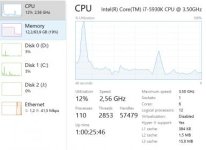
Here is the screenshot of the new computer and the use of XAVC 4K. The initial spike when starting playback is still present. The same spike is NOT present on the drive 0 as you can see.

XAVC playback Filmconvert filter UHD 50p.jpg

I dont understand why it always spikes when i start the playback first time (or resume playback after a little while). If for example i have just recently played back, i can restart the playback and it does NOT spike at all, as you can see in about 50% through of the timeline, i reset the playback and you cant really see it on the CPU use.

This is a 4K XAVC 50p clip with a Filmconvert filter added playing back in realtime. Playing it back at 25P does not really do anything. I shook the camera to induce as much compression CPU use as possible. The i7 5930K ate it all up and even had the guts to ask for more.

Was it worth it for me to upgrade? Absolutely yes! This new setup chews 4K like the cookie monster. It uses 25% CPU with filters added. And my new motherboard even has a switch (!) that i just flipped to overclock the CPU from 3,5ghz right up to 4,05ghz. This is great. Time saved on the OC and time saved on the rendering.

But those spikes are annoying. To the Adobe Support train!


@basspig: How do you read dropped frames during playback? Are your dropped frames only from the beginning of playback? I could not notice any stutter when playing back on my system, only for the first seconds.
 
@basspig: How do you read dropped frames during playback? Are your dropped frames only from the beginning of playback? I could not notice any stutter when playing back on my system, only for the first seconds.

Premiere has a dropped frame indicator. It's located under the wrench icon dropdown menu.
I see anywhere from 80-160 frames dropped at start of play, and then perhaps a dozen frames drop over the course of an 18 minute video.
If I stop and start the video playback three times, I can get it to start without dropping any frames. At the end of the whole timeline, there are dropped frames, usually anywhere from 16-35 frames reported.

The irony is that I can overlay four 4K 24P clips and scale each to 25% using the PiP presets and have them animated across the screen, overlaid on top of a 5th 4K full screen video and playback is just as smooth as with just the full screen 4K.
 
The irony is that I can overlay four 4K 24P clips and scale each to 25% using the PiP presets and have them animated across the screen, overlaid on top of a 5th 4K full screen video and playback is just as smooth as with just the full screen 4K.

And this is with CC2015? Or are you running 2014?
 
I'm testing CC2015 against CS6. Of course, if I rewrap to MP4 first, I can do everything in CS6, only faster and smoother. 2015 will handle the overlaid multiple 4K frames just as easily as one stream, but the initial startup lag remains the same for both project levels.
 
Martin,

While reading an unrelated thread about NVENC encoder on the Adobe forum, a secret shortcut was revealed that opens a Debug Database. In it, is just about every parameter that Premiere uses internally. I was looking for something like this for months.

I spent an hour tweaking and I found some relief for the startup delay by adjusting these parameters:

DisableSpeculativePrefetching - set this from false to true


ImporterMXF.ReadBlockSizeinKB: default is 1024. Experiment with this.. I'm trying 2048 with good results.

If you have a Maxwell-based GPU try this:

GPU.EnableGOPFormats: set from false to true

The secret keyboard command is CONTROL + F12. This opens a console. Then at the top of the console is a word Console with the 3 dash menu icon. Click that and select Debug Database View. Then go and experiment.

I think the speculative prefetching is the main offender. Before I made this change, I would see 150 frames dropped at start of play. Now I see only 14 frames drop. On stop and restart, no frames dropped, instead of 30-40. Real, measurable and significant improvement.

I could ponder whether speculative prefetching is incompatible with SSDs, but maybe it's not compatible with some aspect of our hardware setup. Give these settings a try and see if you get the same results.
 
Give these settings a try and see if you get the same results.

I will see if i get the time.

From the Adobe forums, at least we know its not our shoddy computers:

Hi Romsdalsfilm,
The problem existed also before latest update, which happened just days ago.
​

We had a similar bug that closed in CC 2015 as we could not reproduce it. It looks like it may have reappeared. If you have time and have not already done so, please file a bug.

Thanks,
Kevin
 
Yes, the #1 complaint in those forums is performance-related. Otherwise, the app would be darned close to perfect. I've never had it crash or lock up so far. If the performance issues were cleared, it would be a charm.
 
Yes, the #1 complaint in those forums is performance-related. Otherwise, the app would be darned close to perfect. I've never had it crash or lock up so far. If the performance issues were cleared, it would be a charm.

Oh?

My Adobe programs crashes regularly on all my computers. Except Lightroom. That is stable.

I had the exact same experience with the film schools iMacs and Final Cut 5 & 6, so i guess its just a result of heavy work and complex coding.
 
No. No crashes here. I've done a fair amount of editing on the new dual Xeon, and though XAVC may be stuttery, the program itself has not crashed nor corrupted any files.

On my old machine, it would crash on rare occasions, but not often. Usually pretty stable. My old machine has 8GB RAM and the new machine 128 GB ECC RAM so there's more breathing room. CC won't really run in 8GB though.
 
I am a computer programmer with 10 years experience, and I have never tried to build my own computer. So much depends on the harmony of the system rather than the might of any one piece. This is probably why old Macs play smoothly, while your Death Star is choking. Details like this just make me want to run for cover:

The motherboard you have is not well designed for a video editing workstation. Important fast PCI slots are blocked. See page 10 (or 1-2) in the user manaual...The schematic on the next page, page 11, shows slots 1,3 and 5 are in fact 16 lane slots so any and all cards that are put in those slots will SLOW DOWN to the performance of the slowest card. Slots 2, 4 and 7 are actually 8 lane slots. I would be very surprised if your sound card needs more than 4 lanes of PCI.

Nevertheless there is one technical tidbit that has helped me, and it may help you too --- either in debugging this system or in saving you from pouring money into elephantine CPUs down the road:

Specialized Hardware

Ever wonder how the Sony FS7 can encode and play back XAVC-I, even though its overall system is probably weaker than your phone? Specialized hardware. Some part of the circuitry has no purpose in life but to encode and decode XAVC. If you tried to get it to open a PDF it might take 10 seconds or die of a heart attack, but work with XAVC? It can do that in its sleep.

Likewise the circuitry in your computer has specialized sections. For example, the GPU has area devoted to just compressing and decompressing MPEG-4 (like XAVC uses). Another part is for the specifics of 3-D. Another for various formulas used in encryption. So efficient is this, that the dedicated section can do its thing dozens of times faster than the most powerful Xeon. Another phrase for this is hardware acceleration.

The GPU, not the CPU, should handle the decoding. If the CPU is decoding the video, then you're doing it wrong. Well, probably. The two main chips in your computer are the CPU and GPU. Each has specialized sections. I'm not sure which has which. Some specializations may be in both. But from what I've read, it sounds like they usually put the section for video codecs in the GPU.

The problem is that the CPU (or at least the main part of it, excluding any specialized sections it may have) is a general-purpose processor. That means it can handle anything, given enough time. It can open a Microsoft Word document and it can surf the web. It can decode video and receive a fax. The downside of being a jack of all trades is that it does none of them as fast as a specialist. But because it can do it, sometimes your editing software or operating system will ask it to do it, if said software is confused or if the hardware path to the specialized section is fraught with roadblocks (see cringeworthy quote above about motherboard "slots").
 
Last edited:
Exactly! And this is the heart of the problem: in Premiere and most other NLEs that I am aware of, the CPU does the decoding. GPU plays a very limited role. It accelerates *certain* plugin effects like color correctors, sharpen, etc., as well as does some of the scaling work during render time. It does not, however, decode XAVC.

Having dual CPUs, my system has twice as many PCI lanes as a single processor system. This should actually help with general system performance, according to my research. Much of my hardware info came from Puget Systems, which builds high end NLEs for studios that work with high resolution media. Dual Xeons comprise their top of line system.

Now, interestingly, in Premiere, there is a Debugging Console and one of the parameters in there can be set to allow GPU to decode MPEG. Now this doesn't help with XAVC, but it does shift 40% of the load off the CPU when enabled and playing back XDCam EX footage. What they need is an h.264 or MP4 GPU decode option.

A third party programmer wrote a plug in that uses the GPU to encode h.264 and on my Titan X, it moves along at a rate such that it became glaringly obvious that no one has worked on accelerating AUDIO rendering. My system renders MP4 files faster than it renders audio! Sadly, the NVENC plug in has some issues with improper VBV buffer size that causes compatibility issues with Blu-ray authoring tools on profiles above 4.0.

The most perplexing thing about Premiere is that after that initial CPU spike, the system settles to around 17% on 4K playback at 24fps. In 18 minutes of continues play of some 150 cuts on the timeline with dissolves, 16 to 18 frames will be dropped. But every playback is different. Some times more frames will drop. On rare occasions, no frames drop. It's almost as if system performance depends on the phase of the moon and which way the wind is blowing. The unexplained dropped frames when CPU utilization is so low is perplexing. I've tested the last eight versions of nVidia's drivers and all do the same thing.

What I do notice is that Premiere is stable if it has lots of RAM to stretch out. On my 8GB system, it would soon lock up and hang, but on the 128 GB system, it runs and runs. But I've noticed everything is much more reliable--all programs that I use, from Maya to AfterEffects to SoundForge. A hunch is that ECC RAM decreases the chances that cosmic rays cause memory corruption and the OS to eventually crash, but that's speculative guessing. I don't know why the system is stable. Perhaps because it's not overclocked.
 
I am a computer programmer with 10 years experience, and I have never tried to build my own computer. So much depends on the harmony of the system rather than the might of any one piece. This is probably why old Macs play smoothly, while your Death Star is choking. Details like this just make me want to run for cover:

It's not specialised hardware in Macs that are making the difference but the fact that Apple invested a huge amount of time building into the OS frameworks for media processing. Apple got a lot of criticism in some quarters for dropping QT along with FCP7 and moving to AV Foundation and FCPX which were designed from the ground up to be as efficient as possible and use the CPU and GPU to accelerate processing of modern codecs. Consequently anything built on top of AV Foundation like FCPX has incredible performance and modest hardware will perform like Basspig's Death Star should be doing. AV Foundation is the reason the new iPad Pro can edit 3 streams of 4K.

I dont pretend to understand how Premiere works so badly on some people's hardware and others like Ben have no problem. However, I am surprised there is no proxy workflow in Premiere that you could use? In FCPX it's a simple case of switching to proxies and FCPX will back ground render new lightweight files, you do your edit then switch back to the original media for export so if you've got ancient hardware or forced to work off a slow drive you can at least get your work done.
 
I don't understand why you aren't using CC2015? CS6 was written when XAVC didn't even exist. So when you put an XAVC clip on to a CS6 PP timeline it will try and use a generic MPEG decoder. It might work but it defintely wouldn't be optimised for XAVC.

If you really don't like CC2015 try the free download of Avid and give it a go using the PDZK-MA2 AMA plug in - would be an interesting test on that beast.
 
Interesting points about the Mac platform. Back in 1992, I had Quadra 950 for my color prepress shop. The printer drivers worked much better than Windows. We kept having to redo film seps from the Windows machines due to errors in the PostScript output.

We,be been testing and evaluating cc but not impressed with the performance compared with cs6. The latter easily handles five ProRes 422 streams with four of them overlaid on the 5th in PIP.
We'll probably end up with rewrapping XAVC to mp4 for cs6. We're also going to evaluate Vega. Won't do subscription. Business model won't work for the spotty work flow and long idle times.

UPDATE:
A Tab is not a Closed function. This pertains to Lumetri. I found out tonight, based on the prompts from a thread in the Sony community forum, that Lumetri, even when not displayed, but existing as a tab BEHIND something like the audio mixer, is QUITE active anyway. I closed the Lumetri tab and playback performance went WAY up. Frame dropping cut by over 95%, smoother startups and even nearly useable 60P 4K. CPU usage with Lumetri as a tab = 18%. Close the tab and play the same 4K clip: CPU use = 11% now. 44% CPU playing 60P 4K. This is quite a game-changer.

Lumetri is not off just because it's not displayed!!

UPDATE 2:
Made another interesting discovery.. decided to try turning off the Lumetri tab on my 8 year old Quad Core and now it too can play 2160P Prores 422 video with no difficulty. 36-40% CPU used, even with sharpening and a LUT. And MPEG422 plays at about 17% CPU at 1080P.
It can ALMOST play XAVC 4K.. it judders a lot and drops about 10 frames every 3-4 seconds, but it's much better than before.

Another thing that I find curious: the old machine starts playback immediately and no dropped frames. The "Deathstar" machine needs a couple seconds to spool up and drops frames, no matter if it's playing XAVC, Prores or XDCam EX footage. It will also sometimes drop a frame if I open the Task Manager during playback. The old machine seems more tolerant of multitasking while playing 2160P material on Prores. If all my footage were on Prores, the old machine would be adequate to handle single stream, serial editing work.
 
Last edited:
I urge you to at least test Avid. Its a completely free 30 day trial. Of course test Vegas as well... and why not throw Edius into the mix. At least you might rule out your hardware as an issue.
 
I did tell myself not to keep on banging my head against a wall by adding to this thread but:

Mark,

I did tell you on 6th August Page 2 of this ridiculously long thread:

I wrote:

Second, there have been significant issues with the CC 2015 roll out. One problem is memory leakage (Lumetri Scopes) and other issues. An update has been issued, but users are still complaining of poor playback. I suggest you pay a visit to the Adobe Prem Pro help forums. I rolled back to CC2014 and have no problems in 4K, but I have problems with CC2015. I hope also you've not installed Windows 10.

Do what some do and wait at least 6 months before piling into new versions of software.

That's it... no more...

Good luck.

Claire
 
Yes, yes, I read that thread and in Adobe forums, but had assumed that simply not displayed was as good as 'off', but something someone said in the Sony forum got me thinking that maybe a tab that's hidden is still using the same resources. I did find it curious that performance didn't degrade when the scopes were displayed as opposed to hidden. But closing the hidden tab is the distinction here that was not clear in any threads I had read about the matter.

I'm looking into Vegas now because, aside from Resolve, it's the only other software that you can actually BUY. If I don't change cameras again (I update about every 8 years), I don't need updates. I just need a solid NLE that works.

I'm still bothered by the fact that my old machine plays everything but XAVC 4K with no startup delay and no dropped frames, but the new machine has this hesitation before playback starts. It's really obvious when I run the same project on both machines side by side. I'm thinking of limiting the RAM seen by Windows to 32GB instead of letting it access all 128GB and see if it's a case of fragmented RAM causing that hesitation.

Sometimes we have to try new applications when the old ones won't understand the new video CODECs used by new cameras like the FS7. Otherwise, I'm still happily editing on CS6, which works beautifully on the new machine.
 
Back
Top