FS7: XAVC-I Brings Even the Mighty i7-4770 to its Knees

I already have 4TB blacks in raid. I also have SSD`s in RAID. Can try a 4K clip on that. Or on my 1TB SSD in the other machine.

Nvidia doesnt work with certain plugins i use, so im not switching back. Doesnt Macs only come with ATI nowadays?

This rig is pretty much built to edit 4K prores. What is so great with XAVC, that it justifies the much higher hardware costs if thats the case? I have been contemplating upgrading to i7 5930K for a while now.
 
Last edited:
Im not buying more hardware at the time being, so XAVC will have to adopt like Prores has done before it. XAVC itself is not a goal, its just a tool like any other codec. If XAVC doesnt like most 2-3 year old systems, then to hell with XAVC i say.

I already have 4TB blacks in raid. I also have SSD`s in RAID. Can try a 4K clip on that. Or on my 1TB SSD in the other machine.

Nvidia doesnt work with certain plugins i use, so im not switching back. Doesnt Macs only come with ATI nowadays?

This rig is pretty much built to edit 4K prores. What is so great with XAVC, that it justifies the much higher hardware costs if thats the case?

The fact that 4K XAVC works fine on my 5 year old Mac on 2 RAID 0 Caviar Blacks is pretty good evidence that there's nothing wrong with XAVC and Ben has said countless times XAVC is fine on his Windows system. You and Basspig have issues that Adobe should be helping you overcome, it could be as simple as a driver conflict. It would be advisable to check and recheck that you have up to date drivers for everything even stuff you might not associate with Premiere Pro.

It seems to me that both your systems are not accelerating XAVC decompression, I'm no expert on PP so I can't help but if I were you I would be hounding Adobe on their forums until they explain why one system (Ben's) is fine and yours and Basspig's are not and for help in sorting it.

As for AMD cards I was under the impression that PP supported OpenCL for accelerating workflow. Apple have invested a lot of time and effort in making sure their underlying AV frameworks support all of the CPU and GPU resources the user has at their disposal which is why FCPX is performing so well even on ancient and meagre hardware.
 
Not sure if something has changed in my drivers when uninstalling VLC and tampering around, but now im getting a 35% CPU usage when playing back several clips of 4K XAVC. It even plays smooth!

I had finally taken some time off to pepper Adobe helpline to have this sorted, but now it plays pretty OK so i dont know what to ask them anymore.

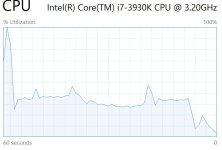
The only issue i see now is every time i press space or play, i get a 2 second period of stuttering and CPU usage of 100%. Are all of you getting these startup spikes?

CPU use.JPG

Left spike is startup. Then followed by 4K playback. The right spike and slightly higher CPU use is 1080p with filmconvert filter put on.
 
Last edited:
Possibly the startup issue is caused by slow pci bus speed on your raids?

I did say a while back I bet VLC is in some way responsible!
 
Maybe. Is that something i can change, or is it the old MOBO thats causing a lag?

I see in some benchmarks that my 3930K is a tiny bit slower than my i7 4790K thats in my gaming computer, so i have been contemplating on upgrading for a while. Is the "extras" surrounding the CPU worth it?
 
I'm using a 5830k which is socket 2011, like your mobo I believe?

Nirv made a good point there too about power saving...
 
Maybe. Is that something i can change, or is it the old MOBO thats causing a lag?

I see in some benchmarks that my 3930K is a tiny bit slower than my i7 4790K thats in my gaming computer, so i have been contemplating on upgrading for a while. Is the "extras" surrounding the CPU worth it?

Martin,

I am assuming you did all the basic disk setups, but one of the basics is making sure the drives do not attempt to index or compress. Harm Millard wrote a great paper in his and Bill Gherke's Tweakers Page. I run Windows, so I do not know if this applies to MAC. Right click on the drive(s), click "Properties". The two click boxes at the bottom should be unclicked - blank.

I use four WD Blacks in RAID 0 SATA2 and with PCIe version 2 and I can STILL play and scrub 4K XAVC. There are no conflicts, I wouldn't edit on it (still delivering HD) but also I do not use any third party plugins or effects. But I repeat, I am using CC2014 and Windows 7, not CC2015 and Windows 10 - I don't care what Adobe says.

People might also like to read the following link about Windows 10 and how it uses the CPU Cores and Threads at the moment:

https://forums.adobe.com/thread/1859764 Read post#38

Hope this helps.

Claire
 
Yeah no i am waiting a while longer for W10. Never adopt early when you make a living of stability ;-)

Will take a look at power saving modes. But we are talking about just 2-3 seconds of standby before pressing play, and voila, CPU spike to 100%. Does the CPU spike to 100% when harddrives wake from sleep?

Ben Scott: You have the newer mobo and 2 generations newer CPU then. I am on 2011-0 socket MOBO. X79 i think. You would be on 2011-3 socket and X99.
 
Even though 4K XAVC runs at about 35-40% CPU now, it starts to stutter once i do a little grading, or throw in a Filmconvert filter. I am very impatient and dislike render times and or half resolution, so i kind of went on ahead and pleased myself with a 5930K, 64gb DDR4, high-end x99 mobo, and GTX 980 Ti.
 
Excellent Martin,

Now it should all pull together, correct PCI version 3 revision and lanes, and CUDA with CPU, although you will need to run DDR4 RAM too. The GTX 980 will be very happy.

There was a whole heap of discussion a few years back about RAID 5 and the outcome is that it is not the best for video across a 4 disk array - data perhaps. Be interesting if you tried your 4 Blacks across a RAID 0 (and SATA 3). On what is still my HD rig mine flies along nicely even on SATA2 and as I said earlier plays back and scrubs nicely with 4K XAVC. For 4K XAVC edit I will be using the Asus X99 E WS with the i75930K as you mention. The CPU offers up to 40 lanes so should be happy with both GPU and RAID card. But I still won't be using CC2015, nor Windows 10 for the time being.

Happy editing.

Edit: OOPS, forgot to mention: you might like to up your PSU to 1K with the new rig - just be mindful that you will need a little more power headroom too.

Claire
 
Last edited:
Not sure if something has changed in my drivers when uninstalling VLC and tampering around, but now im getting a 35% CPU usage when playing back several clips of 4K XAVC. It even plays smooth!

I had finally taken some time off to pepper Adobe helpline to have this sorted, but now it plays pretty OK so i dont know what to ask them anymore.

The only issue i see now is every time i press space or play, i get a 2 second period of stuttering and CPU usage of 100%. Are all of you getting these startup spikes?

View attachment 104745

Left spike is startup. Then followed by 4K playback. The right spike and slightly higher CPU use is 1080p with filmconvert filter put on.


That's exactly how Premiere acts on my dual Xeon. But sometimes that initial delay can be 3-4 seconds if the machine was just powered on and Premiere loaded fresh. But that CPU usage histogram is precisely as mine is.

I have tried 8 different nVidia drivers myself. And this is a clean, new system build with everything freshly installed. A month of tuning based on Black Viper's guide and others for Win 7 optimization. A month of Supermicro tech support tweaking BIOS. And this is about as good as it's going to get, it seems.
 
Upgrading did not fix anything.

Setting RAID 0 did not fix anything.

Upgrading to Windows 10 did not fix anything.

Fresh install of Premiere Pro did not fix anything.

Performance lag when starting playback is still present.

Edit: I can at least grade XAVC without straining the CPU now. At least good news in that regard. 30-50% when playing back, and then 30-50% when adding filters and what not. Very nice. But i guess that also means there is performance to be had when playing back ordinary XAVC by changing settings.

Since i did a clean 100% fresh install on new parts and superstrong 980 Ti now, and it still lags, i assume everyone on Windows that have nice performance must have changed something to make it go fluent, no?

4 systems now have this stutter, and two of them are fresh installs with all stock values.

Edit 2: Sometimes when playing back, CPU usage goes down to 5% and the CPU throttles down to 1,5ghz (from 3,5ghz). Im like, what? Shouldnt decoding the XAVC suck the power out of that thing? The video is still playing smoothly, and this goes on for some seconds before going back up to 30%, then down to 5% again. Very weird behavior.
 
Last edited:
Same thing here on my dual Xeons. CPU clock loafs along at 1200MHz when playing XAVC with some cores bumping to 2400MHz and rarely one or two cores bump to 2600MHz. I almost never see turbo speeds of 3200MHz. Overall CPU usage is 17% on DCI 4K XAVC. Caution: don't even try 60P in XAVC-I. It hits 100% and does a freeze/jump/freeze/jump sort of progression.

24P is pretty manageable. Just have to hit start/stop 3X to get it going smoothly. In 18 minutes it has dropped about 16 frames with hand held, high motion video. Tends to do better with static shots. My 60P test was rapidly panning the camera back and forth like we do to test rolling shutter. I figure that's about as much motion as we'll ever deal with. Oddly, XAVC-L handles much better in both Premiere and VLC. I'm seeing about 6% CPU usage in VLC with 60P UHD material in the long-GOP format. I don't know why the Intra is so troublesome, as it is supposedly the simpler encoding method and should be a lot easier to decode.
 
I would advise that re-wrapping does help, however, there aren't any container formats that support PCM audio AND are readable by Premiere. I've devoted several evenings to experimenting with FFmpeg and the Avanti front end, with some success with the MP4 container, only that audio is recoded to lossy format.

Catalyst can convert footage to h.264, but it's glacially slow.
 
Back
Top